
pfcjooddoeplgchkkgangfkjpobhpbnb

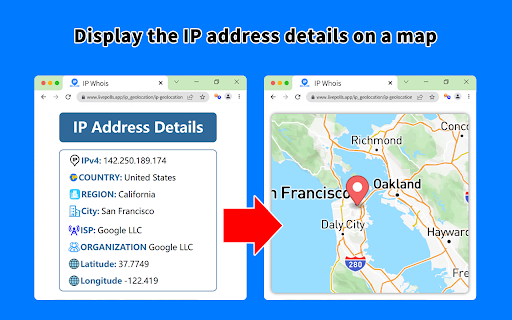
Get all the details for the web page's IP address, including geolocation, network, ASN, and more. Gives you the full IP address information about the server of the website you're visiting. It also shows you the map with the approximate distance between the website server and your location. Here's the list of the data points displayed: By design, your data stays at all times on your Google account, never saved in our database. Your data aren’t shared with anyone, including the add-on owner. We complies with privacy laws (especially GDPR & California Privacy Act) to protect your data.

VPN IP Checker
VPN IP Checker – Your all-in-one tool for network details and VPN verification. The VPN IP Checker app helps you reveal comprehensive network details in a single click. 🕸 Meet VPN IP Checker, your premier Chrome Extension for identifying your IP address instantly. Enjoy an effortless experience: just click the extension button to get all the necessary information about your connection! All-in-One Information: Find out your IP address and complete details about it in one click. Location Mapping: Get your location based on your IP address. Click on the geo-data to open the map. Network Type Detector: We verify your IP against various databases and automatically display icons indicating the network type (VPN, Hosting, or Mobile). Currency Detector: Always know the local currency associated with your IP address's location. Timezone Detector: Instantly view the timezone of your connection. ISP Name Detector: Identify your Internet Service Provider. 🚀 Kickstart Your Journey with VPN IP Checker: Add the VPN IP Checker extension to your Chrome browser. Tap the extension icon to view all essential information about your IP and Network. User-Centric Design: Our extension boasts a clean, intuitive interface for a seamless experience. Full Details: We aggregate information from different databases into one simple window. Multipurpose: Perfect for checking your ISP, VPN status, Proxy, and Mobile operator. Privacy First: Your data belongs to you. We do not store your data on our servers. 🔧 Instructions for Using VPN IP Checker: Tap the "Add to Chrome" button to install the extension. Tap on the VPN IP Checker icon to get your information. That's it! Very simple and useful. 🔹 Is VPN IP Checker free? Absolutely! With the VPN IP Checker extension, you can check your IP address completely for free. 🔹 How does the VPN IP Checker extension manage my data? We prioritize your privacy. VPN IP Checker does not collect your personal data. Try VPN IP Checker now and redefine your IP analysis experience!

IP Location Finder
Finds the geographical location of IP addresses on a page. The "IP Location Finder" Chrome extension is designed to help users identify the geographical location of IP addresses found on web pages. Automatic IP Detection: Automatically detects IP addresses (IPv4 and IPv6) when you select text on a webpage. Geographic Location: Displays the country and city (when available) associated with the selected IP address. Flag Icon & Country Code: Displays a flag icon and country code alongside the location information. Flexible API: Uses an external API for IP geolocation lookup, with customizable API options in the extension's settings. Clean Display:Displays the location in the format: `(FlagIcon CountryCode, City)`. If city is unavailable, only shows `(FlagIcon CountryCode)`. Third-Party Services: This extension uses external geolocation APIs for IP lookups. While we choose reputable providers, we are not responsible for their data collection policies or security practices. Please review their privacy policies separately for more information:

IP Address and Domain Information
The Ultimate online investigation tool! See detailed information about every IP Address, Domain Name and Provider. This extension displays detailed information about the current website. The information can be used for online investigation and SEO purposes. See IP info like (IPv4 and IPv6): location, DNS, whois data, routing, domain neighbors, blacklists and ASN information. Including a shortcut to Your public IP Address (myIP info). See domain info like: Alexa en Quantcast ranking, DMOZ info, social media activity, WOT ranking, whois data and PageRank of every domain. See provider info like: BGP, IPv4 subnets, IPv6 subnets, connected providers (peers), hosted nameservers, hosted domains, number of spam hosts, bogon subnets and whois data. ******************* This extension is also available for Firefox, Opera and Safari. https://addons.mozilla.org/en-US/firefox/addon/ip-address-and-domain-info/ https://addons.opera.com/extensions/details/ip-address-and-domain-information/ http://www.macupdate.com/app/mac/39018/ip-address-information

IP Whois
View info about IP, DNS records, SSL, country flag, domain whois, location, stats and more of any website. This extension is designed to be fast and lightweight, allows you to view all information of any website: - Display the country flag of the website in the current tab. - Show the map, IPv4 and IPv6 adresses, hostname, and the hosting company/organization. - All DNS records. - Whois owner information. - Geolocalization (down to the city). - A fast link to the Wayback Machine. - SSL check tools. - White and dark theme support. - ... and much more Support the extension development! https://github.com/sponsors/SergiX44
