
eohliaamdakpjlipdfdkpgjnpbdbipel
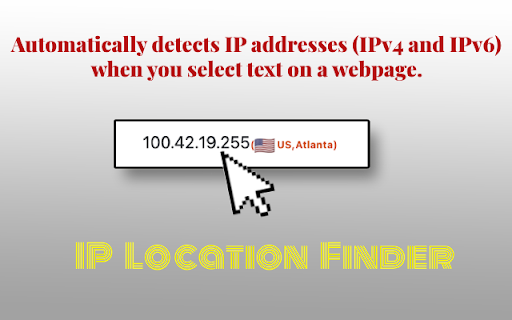


Finds the geographical location of IP addresses on a page. The "IP Location Finder" Chrome extension is designed to help users identify the geographical location of IP addresses found on web pages. Automatic IP Detection: Automatically detects IP addresses (IPv4 and IPv6) when you select text on a webpage. Geographic Location: Displays the country and city (when available) associated with the selected IP address. Flag Icon & Country Code: Displays a flag icon and country code alongside the location information. Flexible API: Uses an external API for IP geolocation lookup, with customizable API options in the extension's settings. Clean Display:Displays the location in the format: `(FlagIcon CountryCode, City)`. If city is unavailable, only shows `(FlagIcon CountryCode)`. Third-Party Services: This extension uses external geolocation APIs for IP lookups. While we choose reputable providers, we are not responsible for their data collection policies or security practices. Please review their privacy policies separately for more information:

ip checker chrome extension
Displays the server's location based on its IP address using IPinfo.io. 🌍 IP Address Checker Chrome Extension 🌍 Welcome to the ultimate IP Checker Chrome Extension designed for the curious, the problem solvers, and every internet user in between. With just a click, delve deep into the details of your IP address and any domain's comprehensive information. 🚀 🖥️ Instant IP Check: Get your IP address information in a snap. 🌐 Domain Insights: Dive into the details of the site you're currently browsing. 🚀 Speed & Reliability: Built for performance, count on our tool to provide you with accurate and timely data. 🤔 Why Use Our Extension? Understanding your IP address and the domain's information can be crucial for: Web Developers: Debugging hosting and domain issues becomes a breeze. Digital Marketers: Understand server locations for better SEO strategies. Cybersecurity Enthusiasts: Quickly gather intel on domains of interest. General Users: Satisfy your curiosity about any website's backend details. 📝 How to Use: Install our IP Address Checker Chrome Extension. Click on the extension icon while browsing. Instantly view your IP and domain details. 🌟 Why Choose Us? With a plethora of IP address and domain information Chrome extensions available, our tool stands out with its user-friendly interface, rapid results, and accurate data. We're committed to providing you with the best experience. Join thousands of satisfied users who trust our extension for their IP and domain checking needs. Try it out now! 🎉

Whois ip lookup
Use Whois ip lookup Chrome extension to check what is my ip address and efficiently monitor its safety with proxy checker online. Easily determine what is my public ip address ipv4 lookup. Explore the capabilities of our Chrome extension tailored to provide detailed insights into your network addr and its precise geographical details. Access comprehensive Whois ip lookup information for managing your network identity. Features Overview 1. Utilize easy whois domain lookup for direct domain details. 2. Fast and reliable analysis of network statistics. 3. User-friendly interface for streamlined navigation. 4. Continuous updates to ensure accurate data. 5. Access geographical details via reverse ip lookup whois. Ease of Installation: 1️⃣ Navigate to the Chrome Web Store, search whois ip address lookup free. 2️⃣ Find the extension, click 'Add to Chrome'. 3️⃣ Click 'Add Extension' to confirm the installation. 4️⃣ Once added, open the extension to see what is my ipaddress vpn. 5️⃣ Begin using it for detailed network analysis. UX ✦ Streamlined interface for effective whois lookup by ip address. ✦ Intuitive, user-friendly layout with responsive controls. ✦ Dynamic interactive maps for accurate location tracking. ✦ Comprehensive help section available for all users. ✦ One-click access for checking my internet address location. Customization Options A. Set the frequency of what is my ip address vpn alerts. B. Enable or disable geolocation features as needed. C. Tailor notification settings to suit personal preferences. D. Manage data storage and historical query information. E. Adjust whois ip lookup data visibility per session. Compatibility with Devices 🔹 Compatible with various desktop and mobile operating systems 🔺 Quick setup on your preferred platforms and whats is my ip address lookup compatible 🔸 Easily integrates with multiple device types 🔻 Seamless performance across all supported devices 🔷 Fast reverse ip address lookup whois compatible Privacy and Security Features ✓ Enables comprehensive reverse whois ip lookup for precise network analysis. ➕ Significantly enhances user privacy through data anonymization. ➖ May slightly reduce browsing speed. ✔ Ensures data accuracy with frequent updates. ✗ Designed as a comprehensive vpn proxy checker online. Performance and Speed 🌟 Efficiently perform whois ip lookup operations for fast results 🌠 User-friendly interface ensures easy navigation and operation 🌟 Optimized for rapid processing and minimal latency 🌠 Integrates seamlessly with your browser for convenience 🌟 Instantly geolocate ip address free with high accuracy Automatic Updates 👉 Easily find your network's whois ip lookup information. 👈 Determine your current net details. 👇 Track changes in network geo place positioning automatically. 👍 Seamless integration with your browser for real-time updates. 👆 Quick access to what is my ip location now. Availability of user support and detailed documentation: 📗 Detailed guide to using the arin whois checker. 📘 Tips for deciphering network addr details. 📙 FAQ section for common troubleshooting. 📒 Direct contact for immediate assistance. 📕 Insightful updates on whois ip lookup address location. User Reviews and Ratings: 🥇 Essential for determining network origin details via reverse ip whois lookup. 🥉 Reliable results, consistently accurate. 🏅 Simple interface, very user-friendly. 🥈 Quickly identify server names with get hostname from ip address lookup. Title: Integration with Other Tools ⬅️ Accurately determines what is my ipv4 address location ⬆️ Compatible with various operating systems and platforms ⬇️ User-friendly interface for easy navigation and use ↗️ Provides real-time updates on network config changes ➡️ Seamless integration with Whois ip lookup Enhance Your Network Security on a daily basis: 🌟 Safeguard your systems with whois ip lookup tools. 💫 Monitor network traffic for unusual activities. 🌠 Stay ahead of potential threats with real-time alerts. 🎇 Implement strict access controls and encryption. ✨ Use whois reverse hostname lookup to identify unknown hosts. Developer Information 🔴 Use the extension to identify site data. 🔵 Retrieve registration details with icann whois lookup. 🟡 View essential server statistics efficiently. 🟢 Pinpoint exact locations using iplocation finder geolocation. Find out more about your connection with our reverse whois Google Chrome extension. Get comprehensive whois details lookup. Ideal for enhancing your browsing experience by accessing essential data on-the-go and precise dns look up at the click of a button.

Geolocation Checker
Check if your VPN works by displaying your current IP, city, and country. Stay informed about your virtual geolocation. 🌍 Geolocation Checker is a simple, easy-to-use browser extension that helps you monitor your online geographical location and verify your VPN connection status. With just one click, you can see your current IP address, city, and country - complete with a flag icon for easy visual confirmation of your geolocation. 🎯 Think of it as your location "truth checker" - a quick way to know where you appear to be browsing from at any time. ⭐ Key Features: 🔷 Shows your current IP address 🔷 Displays your current city location 🔷 Shows your current country (with flag) 🔷 Updates on refresh 🔷 Simple, clean interface 🔷 Works with or without VPN 🚀 How to Use: 1️⃣ Install the extension 2️⃣ Click the extension icon in your browser 3️⃣ Instantly see your current geolocation details 🤔 What does this extension do? 📍 It shows you your current geolocation information (IP address, city, and country). This helps you verify your browsing location and confirm if your VPN or proxy settings are working as intended. 🎯 Why do I need this extension? 🔒 Whether you're using a VPN for privacy, accessing region-specific content, or simply want to know your current virtual location, this extension provides instant geolocation verification. 🌐 Does this extension work without a VPN? ✅ Yes! This extension works with or without a VPN. It displays your current geolocation information regardless of how you're connecting to the internet. 🛡️ Is this extension safe to use? ✅ Yes, the extension is safe. It only reads your current IP address and geolocation information - the same information that websites can see. It doesn't collect, store, or share any of your personal data other than to make lookup. 📊 What information can I see with this extension? You can see three key pieces of information: 📌 Your current IP address 📌 The city you're browsing from 📌 Your current country (with a flag icon for easy recognition) ⏰ When should I use this extension? Use it whenever you: 🔸 Need to verify your current geolocation 🔸 Want to confirm your VPN location change 🔸 Need to check if your location settings are working 🔸 Want to verify which country you're appearing to browse from 📡 Does the extension need internet access to work? ✅ Yes, it needs internet access to check your current geolocation information. ⚠️ What if I see an error message? 🔧 If you see an error message, it usually means either: ❗ Your internet connection isn't working ❗ The geolocation service is temporarily unavailable 💡 Try checking your internet connection and trying again in a few moments. 💰 Is this extension free? ✅ Yes, the extension is completely free to use. ⚡ Will this extension slow down my browsing? ✅ No, the extension only works when you click on it and uses minimal resources. It won't affect your browsing speed. 🌎 Know your virtual location instantly with Geolocation Checker. See your IP address, city, and country with a matching flag - perfect for verifying your VPN is working properly or just checking your current location online.

IP Whois - IP Address and Domain Information
Get all the details for the web page's IP address, including geolocation, network, ASN, and more. Gives you the full IP address information about the server of the website you're visiting. It also shows you the map with the approximate distance between the website server and your location. Here's the list of the data points displayed: By design, your data stays at all times on your Google account, never saved in our database. Your data aren’t shared with anyone, including the add-on owner. We complies with privacy laws (especially GDPR & California Privacy Act) to protect your data.
