
hjfkopginlgihmjejgpfdhcgconehokj
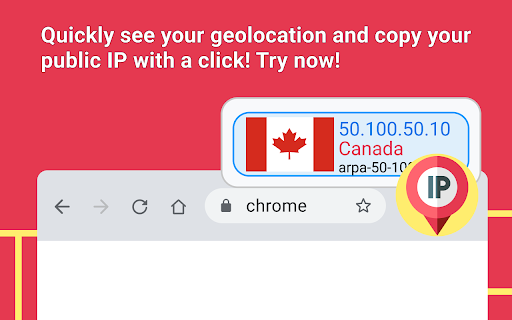
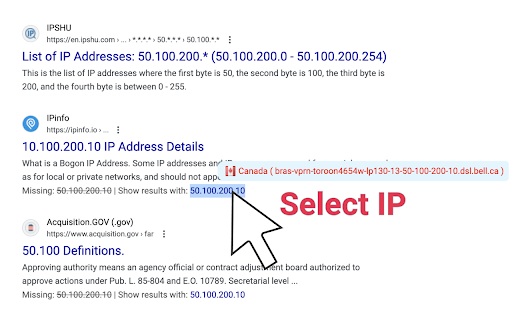
Use Whois ip lookup Chrome extension to check what is my ip address and efficiently monitor its safety with proxy checker online. Easily determine what is my public ip address ipv4 lookup. Explore the capabilities of our Chrome extension tailored to provide detailed insights into your network addr and its precise geographical details. Access comprehensive Whois ip lookup information for managing your network identity. Features Overview 1. Utilize easy whois domain lookup for direct domain details. 2. Fast and reliable analysis of network statistics. 3. User-friendly interface for streamlined navigation. 4. Continuous updates to ensure accurate data. 5. Access geographical details via reverse ip lookup whois. Ease of Installation: 1️⃣ Navigate to the Chrome Web Store, search whois ip address lookup free. 2️⃣ Find the extension, click 'Add to Chrome'. 3️⃣ Click 'Add Extension' to confirm the installation. 4️⃣ Once added, open the extension to see what is my ipaddress vpn. 5️⃣ Begin using it for detailed network analysis. UX ✦ Streamlined interface for effective whois lookup by ip address. ✦ Intuitive, user-friendly layout with responsive controls. ✦ Dynamic interactive maps for accurate location tracking. ✦ Comprehensive help section available for all users. ✦ One-click access for checking my internet address location. Customization Options A. Set the frequency of what is my ip address vpn alerts. B. Enable or disable geolocation features as needed. C. Tailor notification settings to suit personal preferences. D. Manage data storage and historical query information. E. Adjust whois ip lookup data visibility per session. Compatibility with Devices 🔹 Compatible with various desktop and mobile operating systems 🔺 Quick setup on your preferred platforms and whats is my ip address lookup compatible 🔸 Easily integrates with multiple device types 🔻 Seamless performance across all supported devices 🔷 Fast reverse ip address lookup whois compatible Privacy and Security Features ✓ Enables comprehensive reverse whois ip lookup for precise network analysis. ➕ Significantly enhances user privacy through data anonymization. ➖ May slightly reduce browsing speed. ✔ Ensures data accuracy with frequent updates. ✗ Designed as a comprehensive vpn proxy checker online. Performance and Speed 🌟 Efficiently perform whois ip lookup operations for fast results 🌠 User-friendly interface ensures easy navigation and operation 🌟 Optimized for rapid processing and minimal latency 🌠 Integrates seamlessly with your browser for convenience 🌟 Instantly geolocate ip address free with high accuracy Automatic Updates 👉 Easily find your network's whois ip lookup information. 👈 Determine your current net details. 👇 Track changes in network geo place positioning automatically. 👍 Seamless integration with your browser for real-time updates. 👆 Quick access to what is my ip location now. Availability of user support and detailed documentation: 📗 Detailed guide to using the arin whois checker. 📘 Tips for deciphering network addr details. 📙 FAQ section for common troubleshooting. 📒 Direct contact for immediate assistance. 📕 Insightful updates on whois ip lookup address location. User Reviews and Ratings: 🥇 Essential for determining network origin details via reverse ip whois lookup. 🥉 Reliable results, consistently accurate. 🏅 Simple interface, very user-friendly. 🥈 Quickly identify server names with get hostname from ip address lookup. Title: Integration with Other Tools ⬅️ Accurately determines what is my ipv4 address location ⬆️ Compatible with various operating systems and platforms ⬇️ User-friendly interface for easy navigation and use ↗️ Provides real-time updates on network config changes ➡️ Seamless integration with Whois ip lookup Enhance Your Network Security on a daily basis: 🌟 Safeguard your systems with whois ip lookup tools. 💫 Monitor network traffic for unusual activities. 🌠 Stay ahead of potential threats with real-time alerts. 🎇 Implement strict access controls and encryption. ✨ Use whois reverse hostname lookup to identify unknown hosts. Developer Information 🔴 Use the extension to identify site data. 🔵 Retrieve registration details with icann whois lookup. 🟡 View essential server statistics efficiently. 🟢 Pinpoint exact locations using iplocation finder geolocation. Find out more about your connection with our reverse whois Google Chrome extension. Get comprehensive whois details lookup. Ideal for enhancing your browsing experience by accessing essential data on-the-go and precise dns look up at the click of a button.

Free VPN Proxy - VPN for Chrome uVPN
Free VPN for Chrome, Hide IP address, Unblock access to websites, Secure Browsing with Unlimited Data and Fast Speeds uVPN Proxy is a free VPN Chrome extension that hides your IP address, secures your connection, and lets you unblock websites instantly with fast global VPN servers. uVPN is a Free VPN for Chrome browser, Premium version with broader VPN coverage and more features is available by subscription. 🆓 100% Free VPN for Chrome - Use a reliable free VPN with no hidden fees. 💎 Premium VPN Upgrade - access more VPN servers, faster speeds, and advanced features. ⚡ Instant VPN Connection - Turn on the VPN in one click and connect immediately. 🔒 Advanced Encryption - Protect your data with strong SSL (TLS) encryption on any network. 👁️🗨️ No Logs, Full Privacy - uVPN does not track, store, or share your browsing activity. 🌍 Global VPN Network - Access multiple VPN servers worldwide for better speed and access. 🚀 Fast VPN Speeds - Enjoy smooth browsing, streaming, and downloading. ♾️ Unlimited Bandwidth - No limits, no throttling - use the VPN freely anytime. 🚫 AdBlock Protection - Block ads, pop-ups, and trackers for a cleaner and faster browsing experience. 🧠 Smart Location Matching - Your browser location matches your VPN server automatically. 🛡️ Leak Protection - Prevent WebRTC leaks and keep your real IP address hidden. 🪶 Lightweight Extension - Optimized to run smoothly without slowing down Chrome. 👍 Easy to Use - Clean interface designed for instant VPN access. 💬 24/7 Support - Fast, responsive help whenever you need it. 🌐 What You Can Do with uVPN 🌐 🔓 Unblock Websites - Access restricted websites, apps, and services from anywhere. 🕵️ Browse Privately - Stay anonymous and avoid tracking by advertisers and websites. 🛡️ Hide Your IP Address - Protect your identity and location online. 📡 Secure Public Wi-Fi - Encrypt your connection on public networks like cafes and airports. 🚫 Browse Without Ads - Enjoy faster page loads and fewer distractions with built-in ad blocking. ⚡ Why Users Install uVPN • No account required - install and start using the VPN instantly • Fast and stable VPN servers worldwide • Built for Chrome with Manifest V3 support • Perfect for privacy, security, and unrestricted browsing uVPN (also searched as u VPN, uVPN Chrome extension, or u VPN proxy) is fully compatible with Chrome Manifest V3 and follows all Chrome Web Store policies for security and privacy.

Homie VPN - Free Proxy for Chrome
Free Chrome proxy to change IP by country, unblock selected sites, and browse through only the websites you choose Homie VPN is a free proxy extension for Chrome that lets you change your browser IP by country, unblock websites, and route only selected sites through the proxy. Use Homie VPN to switch browser location in one click, check country-specific content, test websites from other regions, and proxy only the tabs and sites you choose instead of running a full-device VPN. 🎁Free proxy for Chrome No registration, no hidden fees, and no credit card required. ⚡Lightweight and simple Fast setup with a clean one-click workflow

VPN for Chrome: NordVPN proxy protection
Connect to the fastest VPN out there — NordVPN. Hide your IP, block ads, and be safer online with our VPN proxy extension for Chrome What is a VPN extension for Chrome? It’s a great way to protect your browsing and an easy-to-use alternative for a proxy server! Install the NordVPN extension for Chrome on your browser to secure your traffic. You need NordVPN’s VPN proxy extension to: • Stay safer online. • Shield your internet traffic from snoopers. • Be extra secure with Scam and phishing protection. • Disable WebRTC and prevent leaks. • Change your real IP and virtual location. What makes NordVPN one of the best add-ons for Chrome? • Increased online privacy Use NordVPN’s extension and change your IP and virtual location with a click. Get a new IP address and surf the web in privacy — no one will know where you’re really connecting from. • Quick. Speedy. Super fast. What makes NordVPN’s proxy extension so fast? A massive network of servers. Choose one of 7,400+ servers covering 118 countries, and you’ll be connected in seconds. • As easy as it gets The NordVPN proxy is free to download once you get a NordVPN subscription. Download, log in, and connect. That’s it! We believe in making complicated things simple, so one click is all it takes to encrypt your internet traffic on the Chrome browser. • No limits NordVPN’s browser extension won't interrupt or restrict your browsing. Want to safely binge a TV show while on the train? You're free to do it — we don’t have any data limits stopping you. • A name you can trust Chrome VPN extensions come in all shapes and sizes — and not all of them are a good choice if you want to secure your browsing and keep your sanity. With NordVPN’s proxy extension, you’ll get a fast, stable, and unrestricted proxy connection every time. • Protection from IP leaks NordVPN’s VPN proxy extension will disable Chrome’s WebRTC protocol to prevent your IP address from being leaked. • More than a VPN proxy extension Be safer online with our VPN extension for Chrome. NordVPN’s unique Scam and phishing protection feature will block intrusive ads and websites hosting malware. • 24/7 customer service Get help the moment you need it. Drop us an email or connect with one of our many award-winning customer support agents via live chat to help you get started with a VPN Proxy extension for Chrome. Features of NordVPN extension for Chrome that users will love • Browse without limits — you get unlimited VPN data. • Easy to use — online security with one click. • Supports Chrome version 90 and newer. • Access certain URLs directly by excluding them from the proxy tunnel. How do I set up a VPN on Chrome? 1. Add the NordVPN extension to your Chrome browser. 2. Log in to your NordVPN account. 3. Click on the NordVPN extension icon in the top-right corner. 4. Click “Quick Connect,” and you’re done! Opt for a risk-free VPN extension for Chrome today — you get a 30-day money-back guarantee when you buy NordVPN!

Web Filter for Chrome
Web Filter for Chrome extension enables safe web filtering and Google safe search in Chrome. Block Adult Content & Enforce Safe Search Powerful web filtering extension for families, schools, and organizations. Automatically blocks pornography, adult content, and inappropriate websites while enforcing SafeSearch across all major search engines. Overview SPIN Safe Browser's Web Filter for Chrome provides instant protection against inappropriate online content. Designed for parents, educators, and professionals, this extension automatically blocks adult websites, enforces Google SafeSearch and YouTube Restricted Mode, and filters content even in Incognito Mode—delivering comprehensive internet safety without complex setup. Key Features Automatic Protection (Free Version) ✔ Instant Web Filtering – Blocks pornography, nudity, and adult content immediately upon installation ✔ Universal SafeSearch Enforcement – Automatically enables strict SafeSearch on Google, Bing, DuckDuckGo, and other popular search engines ✔ YouTube Restricted Mode – Filters out age-inappropriate videos for family-friendly viewing ✔ Incognito Mode Filtering – Maintains protection even in private browsing sessions ✔ No Extra Software Required – Works seamlessly within Chrome and Chromebooks with zero configuration Premium Features (Monthly and Yearly Subscription options available) Upgrade to SPIN Safe Browser Premium for advanced control: ✅ Unlimited Domain Allow list – Whitelist any number of trusted websites ✅ Unlimited Domain Block list – Add specific sites to your custom block list ✅ Allow-Only list Mode – Restrict browsing to only approved websites ✅ Custom Content Categories – Fine-tune filtering beyond default categories ✅ Passcode Protection – Prevent unauthorized changes to settings Parents & Families Protect children from accidental or intentional exposure to inappropriate material while browsing at home. Create a safer digital environment for all family members. Educators & Schools Perfect for Chromebook deployments in K-12 classrooms. Keeps students focused on educational content and away from distracting or harmful websites during school hours. Organizations & Workplaces Enforce company browsing policies, maintain productivity, and reduce liability by limiting access to non-work-related or inappropriate websites. Individuals Anyone seeking self-accountability or looking to maintain a distraction-free, content-safe browsing experience for personal development. Why Choose SPIN Safe Browser for Chrome? Immediate Protection – No waiting period or configuration required. Protection begins the moment you install. Comprehensive Coverage – Works across all search engines and video platforms, including enforced filtering in private browsing mode. Enterprise-Ready – Administrators in managed environments (schools, businesses) can deploy policies preventing extension removal, ensuring consistent protection across all devices. Trusted Solution – Part of the SPIN Safe Browser family, which includes mobile apps for Android and iOS, providing cross-platform protection. Installation & Setup 1. Install the extension from the Chrome Web Store 2. Automatic protection activates immediately 3. Recommended: Upgrade to Premium for advanced features 4. Optional: Set a passcode to lock your settings (Premium) Cross-Platform Protection Extend your web safety beyond desktop with SPIN Safe Browser for Android and iOS devices. Resources Support Portal: community.useboomerang.com/hc/en-us/sections/360000687332-SPIN-Safe-Browser-and-Manage-SPIN Privacy Policy: https://spinsafebrowser.com/spinprivacypolicy Feedback & Support: spinforchrome@nationaledtech.com
