
pemdnnioakfiffdfhglndfhdgbhjglfd
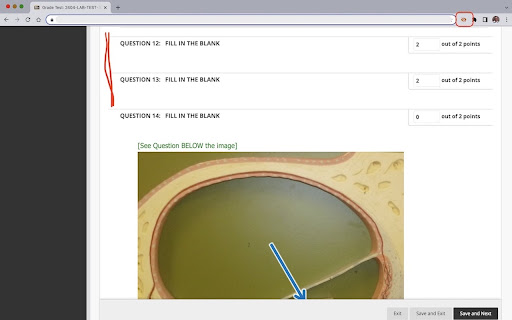
Hide questions marked as correct and show only questions with incorrect answers. This extension is intended for faculty at Austin Community College, who administer online tests on Blackboard. The extension does not alter the content nor interact with content on the LMS server. Faculty can use this to hide all questions marked as correct and to show only those that are either partially correct or incorrect. Once added as an extension, the user may pin the extension to the extensions bar for easy access. The extension is designed to work on pages that contain test items with correct or incorrect markings. Once the page is displayed, click the extension's icon (it will appear in color if the page you are on is on www.austincc.edu) to hide the questions marked as correct. User may then change the grades for any question just they would do while grading. Hitting the icon again or clicking the 'refresh' button or moving to the next page will unhide the hidden questions and you may choose to hide the correct questions on the next page by clicking the extension icon again. No logins are required and no data about the user or the test item on display will be collected or stored by the extension. USE SCENARIO 1: During Grading: Manual review and grading becomes faster as you need to focus only on questions that are incorrect. Hiding the questions marked as correct eliminates unnecessary page scrolling and fatigue. USE SCENARIO 2: During Test Reviews: When you are discussing a test with a student during a review, hiding the questions marked correct helps you focus on the areas the student failed to do well. If you are not a faculty member at Austin Community College and would like to use this on your Blackboard site, contact us by email.

Coursology
Introducing your “Know-it-all” Study Sidekick! Dive into answers, master concepts, and soar academically with AI by your side. Powered by advanced AI, The Coursology Chrome extension is an instant, accurate homework helper designed to help students in all subjects. Capture your question and let our AI solve your complex questions in subjects like math, biology, chemistry, geometry and many more! Fast, step-by-step answers All with a snap of a picture, we provide precise answers accompanied with detailed, step-by-step explanations right below the answer. Support in all subjects With our wide array supported subjects, find answers to complex problems in math, chemistry, physics, history and much more Capture Methods You can use our Button, Snapshot or Text Selection capture methods to answer your questions! Personalized AI Chat We don’t leave you hanging, still have questions about a topic? Use our AI chat feature, or the follow-up chat on the answer popup for any additional questions you may have. Unlock better grades, With Coursology Pro you get: Find unlimited, accurate answers Step-by-step solutions No waits, no ads Access all Coursology features (Chrome extension, Mobile app, Chat, Lecture Listen, AI Study tools & more!)

Quizzard
Quick and easy tool to rapidly search for homework questions, definitions and quiz answers. Quizzard is a browser extension that allows you to rapidly search for questions and answers from thousands of different study sets using the widely popular online study website application, Quizlet. Quickly check your homework or find answers to tests and exam questions by simply searching your question and hitting enter! Quizzard is the ultimate tool for students taking online classes due to COVID-19 😷. Use Quizzard to find, study, and ace those online tests, quizzes, and exams in a matter of seconds! Search with incredible accuracy and sort answers by confidence. Use Quizzard to find multiple solutions and automatically pick the most confident results. Tired of copy and pasting? Right-click on a phrase and rapidly search for answers in the background! Quizzard is a browser extension search tool that is solely intended to assist users in rapidly finding Quizlet-hosted question sets. It is strictly prohibited to use this tool to facilitate any form of academic misconduct on assessed material as follows, but not limited to: quizzes, tests, exams, and alike.

Blackboard Grades UVM
If UVM students know anything about struggle, it's probably Blackboard. And while we can't do Blackboard's job for them, we figured we could make things a little easier for UVM students... Introducing Blackboard Grades UVM, a new way to view your grades! You no longer need to do those tedious calculations yourself when you can't see your final grade. this extension will get all of your grade information and do the calculations for you! Just login to blackboard, click the extension, edit and save your weights (first time only), and you're good to go! 1. log in to blackboard 2. click the extension to load and view classes 3. fill in the assignment types with the weights from your syllabus (first time Only, saves automatically) 4. Enjoy! A: Click the extension icon in the top right corner of your browser A: the extension could not pull the grade info for various reasons. Either your class did not create a grade page or there are no grades entered. if this occurs and neither are the case, report a bug. Do keep in mind that the format of blackboard grades across classes is very different, it's impossible for the extension to account for all of these differences. A: click "report a bug" in the extension and fill out the form with your issue.

Homework Helper - Study, Quiz, & Test Answers Solver with AI
Get INSTANT answers to homework, quizzes, and tests. Private. ALL websites work including Canvas, BlackBoard, McGrawHill, D2L Want to get answers and study help in a click? Get INSTANT answers with homeworkhelper+. Never have to search for answers again. HomeworkHelper+ gives you answers to your homework, quiz, and test questions directly on your screen with the click of a button. Take it for a test drive! **NEW HIGHLIGHT/RIGHT CLICK & ASK FEATURE is universal It's even free to download and try out! Take it for a test drive. You see, it uses datasets and AI to get the right answer and display it on your screen. It's smart. It's passed AP exams, the bar exam, and medical exam with flying colors. Pass with ease = no stress. If you are interested in checking yourself or getting answers, then this could be for you. It works on all question types: Multiple choice, true or false, it even will provide answers for essay / free response questions. NEW RIGHT CLICK & ASK FEATURE is universal and works on all platforms and websites (including Canvas, McGrawHill, Blackboard, Moodle, D2L, and more). The extension is downloaded right on your web browser so it is private and discrete (no one will know unless you tell them) so no need to worry about privacy. So, if you're interested in getting answers or using it to check your gut, go ahead and download Homework Helper+ by clicking the "add to chrome" button above now. So go ahead and give it a go. You could be using it in less than 30 seconds from now. Simple click the "add to chrome" on this screen now. We hope you like it (but are pretty confident you will based on our current student reviews and customer service:) ) Our team is here to help with any questions that come up (we send a video tutorial after you download it). See you on the other side! Note From Developer Team: Some people have reported problems seeing/using the extension, make sure you "refresh" after you download to ensure it works. This resolves any potential issues reported by customers and ensures it works for you. Go ahead and give it a try! November 2025: - Text and description update September 2025: - Text and description update February 2025: - Fixed issues customers reported around extension not working - Additional updates and bug fixes based on feedback November 2024: - Updates and bug fixes based on user feedback March 2024: 1.1.1 - Updated pop up and design to be tell user how to user right click feature. March 2024: 1.0.9: - Ugraded highlight and right click feature to work better across ALL websites for students. - Updated highlight and right click answer popup design to work on McGraw Hill, Blackboard, D2L and more. - Increased answer accuracy December 2023: 1.0.8: - Added highlight and right click feature to work across all website - Updated design to be more intuitive and fix bug issues. It's like your own homeworkhelper answersai quizmate quiz whiz study buddy transcript virtual professor quizlet canvas quiz tool chrome extension homework helper answers ai coursology studdybuddy study fetch AI plugin my jot bot jenniai homeworkhelper+ sidekick!
