
ppojalbcialfpnanlmjkalgmmfdcedjo

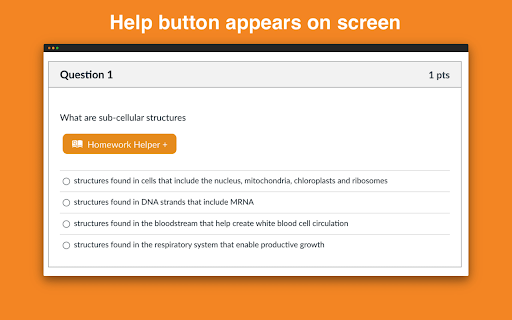
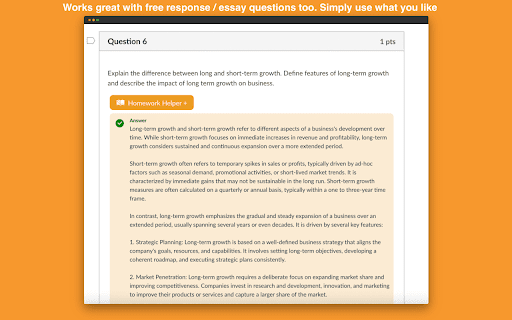
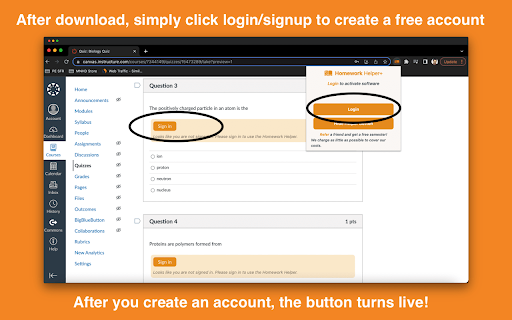
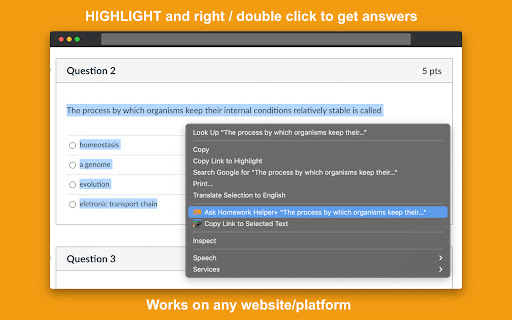
Get INSTANT answers to homework, quizzes, and tests. Private. ALL websites work including Canvas, BlackBoard, McGrawHill, D2L Want to get answers and study help in a click? Get INSTANT answers with homeworkhelper+. Never have to search for answers again. HomeworkHelper+ gives you answers to your homework, quiz, and test questions directly on your screen with the click of a button. Take it for a test drive! **NEW HIGHLIGHT/RIGHT CLICK & ASK FEATURE is universal It's even free to download and try out! Take it for a test drive. You see, it uses datasets and AI to get the right answer and display it on your screen. It's smart. It's passed AP exams, the bar exam, and medical exam with flying colors. Pass with ease = no stress. If you are interested in checking yourself or getting answers, then this could be for you. It works on all question types: Multiple choice, true or false, it even will provide answers for essay / free response questions. NEW RIGHT CLICK & ASK FEATURE is universal and works on all platforms and websites (including Canvas, McGrawHill, Blackboard, Moodle, D2L, and more). The extension is downloaded right on your web browser so it is private and discrete (no one will know unless you tell them) so no need to worry about privacy. So, if you're interested in getting answers or using it to check your gut, go ahead and download Homework Helper+ by clicking the "add to chrome" button above now. So go ahead and give it a go. You could be using it in less than 30 seconds from now. Simple click the "add to chrome" on this screen now. We hope you like it (but are pretty confident you will based on our current student reviews and customer service:) ) Our team is here to help with any questions that come up (we send a video tutorial after you download it). See you on the other side! Note From Developer Team: Some people have reported problems seeing/using the extension, make sure you "refresh" after you download to ensure it works. This resolves any potential issues reported by customers and ensures it works for you. Go ahead and give it a try! November 2025: - Text and description update September 2025: - Text and description update February 2025: - Fixed issues customers reported around extension not working - Additional updates and bug fixes based on feedback November 2024: - Updates and bug fixes based on user feedback March 2024: 1.1.1 - Updated pop up and design to be tell user how to user right click feature. March 2024: 1.0.9: - Ugraded highlight and right click feature to work better across ALL websites for students. - Updated highlight and right click answer popup design to work on McGraw Hill, Blackboard, D2L and more. - Increased answer accuracy December 2023: 1.0.8: - Added highlight and right click feature to work across all website - Updated design to be more intuitive and fix bug issues. It's like your own homeworkhelper answersai quizmate quiz whiz study buddy transcript virtual professor quizlet canvas quiz tool chrome extension homework helper answers ai coursology studdybuddy study fetch AI plugin my jot bot jenniai homeworkhelper+ sidekick!

QuestionAI Homework Powered AI Assistant
AI Copilot can answer screenshot queries and assist with writing, summarizing, translating, and grammar checking. Question.AI is your comprehensive AI Copilot, powered by GPT, and accessible in the sidebar for all your needs. It is designed to answer screenshot queries, questions on learning platforms and assist with writing, summarizing, translating, and grammar checking. It's a versatile tool available directly in your browser, ensuring you have the support you need anytime, anywhere. Your Ultimate Homework and Learning Assistant Question.AI, integrated as a ChatGPT plugin, serves as your AI Copilot. It's ready to tackle complex questions and assist with your homework, offering instant, accurate answers. Simply take a screenshot of your query, and Question.AI will provide precise solutions in no time. Key Features 🔥 Get answers to questions with easy screenshots Take or upload a screenshot to receive accurate answers to your learning inquiries. Perfect for all subject questions, espeically mathematical questions. Our AI tutor powered by advanced technology provides precise and step-by-step answers instantly. 💡 Real-Time AI Conversations with no fees Click the Question.AI icon for real-time conversations or select text on any webpage to get instant and detailed AI responses. Stop wasting time searching for answers. Our AI learning tool is available 24/7 to provide answers and support without usage limits or hidden fees whether you're studying late at night or during the weekend. 📏 LaTeX Equation Recognizer Identify LaTeX equations on any webpage and ask AI for explanations. Perfect for students dealing with complex formulas. 📝 Perfectly compatible with learning platforms Get correct answers and suggestions for coursework, quizzes, and tests directly within your learning platforms like Canvas, Blackboard, McGraw, etc. You can use Question.AI on any website. 📚 Supports All Subjects and Grades with High-Quality Answers From math and history to literature and foreign languages, Question.AI covers a wide range of topics for students at all levels. Benefit from our advanced AI technology that ensures accurate and quick solutions to your queries. ✍️ AI Writing Assistance Create high-quality content in seconds. Provide you with intelligent suggestions and create engaging and well-structured content, making writing tasks easier and faster and saving time and effort. 🔗 Easy Chrome Integration Install the Question.AI Chrome extension with a few clicks and start getting answers instantly. 🔒 Safe and Secure We prioritize your privacy. Question.AI ensures the safety and protection of your data. 🚀 Quick Start Tips 1. Click the Question.AI icon on the side of the screen to start a conversation. 2. Select any text on the webpage, click the Question.AI icon that appears, and let the AI give you answers. 3. Press Cmd+E or Ctrl+E to take a screenshot and send your question to Question.AI for immediate answers. 4. Press Cmd+K or Ctrl+K to open Question.AI and ask any question. 5. Use the prompt library with user-provided prompts for inspiration and streamline your ChatGPT interactions. 💻 How to use: 1. Click the "Add to Chrome" button and pin it to your toolbar. 2. Log in to your Question.AI account. 3. Start using Question.AI in the sidebar. It's accessible in the sidebar for all your needs 24/7. ❓ Frequently Asked Questions: 📌 Do I need a ChatGPT/OpenAI account? No, you don't need a ChatGPT account to use this plugin. You can set up a free account directly with us. 📌 Is it free to use? Yes, we offer a free version with limited usage. 📌 What platforms does Question.AI support? Question.AI is available on multiple platforms. You can download our app from the Apple Store for iOS or Google Play for Android. For Windows and Mac users, you can enjoy the extension via Chrome or access our services directly on our webpage. Contact Us For any questions or feedback, reach out to us: ● Email: feedback@questionai.net ● Website: https://www.questionai.com Enhance your learning and productivity with Question.AI, your versatile GPT AI assistant. Start using it today and experience the benefits firsthand!

Quizard AI - Homework Tutor
Study smarter with Quizard! Instant AI answers and explanations for your all your questions to help you learn and succeed! ✨ Homework & AI Answers Solver Are you struggling to understand your homework and study materials? Don’t worry, Quizard is here to help! Take screenshots 📸 and get instant answers, explanations, and related resources for any question. 💁♀️ 🪄 【 Instant and Accurate Solutions 】 ✅ Instant answers: in just seconds receive answers, explanations, and related resources to your question ✅ The #1 AI in accuracy: we are 20% more accurate than ChatGPT and deliver the highest quality, most accurate answers with speed ✅ 24/7 support: use Quizard anytime, anywhere, we’re always there to help you ✅ Math: Quizard can accurately recognize and solve even the most complex math problems that have symbols which can’t be copy and pasted 🔥 【 Take A Screenshot, Get An Answer 】 ✅ Screenshot feature: allows effortless question-asking by capturing a screenshot ✅ Highlight text: simply highlight and solve any question found online ✅ Type In Your Question: you can directly type your question into the text box to receive an instant answer ✅ Universal compatibility: use it on websites like Canvas, Blackboard, Moodle, Google Classroom, and more 🎓 【 Any Subject, Any Level 】 ✅ Any type of question: we can solve multiple choice, short and long answer questions, and provide step by step solutions to your word problems ✅ Help on any subject: from math, history, chemistry, biology you name it we got you covered ✅ Every grade level: whether you’re a college student, high school student, or even an adult looking to brush up on your knowledge, Quizard is the perfect tool to help you succeed. 🗣 【 Clarify Your Understanding 】 ✅ Ask follow-up questions: interact with Quizard to explore complex topics effortlessly ✅ Related resources: we generate you related resources from the web based on the question to confirm the solution we’ve provided and see how others have solved it 💻【 How To Use 】 🟪 Click the “Add to Chrome” button and pin it to the toolbar. 🟪 Log in to your account. 🟪 Press Cmd/Ctrl+Shift+K to wake up Quizard 🟪 Start working with AI! 🗣️【FAQ】 📌 Is it free to use? -Yes, we offer limited use for free. For unlimited access, you can choose the Quizard Pro Subscription. 📌 Is my Quizard Pro Subscription active on both the mobile and Quizard Chrome Extension version? -Yes! If you are a Quizard Pro subscriber link your device in-app or through the Chrome Extension 📌 How can I link my Quizard profile to the extension or from the extension to the app? -From the extension, go to your settings and click “Link Device.” You will then receive further instructions for linking with your mobile device! 📌 ChatGPT is banned in my country. Does it work in my country? -Yes. Our chrome extension works in all countries. 📌 Can I use your service on my phone? -Yes. Quizard is available on all devices (Chrome Extension, iOS, Android). Search up “Quizard AI” in the App Store/Google Play Store

SolvelyAI - AI Homework Tutor & Study Helper
SolvelyAI is your AI Homework Helper—instant screenshot solving, step-by-step AI Answers, AI Summary, and Study Helper tools. Capture, Solve, Summarize, and Learn Anytime, Anywhere 🚀 Solvely.ai is the AI learning assistant for solving problems and understanding content faster. Our revolutionary One-Click Solve now gets you answers to an entire page of questions at once. 💬 👉 Your AI Homework Solver Stuck on a tough assignment? Whether it's one question or a whole page, get instant clarity. 🆕 One-Click Solve All : Solve all problems on your screen at once with one click. Press the magic button for instant answers, no screenshots required. ✔️ Take a Screenshot to Get Instant Answers: Quickly capture your homework questions and receive immediate solutions from AI. ✔️ Step-by-Step Solutions: Understand complex problems with detailed, step-by-step explanations that guide you to mastery. ✔️ Save Problems for Later Review: Keep a record of your questions and solutions for future reference and revision. ✔️ Solutions in Various Formats and Languages: Access solutions in different formats and languages to suit your learning preferences. 👉Your AI Content Summarizer Overwhelmed by long videos and articles? Get the key ideas in seconds. ✔️ Real-Time YouTube Summaries: Get AI-generated summaries, key points, and time-stamped chapters while you watch. Instantly grasp the core concepts of any video and jump directly to the most important parts. ✔️ Summarize Any Webpage in Seconds: Instantly distill any article, academic paper, or online report into a concise summary and key talking points. Absorb complex information at a glance and accelerate your research. 📌Pro tip: Use our quick capture shortcuts for faster question solving: 👉Learn Smarter, Not Harder Get the Solvely.ai extension now and embark on an extraordinary journey of knowledge and success. Unlock the power of AI and make every study session count! 💪📚🌟

TutorGPT - Free AI Homework Helper & Personal Tutor
Free AI tutor for instant homework help. Solve math, explain lessons, answer questions 24/7 with TutorGPT. TutorGPT is an AI-powered learning assistant that helps with homework, explains difficult concepts, and supports daily studying. It provides clear step-by-step explanations and instant help for common subjects including math, science, and writing. Once installed, the extension runs smoothly in your browser with no logins or complicated setup. ⭐ Key Features ✅ In‑Browser Instant Help: Get answers and explanations directly while browsing study materials, no tab switching needed. ✅ AI‑Powered Step‑by‑Step Solutions: Powered by advanced LLMs, it breaks down complex problems into clear, logical steps to build real understanding. ✅ Multi‑Subject Support: Covers math, science, writing, history, languages, and more—your one‑stop tutor for all academic needs. ✅ Image & Text Input: Type questions or upload photos of problems for instant, accurate solutions. ✅ 24/7 Availability: Access help anytime, anywhere—no waiting for tutors or office hours. ✅ No Sign‑Up Required: Use all core features immediately after installation—no accounts, no hidden fees. 🎯 Perfect For ● Students (K‑12, College): Solve homework, clarify concepts, study for exams, and build confidence in any subject. ● Lifelong Learners: Master new skills, understand complex topics, and learn at your own pace with personalized guidance. ● Language Learners: Get grammar help, vocabulary explanations, and practice conversations in multiple languages. ● Teachers & Tutors: Generate practice problems, create lesson examples, and supplement teaching materials effortlessly. 🚀 How to Use 1. Install the TutorGPT extension in your Chrome browser and enable it. 2. No registration or login—start using immediately after installation. 3. Type your study question directly in the extension panel, or upload a photo of your problem. 4. Receive instant, step‑by‑step explanations and solutions tailored to your question. 5. Copy and save the content for your notes or further study. 💡 FAQ Q1: Do I need to create an account to use TutorGPT? 💬 No! All core features are available immediately after installation—no sign‑up, no email required. Q2: What subjects does TutorGPT support? 💬 It covers math, science, English, history, languages, writing, and more—most academic and learning topics are supported. Q3: Is TutorGPT completely free? 💬 Yes! All basic features—question answering, step‑by‑step explanations, image input, copy answer—are 100% free with no hidden costs. Q4: Can I use TutorGPT on any website? 💬 Yes! It works across most web pages, letting you get help while reading articles, watching tutorials, or working on online assignments. Q5: Can TutorGPT help with exam preparation? 💬 Absolutely! It can explain key concepts, break down practice problems, clarify mistakes, and help you review efficiently for quizzes and exams. Q6: Does TutorGPT support photo uploads for handwritten problems? 💬 Yes! You can upload photos or screenshots of handwritten or printed problems for instant AI analysis and solutions.
