
pdnenlnelpdomajfejgapbdpmjkfpjkp


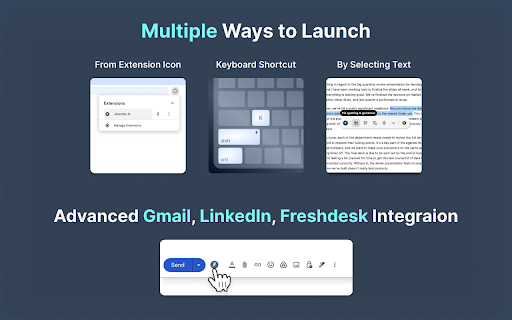

Write emails & messages, chat with page, improve writing, translate, and do much more. Powered by the most intelligent AI models Get personalized, context-aware AI help on any website with Jetwriter AI. Write emails and messages, chat with page, fix grammar, improve your writing, translate text, and much more - all in seconds. Powered by the world's most intelligent AI models. Free to try. 📧 ADVANCED GMAIL INTEGRATION: REFERENCES PAST EMAILS, WEB SEARCH, and HELP DOCS Generate personalized, context-aware replies in your exact tone directly from the Gmail compose window. Jetwriter AI learns your unique style from your sent emails, while seamlessly pulling accurate, real-time answers from your linked website, help docs, or live web searches. ✍️ GENERATE CONTEXT AWARE REPLIES IN YOUR VOICE Get AI assistance on email and messaging platforms such as Gmail, WhatsApp, LinkedIn, Outlook, Zendesk, and more. 🚀 HIGHEST QUALITY RESPONSES Go beyond generic AI. Our system is fully personalized to you, generating intelligent, context-aware responses. Powered by the world's most advanced AI models, including GPT-5.2 Thinking, Claude Sonnet 4.6, Gemini 3.1 Pro and more. 🌐 WEB SEARCH & READ LINKS Accesses the web to get the latest info for your replies. 📄 CHAT WITH ANY PAGE - Summarize articles - Find key information - Proofread your work - Explain complex terms ✨ SELECT ANY TEXT TO TRANSFORM - Correct grammar and spelling - Improve writing clarity and style - Rephrase and change the tone - Translate to any language - Create your own custom actions 👤 PERSONALIZED TO YOU - Teach the AI about you and your role for truly personalized responses. - Create different writing styles for various purposes. - Save your favorite prompts for one-click access. - Customize the length of AI responses. - Supports all languages. 🎙️ VOICE INPUT Save time with instant, accurate voice-to-prompt in any language. 🎨 MINIMAL, NON-INTRUSIVE DESIGN - No Layout Shifts: Unlike sidebar extensions, Jetwriter opens as a clean modal on top of the page. - Flexible: Resize and drag the modal anywhere on your screen. - Easy Access: Open via keyboard shortcut, highlighting text, right-click context menu, or the extension icon. - Integrated Buttons: Find AI reply buttons directly within popular sites such as Gmail, LinkedIn, WhatsApp Zoho, and more. - Rich Chat Experience: Supports multi-turn conversations, Markdown, code highlighting, and LaTeX. ⚡ SUPERIOR PERFORMANCE - Lightweight extension (

Writecream - AI-powered writing assistant
An A.I-powered app for generating blog articles, YouTube videos & podcasts in seconds. Writecream - Write all your content using AI. Key Features • Write blog articles • Write ad copies • Generate voiceovers • Write eCommerce product descriptions • 35+ writings tools inside the software to automate your life • Supports 70+ languages Writecream is your secret weapon for cold emails & marketing! We've got you covered! Writecream helps you automate your sales and marketing. Your prospect receives 100s of emails daily & their brains have adapted to ignore them. We've built Writecream to generate personalized, customized introductions that compel recipients to open, click, and respond. We scan your prospect's website or LinkedIn profile, gather the most important details, and write the coolest cold emails for you. Writecream can also generate blog posts, Facebook & Google ad copies, Landing Page Content, Product Descriptions, and even your next Angel Pitch email for angel funding! There are 40+ tools to choose from for an effective cold outreach & marketing campaign!

Merlin AI
26-in-1 Chrome extension to Research, Re-write, and Summarise content on any website Merlin provides multiple AI models in one extension that works directly inside your browser. It helps you chat with webpage content, re-write text on any website, summarize YT videos and documents, rewrite content, translate text, and create high-quality writing, without switching tabs. 🔥 Use Merlin AI to research, code, chat with websites, videos, and documents, plus write social media content in 128+ languages 🔥 ✔️ Unified Model Hub – Use leading AI models from Open AI, Anthropic & Google like the latest versions of ChatGPT, Gemini, Claude etc as soon as they’re launched. ✔️ Every Platform, One Login: Use one account across Chrome, iOS, Android, and Windows. ✔️ Built-In AI Utilities – From AI Detector & Humanizer to code explainer, slide maker, and voice-to-text, level-up any workflow in a click. Boost your productivity and make your workflow truly magical! 🚀 Think of us as an AI chatbot that’s more capable than typical models, we are powered by the AI models from multiple AI powerhouses. We supercharge your AI experience in some truly awesome ways. Here’s the scoop: 2️⃣ AI Playground: Get access to the latest AI models from OpenAI, Google, Anthropic and more as soon as they are launched. 3️⃣ Context is King: Whether you’re reading an article, replying to a tweet, or searching the web, Merlin acts as an in-context AI assistant powered by multiple AI powerhouses. 4️⃣ Save Prompts: Store and manage your favorite prompts, then deploy them anywhere online with ease. Store custom prompts for quick retrieval using “/” 5️⃣ Chat with Webpages: Open the extension as a sidebar on any website. Summarize, translate, extract key points, and more, right on the spot. 🔰 What Sets the Merlin Extension Apart in 2026? 1️⃣ Chat AI Capabilities in the Side Panel Multiple Models, One Interface Unified Conversations: Keep every chat thread model-agnostic; switch engines mid-conversation without losing context. Multimodal Input & Output: Drop images, PDFs, or audio snippets directly into the side panel and receive rich, cited answers, descriptions, or transcripts. Custom AI Assistants: Train dedicated bots on your Notion space, Google Drive folders, S3 buckets, or any URL list. Centralized Knowledge Hub: Automatic semantic search plus vector-based retrieval keeps everything at your fingertips. Specialized Writers & Agents: Spin up AI writers or code reviewers inside each project. Fine-tune temperature, tone, and function-calling permissions with one click. On-Demand Artifacts: Generate full-stack React apps, Mermaid diagrams, SQL schemas, or Python notebooks from plain English—using any connected model. Live Preview & Deploy: See results next to the chat, then one-click export to GitHub, CodeSandbox, or downloadable ZIP. Advanced Data Workflows: Drag-and-drop CSVs or JSON, run instant EDA, build charts, or schedule automated refreshes—like having an embedded data analyst. 4️⃣ Chat with Files Vision Features: Convert screenshots to editable text, ask AI to “explain this dashboard,” or create alt-text for accessibility. Document Intelligence: Summarize, translate, redact, or OCR PDFs, DOCX, and scanned images in seconds. Webpage & Video Overviews: Paste a link to any site or YouTube video and get an actionable summary (with bilingual subtitles for videos). Interactive Q&A: Upload multiple files, cross-question them, and have the AI cite page and line numbers. Article & Paper Digests: TL;DRs with auto-generated keywords, concept maps, and follow-up questions. Smart Highlights: Hover to surface definitions, related research, and inline translations. Context-Aware Everywhere: Inline suggestions in email clients, social platforms, CMS editors, and IDE comments. Instant Rewrites & Outlines: One-click paraphrasing, tone shifts, or structured outlines (SEO, academic, or storytelling formats). Voice-to-Draft: Dictate ideas and watch them expand into polished prose. 130+ Languages Supported: Side-by-side comparison of model outputs for nuance control. Live Subtitling & Dubbing: Real-time bilingual YouTube captions and automatic voice-over for short clips. AI-Powered Search Overlays: Concise, citation-rich answers on Google, Bing, DuckDuckGo, and Perplexity. Inbox Copilot: Write, summarize, or schedule Gmail responses without leaving the thread. Community Boosters: Auto-draft answers on Quora, StackOverflow, and Reddit with reference links. YouTube Key Points: Scroll through timestamps of the most important moments… no full watch needed. Install & Pin: Click “Add to Chrome” (or Edge/Brave) and pin Merlin to your toolbar. Sign Up: Create an account to unlock the full feature set. Explore & Enjoy: Visit https://www.getmerlin.in/chat to research, summarize, translate, and create—right inside your browser! 🔥 Merge the power of AI with your daily tasks. Research, write, translate, analyze, and create—without ever leaving your tab. Download now and revolutionize the way you work! ✨ Merlin is proud to support the AI 4 All organization, a nonprofit whose mission is to ensure that the next generation of AI leaders reflect all of humanity. We invite you to help this mission when you are shopping at partner stores, at no cost to you. Support is always optional, and can be permanently disabled at any time. Merlin may get paid commissions directly from companies and/or via affiliate programs on sites visited and/or products purchased while using this browser extension. These commissions/affiliate-payments become the donations that go to your selected charity.

AI Email Response Generator - superReply
Let superReply handle the hard work for you with its AI-powered email response tool. AI Email Assistant: superReply Streamline your email workflow with superReply - the cutting-edge Chrome extension that leverages advanced AI language models to provide instant, one-click responses to your work emails. No more struggling to craft the perfect reply from scratch. Whether you're an accountant, entrepreneur, eCommerce business owner, service provider, medical professional, educator, contractor, customer care representative, or sales professional, superReply is engineered to revolutionize how you manage high-volume professional communication. 🧠 AI-Generated Responses: Get relevant, contextual replies with a single click 💬 Tone Matching: Tailor replies to suit any situation with multiple tone options 📥 Seamless Integration: Reply directly from Gmail's main view or per-email 📫 Outlook Support: Now available for Outlook Web for enhanced productivity 🔒 Privacy Focused: No email data stored, uses secure AI models With an unlimited subscription, experience the ultimate efficiency in email management. Ideal for businesses on Google Workspace/G Suite seeking optimized customer support. Sales teams can leverage superReply for streamlined outreach. Try superReply for free and experience a smarter way to stay on top of your inbox. Upgrade your email game with this AI email assistant - download now!

FancyGPT
Save and share beautiful ChatGPT snippets as images, PDFs, and text files. FancyGPT lets you beautify your ChatGPT threads, and store them for future reference or sharing with others with images, searchable PDFs, and text files. Features: - Export better looking code snippets, lists, tables, and more. - Choose which messages to include / exclude when sharing. - Select from neon, sketch, dark, and light styles. - Highlight areas of interest in ChatGPT's responses. - SVG path images are rendered below the code. - Save as an image for social sharing. - Save as a PDF for keeping and sharing searchable content. - Save as a text file in markdown format for sharing searchable content. Use cases: - Save chat threads for your personal reference when ChatGPT is down. - Share selective messages in a good looking way with friends and colleagues. - Export chat threads as text for further processing and analysis. If you have any issues, ideas, or requests, message us on Twitter @fancyGPT. Thanks for trying FancyGPT!
