
aabfjmnamlihmlicgeoogldnfaaklfon
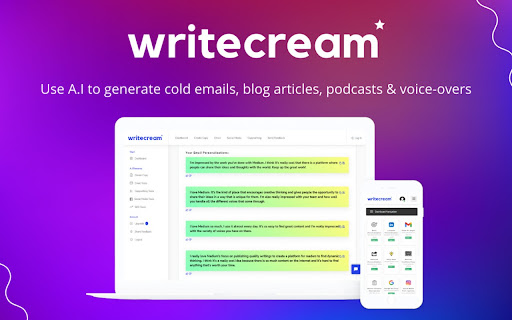


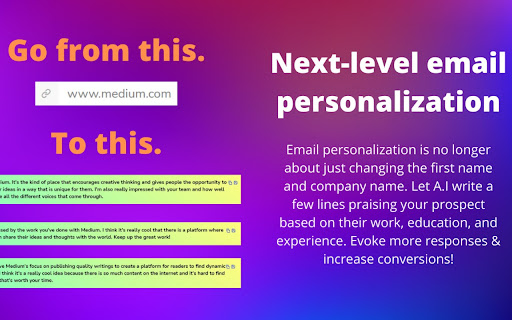
An A.I-powered app for generating blog articles, YouTube videos & podcasts in seconds. Writecream - Write all your content using AI. Key Features • Write blog articles • Write ad copies • Generate voiceovers • Write eCommerce product descriptions • 35+ writings tools inside the software to automate your life • Supports 70+ languages Writecream is your secret weapon for cold emails & marketing! We've got you covered! Writecream helps you automate your sales and marketing. Your prospect receives 100s of emails daily & their brains have adapted to ignore them. We've built Writecream to generate personalized, customized introductions that compel recipients to open, click, and respond. We scan your prospect's website or LinkedIn profile, gather the most important details, and write the coolest cold emails for you. Writecream can also generate blog posts, Facebook & Google ad copies, Landing Page Content, Product Descriptions, and even your next Angel Pitch email for angel funding! There are 40+ tools to choose from for an effective cold outreach & marketing campaign!

Qopywriter: AI-Powered Article Writer
AI content generator that writes for you! Create human-quality blog posts, SEO articles, news, press releases, and more in seconds. Create quality content in seconds using AI technology! Qopywriter generates unique, highly engaging articles on any topic. Qopywriter uses cutting edge algorithms to deliver fully automated and optimized SEO-friendly content. If you are looking for a new and efficient way to create high quality articles for your website or personal blog, Qopywriter can help! 1. Optimized for long-form writing: Qopywriter creates SEO-friendly content, from in-depth blog posts and press releases to sales copy and academic essays. Its flexible AI adapts to your business or personal needs, making it the ultimate content creation tool. 2. Human-like quality: Experience AI-generated content that feels natural and professional. Qopywriter’s advanced AI mimics human writing, ensuring your articles sound authentic and engaging while maintaining high quality. 3. Personalize your content creation: Simply instruct Qopywriter using natural language prompts, like “write a blog post about…” or “create an essay on…,” and watch as high-quality, tailored content is generated in moments. 4. Reach a global audience: Qopywriter supports multiple languages, allowing you to create content that resonates with readers worldwide. Who is Qopywriter for? Copywriters Write engaging content with the help of AI-powered copywriting tools. SEO Managers SEO article writing services can help you create and optimize high-quality content that search engines will love. Bloggers Your personal AI blog post generator makes it fast and easy to create the content you need, no matter what your niche is. College Students Write college papers and high-quality essays in seconds with our service. Journalists Get your readers' attention and create a first draft of your story automatically. Marketing Specialists AI copywriter software can automate your content marketing tasks, freeing up more of your time to focus on other aspects of the business. Writing articles is hard work. That's why our AI-powered content generator helps you create high-quality articles in your niche. Need more content for page optimization, blog posts or product description for e-commerce? With Qopywriter we make things easy for you!

WriteMe.ai - AI powered writing assistant
Prepare to witness the next big transformation in your writing experience on your favorite Browser, using WriteMe.Ai Google Chrome Extension. WriteMe.Ai’s Google Chrome Extension Features: We have got some amazing features in WriteMe.Ai Google Chrome Extension for a better, smoother and more streamlined writing experience using AI. Next Line Suggestions to incorporate fresh, new ideas in your text Built-in Grammar Checker to edit, polish and perfect your text Write Complete Article to create long form content in a jiffy Popular Use Cases to write unique content for certain use cases in minutes How to Setup WriteMe.Ai’s Google Chrome Extension: All you will need to do is: Download the WriteMe.Ai Google Chrome Extension Pin the WriteMe.Ai Google Chrome Extension to Your browser Launch the WriteMe.Ai Google Chrome Extension and Log In After Downloading Here are the next steps you need to follow to use WriteMe across all websites to use WriteMe.ai’s extension Step 1: Once you have successfully installed the extension, go to your extensions settings Pin WriteMe.Ai extension on your browser. Create a new document to start using WriteMe.Ai or go straight to the web app. You can also set your preferences for using WriteMe.Ai on different websites by going to the Extensions Settings page. Step 2: Move your cursor over the text and select any text between 30 to 300 characters length. WriteMe.Ai icon will appear under the highlighted text. Click on the WriteMe.Ai icon to open the toolbar (ribbon). Step 3: The ribbon will show you available actions you can take. Choose any option to get Next Line Suggestions, view Use Cases, use Grammar Tools, or Write Complete Article using WriteMe.Ai. Chrome Extension Launched Access 40+ use cases & templates Supports 30+ languages and 20+ tones Write sales & marketing emails that get replies Discover ideas & write engaging content for blog Generate creative, catchy copies for social media Write product, job, profile, video descriptions Generate interesting caption ideas for Instagram post In-built native plagiarism checker (powered by Copyscape) Workflow and team management features WriteMe Extension is now Draggable New “WriteMe” Button to get text answers for anything Now Data is copied auto on Click Using Append Function* Input Unlimited Text Utilize the capabilities of GPT-3.5 and GPT-4 now. Drag and Drop Extension: Take the extension anywhere with you! Drag and drop the extension anywhere on the page and continue making edits. Enjoy more writing freedom! "WriteMe" button can help you with emails, social media posts, ad copies, and more! You don't have to waste time searching for the right use case; just use the WriteMe option to get something written for you. Use the new WriteMe button to find text-based.

Inksprout - AI Social Media Writer
Compose a clear, trustworthy caption in social media link sharing with Inksprout's AI writing assistant. We'll seed your "create post" with the article summarization. You are free to edit the summarized text. Add a personal message. You will increase engagement with a clear description in your linked post. Provide value and gain more followers. Sharing your blog post has never been easier. Never miss the last opportunity to bring traffic to your site. Support schedulers such as Hootsuite, SocialBee, and Publer as well as native platforms like LinkedIn.

Ausum
Turn any article into a short audio summary, with just one click. Ausum is a free Chrome extension that turns every article into a short audio summary, with just one click. When you find an article you want to summarize, just click the Ausum icon and listen to the summary, instantly. * No Sign-Up Required: getting an audio summary is always a click away. * Avoid Ads: avoid all the distractions and annoying ads on the article, with a better, cleaner experience * Instant Smart Summaries: smart summarization technology ensures you get the most important, accurate highlights of any story. * Save Time: with audio, you’re free to do other tasks, listen while walking, or deep-diving the web. * Download Audio Summaries: all your articles so you could listen anytime, anywhere * Natural Voice: high-quality text-to-speech technology, for a natural listening experience. * Share: share summaries with others. Ausum turns text into lifelike speech. Users can automatically summarize any webpage into audio, as you browse. With just one click, Ausum generates a summary including the important ideas and facts of any long article, research report, document, essay into a downloadable recording you could take with you. Save time and read smarter, with audio. Next time you’re reading the news, science research journals, health reports, or sports analysis… Ausum will convert all your long text into a short-form audio summary so you can listen for the most important, accurate highlights. We are constantly optimizing and improving our text to audio summary extension, so if you see bugs or have suggestions to make Ausum better, please don't hesitate to provide feedback.
