
pdjneadbofcpgcamdgaenlehgjennbbi


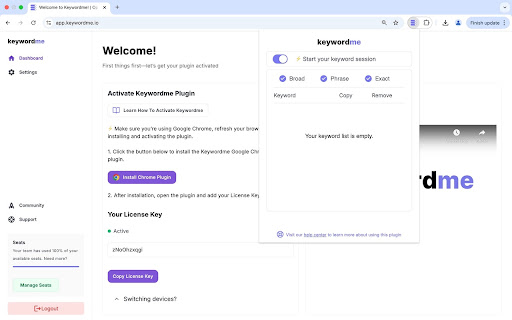


AI-powered tool to help you eliminate junk keywords, review search terms, build keyword lists, and apply match types fast. Keywordme is a Chrome extension built for people who manage Google Ads accounts. It works directly inside Google Ads and removes the slow, repetitive parts of keyword management, whether you prefer manual control or AI assistance. You can click through search terms manually and build lists in seconds. Or scale it with AI. Your workflow. Your control. Inside your Search Terms report, you can: • Click or highlight words to instantly build negative lists • Select multiple terms and format them in one action • Apply match types without copying into spreadsheets • Paste clean lists back into Google Ads immediately No exporting. No formatting. No retyping brackets and quotes. When you want deeper cleanup, upload your Search Terms report and let AI go line by line through your data. You review everything before copying or downloading. ✅ Built Into Your Real Workflow If you’re inside Google Ads every week, this matters. • You don’t want to scroll through 2,000 search terms manually • You don’t want to copy, paste, bracket, quote, repeat • You don’t want spreadsheets just to format match types • You don’t want keyword cleanup eating half your optimization time Keywordme gives you speed without losing control. Manual when you want it. AI when you need scale. If you manage Google Ads hands-on, Keywordme makes your workflow dramatically faster.

Keyword Hub
Stop Hitting a Wall with Keyword Ideas! Discover More Keywords, Faster. Tired of basic keyword tools that only scratch the surface? Need to truly understand what your audience is searching for and the questions they're asking? Keyword Hub is your streamlined extension for effortlessly uncovering unlimited "Related Keywords" and "People Also Ask" (PAA) questions directly from search engine insights. Perfect for content creators, SEO specialists, and marketers looking to: * 🔍 Endless Related Keyword Discovery: Enter your primary keyword and instantly unearth a vast stream of closely related terms and long-tail variations. Go deeper than ever before without limits! * ❓ Unlimited "People Also Ask" (PAA) Insights: Tap into the exact questions your audience is typing into Google. Uncover endless content ideas, FAQ topics, and gain a clearer understanding of user intent. * 💾 Simple & Quick Export: Found a goldmine of keywords? Easily export your discovered "Related Keywords" and "PAA" lists (e.g., to CSV/TXT) for further analysis or use in your content planning. ✨ Key Feature Highlights: * Truly Unlimited Exploration: No caps on how many related keywords or PAA questions you can reveal for your seed keyword. * Direct from Search Insights: Get keywords and questions that are actively being searched and suggested. * Focus on User Intent: Quickly grasp what users are curious about and the specific language they use. * Clean & Efficient Interface: No complicated settings. Just enter your keyword and start discovering. * One-Click Export: Save your valuable findings with ease. 💡 Why Choose Keyword Hub? * Generate Countless Content Ideas: Never run out of relevant topics for your blog, articles, or videos. * Deepen Your Topic Understanding: Explore every angle of your core keywords by seeing related queries and questions. * Save Time on Manual Research: Automate the tedious process of finding related searches and PAA questions. * Improve Your Content's Relevance: Align your content directly with what your audience is actively seeking. 👇 Install Keyword Hub for FREE today and supercharge your keyword brainstorming and content ideation!

Google Keyword Getter
Optimise Google Ads and Keyword Research with Google Keyword Getter! Effortlessly copy match-type keywords or full table data. Simplify Your Google Ads Workflow in Seconds! ✨ Unlock unparalleled efficiency in your Google Ads campaigns with Google Keyword Getter v3.2.1, the cutting-edge solution from Fatduck Marketing. This powerful Chrome extension revolutionises the way you manage and extract keywords, saving you time and effort while improving accuracy and productivity. Managing keywords in Google Ads can be a tedious process, especially when working with the Keyword Planner, Search Terms, or Keywords interfaces. Google Keyword Getter (GKG) makes this process effortless by allowing you to instantly copy keywords, tables, and metrics with a single click—no manual copying or tedious workflows required. Whether you’re a digital marketer, PPC specialist, or SEO professional, GKG is the ultimate companion for optimising your keyword research and campaign management. 🔑 Instant Keyword Copying Effortlessly copy keywords directly from Google Ads’ Keyword Planner, Search Terms, and Keywords views. Choose from Broad, Phrase, or Exact match types to suit your campaign needs. 📋 Seamless Table Export Need more than just keywords? GKG lets you copy entire tables, including keyword data and performance metrics, for in-depth analysis or report generation. ⚙️ Flexible Match Types Customise how you copy keywords with ease—select Broad, Phrase, or Exact match formats with just one click. 🖥️ Integrated User Interface The GKG interface appears automatically when viewing keywords in Google Ads, so you can stay focused without switching tools. 🚀 Optimised Performance Built with the latest web technologies, GKG v3.2.1 operates efficiently and won’t slow down your browser, ensuring a seamless experience. ✅ Enhanced Compatibility Now fully supports Google Ads’ Keyword Planner, Search Terms, and Keywords views for maximum versatility. ✅ Sleek UI Improvements A refined interface design that’s more intuitive and streamlined for quicker keyword management. ✅ Advanced Copy Options Export with precision using new options, like custom delimiters for table exports. ⚠️ To ensure all selected keywords are copied, scroll through the entire list after selecting “Select All.” This ensures all items are visible for GKG to process, as Google Ads loads content dynamically. Perfect For: 💼 Digital Marketers & PPC Specialists Save time on keyword research and focus on scaling campaigns. 📊 SEO Professionals Quickly extract keyword data for performance analysis and reporting. ✍️ Content Creators & Online Marketers Gain fast keyword insights to power your strategies. Experience effortless keyword management with Google Keyword Getter v3.2.1 by Fatduck Marketing. Simplify your workflow, extract data instantly, and spend more time strategising and less time copying. Install now and take your Google Ads campaigns to the next level! 🎉

gs location changer
change location for google search let's you choose your location in Google Search

Google Ads Match Type Helper™
Mass update the match type before adding keywords in Google Ads. Bulk-update match types on the keywords you add in Google Ads and now Microsoft Ads (Bing Ads). Google increasingly defaults new keywords to Broad match, whether you're adding new keywords, promoting matched search terms, or applying negatives. This slows down workflow and increases the chance of syntax errors. Microsoft Ads often defaults to Phrase match and has a cumbersome, multi-step selector to change the keyword match type. This extension brings back the bulk match type selector — and now works across Google Ads and Microsoft Ads. Follow these 4 steps: → Install our Match Type Helper Chrome extension. → Review matched search terms in Google Ads. → Choose your desired match type: exact, phrase, or broad. → Bulk change match types for all matched terms before adding. Google Ads ⦾ Adding Keywords from Insights and reports → Search terms ⦾ Adding Negative Keywords from Insights and reports → Search terms ⦾ Adding search keywords from Campaigns → Ad Groups ⦾ Adding Negative keywords from Campaigns → Ad Groups ░░░ Details: ░░░ Previously, Google Ads let you choose whether a new keyword should be "Exact," "Phrase," or "Broad" match directly when adding it from the matched search terms. Now, Google automatically sets new keywords as "Broad" match, and if you want "Exact" or "Phrase" match, you have to add extra symbols manually each time, which can be time-consuming and error-prone. Our Google Ads extension addresses this issue. It allows you to: → Choose the match type for each keyword individually when adding matched search terms. → Change the match type for all matched terms in bulk before adding them. This makes the process faster and reduces the likelihood of mistakes. Our extension works on your device and does not send your data to external servers or third parties. v1.0.13 • Minor bug fix to address multiple " and [ syntax which could occur v1.0.12 • Extension name change to better represent the broader capabilities recently added • Adjustments to improve activation of extension under different conditions v1.0.11 • Minor UI fixes • Changed extension activation method to address issue reported by some users v1.0.10 • Extended match type switcher from "matched terms" screens to core "add keyword/negative keyword" screens to enable quick match type switching everywhere • Revised UI with buttons for improved UX • Added links to Privacy Policy, Support Center, Reviews and Social Sharing
