
blpgcfdpnimjdojecbpagkllfnkajglp
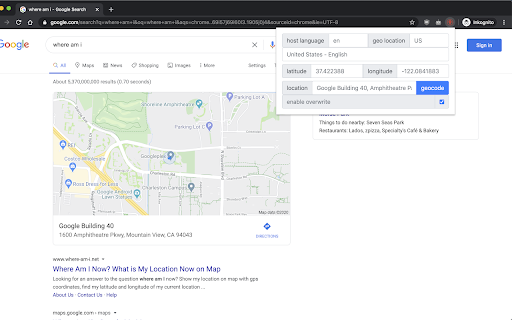
change location for google search let's you choose your location in Google Search

Change Geolocation (Location Guard)
Easily change your geographic location (Geolocation) to a desired one and protect your privacy. Change Geolocation (Location Guard) is a browser extension that let you easily change your geographic location to the desired value and protect your privacy. Simply open the addon's options page and set the latitude and longitude for where you want the geolocation to be (the default location is Greenwich, UK). Next, reload a page and check your location (i.e. webbrowsertools.com/geolocation/). Please note that besides latitude and longitude you can set other variables in the geolocation API (see options page). Moreover, pressing on the toolbar icon will activate or deactivate the addon. Note: toolbar button serves as an ON|OFF switch to activate and deactivate the addon. The green color is for ON and the grey color is for the OFF state. To report bugs, please fill out the bug report form on the addon's homepage (https://mybrowseraddon.com/change-geolocation.html).

Change My Location
Easily change your location to see search results in an other city, state, or country! Great for marketing research. Trying to do market research in other cities or states can be a challenge. By using this extension, you can modify your search results to show those from another area! Great for SEO or ads research.

SEO META in 1 CLICK
Displays all meta data and main SEO information for the best SEO SEO META in 1 CLICK is a tool that displays all meta tags/data and main seo information clearly. By using this tool, we hope you can better manage and improve your SEO and visibility on Internet We focus on displaying: ✔ title and its length, ✔ description and its length, ✔ URL (and meta-canonical url too), ✔ meta-robots, ✔ displaying headers in order of their appearance in HTML (H1, H2, H3, H4, H5 and H6), ✔ number of images with and without ALT, ✔ the number of links (internal, unique, ...) ✔ Open Graph and twitter social data ✔ Robots.txt and sitemap.xml ✔ and much more... (See printscreens) You can also via ETERNAL TOOLS analyse your site and know how improve it (html, css, Google Rich Snippet, PageSpeed...)

PlePer Local SEO Tools
Useful shortcuts and quick analyzes for Local SEO`s The extension offers collection of tools and shortcuts for Local SEO's. With this extension you get detailed information for every google my business listing in Maps, Local Finder, Knowledge panel and making four different analysis based on maps search results. Listing details returned by the extension: Name / Address / Phone / All Categories / Verification status / Attributes / Coordinates / All important Google ID’s (CID, Place ID, Knowledge Graph ID) / Export function / Pin function / Links to popular business directories, search engines, different website analysis tools (Speed Test / Mobile Friendly Test / Whois information / Domain backlink analysis etc ). For US listing direct link to corespondig Secretary of state business lookup website. Four different analyzes when searching in Maps: - Categories - top categories used, average categories per listing, max categories per listing; - Reviews - average rating and reviews, maximum/minimum rating and reviews, listings without reviews; - Attributes - all the attributes used; - Business Hours - when business are open and the average business hours; Pin function - the listing information on any website with keyboard combination (CTRL + ALT + E). Easiest way to compare / enter data anywhere. The chrome extension is plug and play - no settings or configuration needed! Instructions: 1. Install the extension 2. Open in new tab google maps 3. Make a search and you will see the analyses. 4. Select any listing from the results and you will see the details.
