
lejoknkbcogjceoniealiipllomkpioe
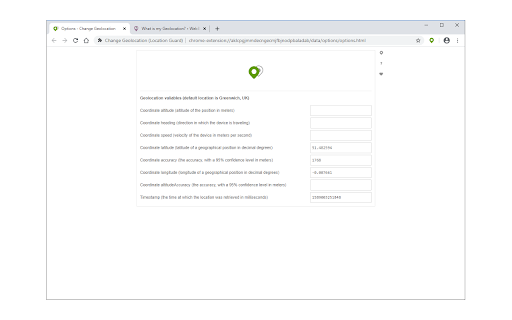

Easily change your geographic location (Geolocation) to a desired one and protect your privacy. Change Geolocation (Location Guard) is a browser extension that let you easily change your geographic location to the desired value and protect your privacy. Simply open the addon's options page and set the latitude and longitude for where you want the geolocation to be (the default location is Greenwich, UK). Next, reload a page and check your location (i.e. webbrowsertools.com/geolocation/). Please note that besides latitude and longitude you can set other variables in the geolocation API (see options page). Moreover, pressing on the toolbar icon will activate or deactivate the addon. Note: toolbar button serves as an ON|OFF switch to activate and deactivate the addon. The green color is for ON and the grey color is for the OFF state. To report bugs, please fill out the bug report form on the addon's homepage (https://mybrowseraddon.com/change-geolocation.html).

Cloaq - Location Guard & Locale Switcher
Spoof time zone, geolocation & locale. Match your location data to your VPN's IP address. Cloaq is a browser extension that spoofs your time zone, geolocation, and locale to any location you choose. It’s useful for testing websites in different regions, bypassing geo-restrictions, or matching your location data to your VPN IP address. Cloaq is free, open source, and collects no user data. Cloaq uses the chrome.debugger API to change data directly at the browser level, making it effective across all frames and web workers, unlike other extensions that rely on less reliable script injections. This approach ensures data modifications are undetectable and work consistently, even during the initial page load. Cloaq does not change your IP address. To change your IP address, you will need a VPN or proxy. While the extension is on, a notification bar becomes visible. Hiding the bar can be done by using the --silent-debugger-extension-api flag. Instructions on how to run chrome with flags: https://www.chromium.org/developers/how-tos/run-chromium-with-flags/ debugger: Enables the extension to attach to tabs and emulate user settings such as location, timezone, and locale. webNavigation: Enables the extension to attach the debugger to pages and monitor page transitions. storage: Enables the extension to store and retrieve settings and preferences.

Browser location simulator
Simulate browser location to another country or city all over the world. Simulate browser location to another country or city all over the world. You can reach me on LinkedIn or via email. https://www.linkedin.com/in/geotzinos/

Mark Location
Mark a location on a page and scroll to it. While reading a wall of text you might want to jump around the page and if there are no links, finding the parts you want to check often can be tedious. This add-on helps you in that goal by allowing you to bookmark those locations. In the new version (0.5.1) you can have permanent marks for pages. They will last until you clear them. This is now a default setting for new installs. Or you can change to have volatile marks that disappear if you refresh the page. You can configure your own key shortcuts (any won't work, for example shortcuts that Firefox uses) for marking and scrolling in the settings. Permanent marks use IndexedDB for saved images. So they might be deleted in some case. You might need to refresh page to update marks in some edge cases, as if you have the same page (exact URL) open in several tabs or if you switch between permanent and volatile marks. For usage, see a demo at https://www.youtube.com/watch?v=XsyrQENMXjg. * Add support for all supported protocols. * Add permanent marks feature. * Add number of marks to the browser action badge. * Localize the add-on.

Google Search Location Changer
This extension allows you to search Google by specific locations and languages. This extension allows you to change your location in Google search with ease. 🌍 The Google Search Location Changer extension empowers you to easily switch your browsing location on Google. It's your go-to solution when wondering how to change your location in Google search, providing a convenient method to explore results as if you were in different countries. Perfect for SEO professionals, digital marketers, researchers, and anyone curious about how search results differ by location. 📍 Google Location Change: Instantly adjust your browsing location. Choose from a plethora of countries and regions. Ever wondered, “Can I change my Google search location?” This tool is your answer. 🌐 Language Selection: Opt for your preferred language in multi-language countries, and experience localized Google search results accurately. Supported languages abound to refine your browsing. ⚡ Quick Location Buttons: Jump to popular locations like the USA 🇺🇸, UK 🇬🇧, and more with a click. Perfect for those who often ask, "How do I search Google from a different location?" 🛠️ Versatile Utility: Tailored for diverse needs. Whether it's for SEO, content localization, market research, or language learning, if you're pondering how to search Google from a different location, this extension is your solution. 🔗 Uninterrupted Integration: It integrates flawlessly with your Google search location experience, opening results in a new tab and keeping your default settings intact. Swap between locations seamlessly. 👍 User-Friendly: The intuitive design ensures even those unfamiliar with SERP location changer tools can navigate effortlessly. 🚀 Delve into location-specific searches and uncover insights into how results differ globally. Download the Google Search Location Changer now and experience localized browsing. ⚠️ Note: This only modifies your Google search location and not your real-world location, unless used with a VPN. 1️⃣ Download the Google Search Location Changer from the Chrome Web Store. 2️⃣ Locate the extension icon on your browser toolbar. 3️⃣ Click the icon to access the SERP location changer menu. 4️⃣ Select your desired country and language if applicable. 5️⃣ The extension will then alter your Google search location. 6️⃣ Execute your Google search, and the results will reflect your chosen location and language. 7️⃣ Want a different location? Click the icon and pick from the dropdown. 🌟 SEO and Other Benefits: 🔍 Localized SEO Analysis: Enables SEO pros to scrutinize results for various countries and languages 🌍. Select precise locations and languages for insights into trends, competition, and keywords. 📝 Content Localization: Essential for content creators. View results from your audience's viewpoint, aiding content adaptation, understanding preferences, and boosting localization. 📈 Market Research: Businesses can conduct in-depth research, evaluate keyword competitiveness, study local competitors, and discern user behaviors. 🗣️ Language Learning: Engage with search results in different languages, assisting in language proficiency and cultural comprehension. 🎯 Ad Testing: Digital marketers can preview results from diverse countries, assessing ad visibility and effectiveness. 👥 User Testing: View results as users do in various locations, evaluating visibility, rankings, and engagement. 🌍 The Google Location Changer equips users in multiple fields to simulate browsing from assorted locations. Dive into global results and obtain invaluable insights into the worldwide online environment. Adopt the tool today for the ultimate Google search location experience 🚀.
