
pcmopeooniljomkngcpdnijhdkimldpo


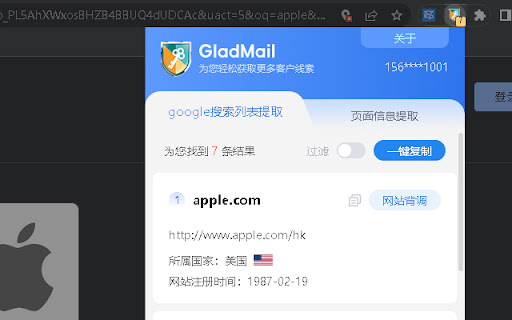
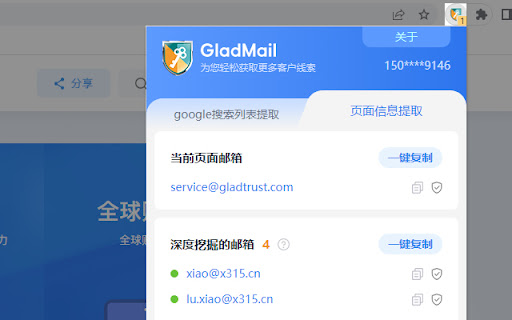
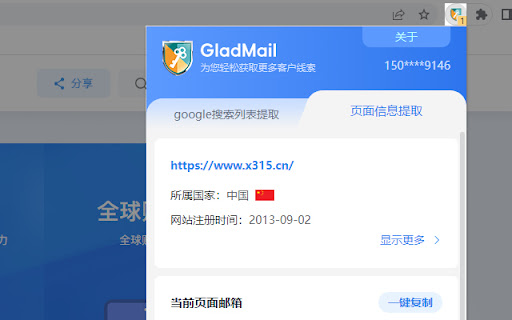
简单好用的网页邮箱获取工具,在任何网站上挖掘邮箱。快速提取谷歌搜索到的目标客户网站。 GladMail是一款用来获取潜在客户线索、方便查找邮箱地址的工具。 ☞插件可以做什么? ✓找邮箱 可以在任何网站上查找邮箱地址。点击GladMail插件图标,GladMail开始分析并采集您正在访问的页面,网站基础信息、当前页面邮箱和深度挖掘邮箱,支持一键复制所有邮箱。 ✓找客户 提取google(谷歌)搜索结果列表页的所有网站域名。 在谷歌搜索结果列表页,点击GladMail插件图标来提取所有网站域名,并可以过滤掉广告、社媒、商城等网站,一键复制全部网站域名,也可以一键进入格兰德数据库,批量自动匹配包括企业信息、联系人、邮箱等信息。帮你提高搜索质量,节省搜集信息时间,高效开发客户。 ✓数据导出 一键批量复制插件获取结果,更便捷的使用体验。 ☞哪些人在使用? 业务员、销售、营销、采购、soho、老板等都在使用。 ☞更多工具 全球市场分析、找客户、找邮箱、邮箱有效性验证、全球节假日查询、全球企业信用报告等日常工作所需工具。 利用工具高效获取客户邮箱、开发客户,是很多专业人士的选择。 GladMail插件是免费客户开发客户工具,创建账号即可立即使用https://www.x315.cn/ 希望与您共进步!

Hunter - Email Finder Extension
Find email addresses from anywhere on the web, with just one click. Hunter for Chrome lets you find immediately who to contact when you visit a website. The Domain Search is the most powerful email-finding tool of its kind. Click the icon in Chrome to find all the email addresses related to the website you’re visiting. It includes the most common email pattern used, department filters and the public sources. The email addresses are marked verified or returned with confidence scores. If an email address is not verified yet, you can do it by clicking the checkmark icon next to it. If you already know the name the person you would like to contact, type it in the search field. The Email Finder will return the found email address along with a confidence score and sources. If you're reading an article, Hunter's extension will look for the author's name and email address. Click the "+" next to a person to save this lead to a list. You can send email campaigns to your leads or save them to Salesforce, HubSpot, Pipedrive, Zoho and more than a hundred other CRMs and applications. Hunter (formerly Email Hunter) is used by salespeople, marketers, recruiters, bloggers, reporters and plenty of professionals who need to reach out. Hunter's email finder extension requires an account you can create immediately after the installation. You'll get 25 free searches/month and can upgrade your account for more. By installing the extension, you agree to Hunter's Privacy Policy (https://hunter.io/privacy-policy).

Easy Email Extractor
Free email extraction tool. Download any email address from the web with just one click. Effortlessly Capture Email Addresses for your marketing needs. Browse the web as normal, and have emails auto-saved. Key Features: Save Emails as you browse: We will scan the page you are on and make it easy for you to copy and download any emails we find. Fast and Lightweight: The extension is compact and designed for speed. User-Friendly: No intrusive ads or extra junk—just a clean and efficient tool. Cloaked Email Detection: Identify and extract hidden or cloaked email addresses. Local & Offline Support: Extract emails from local HTML documents and text files. Export Options: Export and download extracted emails to a text or CSV file for convenient use. Auto Save Emails: When enabled, we store all your extracted email addresses in the cloud for easy access and management. Subscription Sharing: Share your Premium subscription with friends, family or colleagues. Subscriptions can be shared with friends, family or colleagues. This extension is a cost-effective alternative to email extraction tools and services like Email Hunter, Voila Norbert, Clearbit Connect and more. Usage Note: If you navigate to a new tab or page, the extracted email addresses will be overwritten. To avoid losing data, switch back to the previous tab to export emails or enable the auto-saving feature (a paid feature). The extension only accesses email addresses and stores them locally. Support: For any issues, please contact us via hi@tryemailextractor.com. Informal Disclaimer: This extension is intended for personal use only. Please avoid using it for spamming or unsolicited marketing.

Email Finder - GetProspect
LinkedIn Email Finder – Look up emails for free. Find email address in seconds – free email finder. Search emails on website. Extract emails with GetProspect. Our plugin is the fast and easy-to-use LinkedIn email finder tool that helps to get accurate business email addresses in seconds. ✔ Email Finder It is the best solution to find email addresses of your connections for free or any people from LinkedIn search. With GetProspect Chrome extension you can easily find anyone’s email address and generate LinkedIn leads by clicking just one button in users’ profiles. - Easily search for email addresses of your 1st, 2nd and 3rd+ Linkedin connections; - Find business email addresses of any person from the basic LinkedIn or Sales Navigator search based on your specific search filters; - Save leads with emails in bulk from Sales Navigator lead lists or LinkedIn group members; - Get all the obtained email addresses verified for FREE. ✔ Bulk email finder Save hundreds or thousands of contacts at once with our batch email finder by clicking «Select all» → «Save prospects» in LinkedIn search, LinkedIn group members, or LinkedIn events attendees. Add the number of pages you want to save leads from. Our bulk email tool will automatically find and add their verified emails to your list. ✔ Email finder by name and by domain You can generate LinkedIn leads from basic search or with Sales Navigator. You just fill in your search criteria on LinkedIn, then extract hundreds of potential clients into a spreadsheet. You not only get an email address – but also other data from LinkedIn: - first and last name - position - location - summary - company name - industry - company website and address - LinkedIn profile URL ✔ Find email address by name with GetProspect email extractor extension This is how to search email by name in 2 minutes. To look up email addresses by name you enter the first and last names of the person of interest in a LinkedIn search. Go to their profile and click «Get email». The email and other information about the prospect will be saved to your GetProspect account. ✔ CRM contact management software All your saved leads from LinkedIn you will find in GetProspect contact management software. The web-based CRM allows you to: - group your leads in relevant folders; - segment your prospects with dynamic lists; - create custom filters; - cooperate with team members; - export your lists in the necessary format; - integrate GetProspect with Gmail or other sales tools. ✔ Our email finder is ideal for: - Sales teams - Founders and owners - Freelancers - Consultants - Project managers - Digital marketers - Email marketers - Growth marketers - Recruiters - Outbound marketers ✔ Main advantages GetProspect email extractor: - FREE monthly credits - Online human support - Email verification at no additional cost - Compatible with free LinkedIn, Sales Navigator and Recruiter - Pricing beginning with 49$/month - Exporting LinkedIn leads with the data in .csv or .xlsx - Saving numerous LinkedIn pages at once - Integrations with other services ✔ How to use the email address finder plugin? Step 1. Install the GetProspect email extractor Chrome extension. Step 2. Go to any LinkedIn profile and click on the «Get email» button. You will see the GetProspect banner indicating that the email is found and saved. Step 3. Or make a search on basic LinkedIn or Sales Navigator, click «Select all» → «Save prospects» and get multiple pages of leads with emails. ✔ FAQ 1. Can I use GetProspect email finder extension for free? Yes, email extractor plugin is free, but you can use it only in the Google Chrome browser for now. 2. How to find email addresses on LinkedIn? To find email with the GetProspect extension, open any LinkedIn profile and tap on the «Get email» button. The email will be automatically saved. If you want to save many emails, open the list of LinkedIn profiles in LinkedIn search, LinkedIn group, or LinkedIn events and click «Select all» → «Save prospects.» 3. Can I find email address owner with GetProspect? You can find email addresses owners in your GetProspect account with the enrichment feature. Go to the «Enrich» page, choose «Email lookup section», and enter the email of interest. 4. How can I use email extractor software for business? You can use the GetProspect extension to find emails of potential clients to reach them without reputation risks to your email account. 5. Can I extract emails from websites by GetProspect? Yes. Go to the tab with the website and click on the GetProspect icon among your extensions. You will see the panel and field to enter the name you want to find the email for. 6. Which payment methods can I use for GetProspect subscription? You can pay for the GetProspect subscription through the Fondy payment gate or BlueSnap payment gate. By default, our system offers to pay through Fondy. In case you are unable to pay by this method, try to use BlueSnap. 7. How to cancel my email finder subscription? Go to the Settings icon in your GetPropsect account. Choose the Price and billing section. In the Subscription tab, find your plan and click Cancel subscription. For any further questions about email finder, feel free to contact us support@getprospect.com

Find That Email - Unlimited Leads
Find Corporate Emails in a blink of an eye. The Email Finder tool to have in your arsenal. The most powerful email finder tool to generate a lot of leads. An easy way to find email by name. If you are "I like to find my leads within minutes" type of person, then today is your lucky day. Find corporate emails based on person's name and company website domain (firstname,lastname,findthatemail.io) anywhere in the world. Or use the corporate email to find the person's name for enriching your email lists which does not contain any name's yet. This is the fastest way to find emails associated to employees from a given company. If you are not able to find the specific person, try another employee's name and discover what the pattern is! How it works? All you have to do is open our extension and put in the search the persons name like: firstname,middlename,lastname,company.com (middlename is optional) OR if you wish to find the person's name associated with any given corporate email, simply type the email in the search field (joe@company.com) and it will be searched. And wait for the extension to find the associated email or person's name for you. PS: We can also help you find emails directly from LinkedIn profiles and even from the LinkedIn Company employees tab! Another easy and fast way to find emails. Try our Name2Email version to find that lead today with our email finder extension. Something that Skrapp or Prospeo doesn't or makes it very difficult like Aeroleads. Best for: Business owners - Sales Teams - SaaS Companies - Growth Hackers - Recruiters - Account Managers - Marketing Teams You can use the TRIAL version (limited data) to see how the tool works and decide to upgrade to our UNLIMITED access plan for a fair monthly subscription - cancel anytime you like, no questions asked with 30 Days Money Back Guarantee on your first purchase! Find That Email is designed to find corporate emails and cannot guarantee 100% results and in those cases it will show - (in orange) to indicate it was not found. TIP: You can always try another employee's email to see what the company wide used pattern is. If you are not satisfied with either FindThatLead or any other type of Email Finder extension like Hunter, give Find That Email a try today! Prospecting does not have to be difficult. DISCLAIMER: All data collected by the extension will not be stored locally on the computer where you install the extension. The extension will NOT attempt to offload, distribute, broadcast, sell or in any way share collected data. We designed Find That Email.io with the privacy of the user's data in mind.
