
jpoalllfeijciocphdlgckpklijpaehp

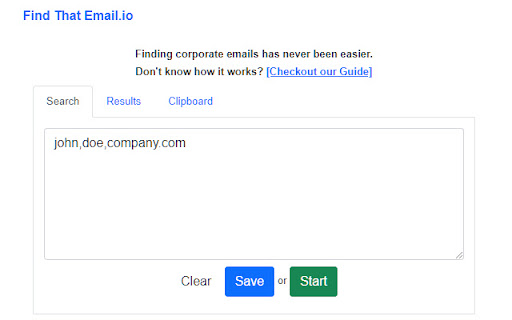
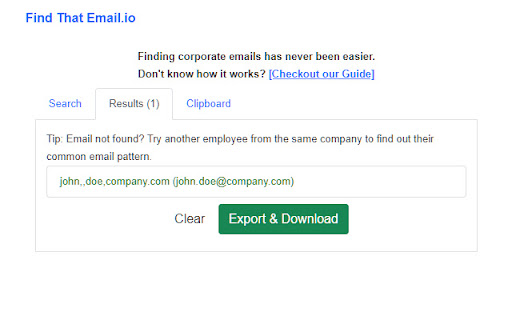
Find Corporate Emails in a blink of an eye. The Email Finder tool to have in your arsenal. The most powerful email finder tool to generate a lot of leads. An easy way to find email by name. If you are "I like to find my leads within minutes" type of person, then today is your lucky day. Find corporate emails based on person's name and company website domain (firstname,lastname,findthatemail.io) anywhere in the world. Or use the corporate email to find the person's name for enriching your email lists which does not contain any name's yet. This is the fastest way to find emails associated to employees from a given company. If you are not able to find the specific person, try another employee's name and discover what the pattern is! How it works? All you have to do is open our extension and put in the search the persons name like: firstname,middlename,lastname,company.com (middlename is optional) OR if you wish to find the person's name associated with any given corporate email, simply type the email in the search field (joe@company.com) and it will be searched. And wait for the extension to find the associated email or person's name for you. PS: We can also help you find emails directly from LinkedIn profiles and even from the LinkedIn Company employees tab! Another easy and fast way to find emails. Try our Name2Email version to find that lead today with our email finder extension. Something that Skrapp or Prospeo doesn't or makes it very difficult like Aeroleads. Best for: Business owners - Sales Teams - SaaS Companies - Growth Hackers - Recruiters - Account Managers - Marketing Teams You can use the TRIAL version (limited data) to see how the tool works and decide to upgrade to our UNLIMITED access plan for a fair monthly subscription - cancel anytime you like, no questions asked with 30 Days Money Back Guarantee on your first purchase! Find That Email is designed to find corporate emails and cannot guarantee 100% results and in those cases it will show - (in orange) to indicate it was not found. TIP: You can always try another employee's email to see what the company wide used pattern is. If you are not satisfied with either FindThatLead or any other type of Email Finder extension like Hunter, give Find That Email a try today! Prospecting does not have to be difficult. DISCLAIMER: All data collected by the extension will not be stored locally on the computer where you install the extension. The extension will NOT attempt to offload, distribute, broadcast, sell or in any way share collected data. We designed Find That Email.io with the privacy of the user's data in mind.

LI Prospect Finder
Find and collect verified leads from LinkedIn with a powerful Chrome extension. Fill your funnel with quality B2B contacts and boost sales using LI Prospect Finder, an intuitive and free LinkedIn email finder Chrome extension. Get started by installing and activating the extension to get email from LinkedIn for any prospect you’re targeting in seconds. Which LinkedIn pages can LI Prospect Finder extract leads from? You can use this extension to find emails on LinkedIn across profiles, search results, company pages, and attendee lists. Basically, everywhere you're already looking for prospects. What profile information will you gather with this LinkedIn email finder Chrome extension? Our LinkedIn email finder extension captures the following data points for every potential lead: First name Last name Full name Prospect’s social profile Job position Locality Company name Company URL Company’s social profile Company size Company locality Country State City Industry How can you save leads for your sales pipeline? Once you see a contact you’d like to get, simply activate LI Prospect Finder in your browser and save the email address along with other profile details straight into your chosen list. What do you get with our free LinkedIn email finder extension? ✓ Save hours by capturing complete prospect information from profiles, search pages, and attendee lists — individually or in bulk. ✓ Build accurate lead databases filled with verified, up-to-date email addresses. ✓ Keep contacts organized in the built-in CRM or export them to tools like HubSpot or Pipedrive in seconds. Before using our email finder extension for LinkedIn, please read and agree to the Privacy Policy: https://li-prospect-finder.com/privacy-policy LinkedIn email extension permissions 1."tabs" — is using the chrome.tabs API (getting bookmark links, creating new tabs with our link, reloading open pages of li-prospect-finder.com) 2."http://*/" — access to all sites to get page content (alternative to all_urls) 3."https://*/" — access to all sites to get page content (alternative to all_urls) 4."cookies" — session recovery via cookies from li-prospect-finder.com 5."notifications" — to show push notifications (completion of background tasks) 6."webRequest" — for automated information collection from web pages without direct opening of the pages by the user 7."contextMenus" — to create a new item 'Background tasks' in the context menu of the extension Sign up now for a free plan and get 50 credits every month! Hope you love LI Prospect Finder. Have feedback or found an issue? We are happy to hear from you—reach out via the website chat or email at help@lipf.store. Excited to see you on board with the best LinkedIn email finder extension 💜

Email Finder - GetProspect
LinkedIn Email Finder – Look up emails for free. Find email address in seconds – free email finder. Search emails on website. Extract emails with GetProspect. Our plugin is the fast and easy-to-use LinkedIn email finder tool that helps to get accurate business email addresses in seconds. ✔ Email Finder It is the best solution to find email addresses of your connections for free or any people from LinkedIn search. With GetProspect Chrome extension you can easily find anyone’s email address and generate LinkedIn leads by clicking just one button in users’ profiles. - Easily search for email addresses of your 1st, 2nd and 3rd+ Linkedin connections; - Find business email addresses of any person from the basic LinkedIn or Sales Navigator search based on your specific search filters; - Save leads with emails in bulk from Sales Navigator lead lists or LinkedIn group members; - Get all the obtained email addresses verified for FREE. ✔ Bulk email finder Save hundreds or thousands of contacts at once with our batch email finder by clicking «Select all» → «Save prospects» in LinkedIn search, LinkedIn group members, or LinkedIn events attendees. Add the number of pages you want to save leads from. Our bulk email tool will automatically find and add their verified emails to your list. ✔ Email finder by name and by domain You can generate LinkedIn leads from basic search or with Sales Navigator. You just fill in your search criteria on LinkedIn, then extract hundreds of potential clients into a spreadsheet. You not only get an email address – but also other data from LinkedIn: - first and last name - position - location - summary - company name - industry - company website and address - LinkedIn profile URL ✔ Find email address by name with GetProspect email extractor extension This is how to search email by name in 2 minutes. To look up email addresses by name you enter the first and last names of the person of interest in a LinkedIn search. Go to their profile and click «Get email». The email and other information about the prospect will be saved to your GetProspect account. ✔ CRM contact management software All your saved leads from LinkedIn you will find in GetProspect contact management software. The web-based CRM allows you to: - group your leads in relevant folders; - segment your prospects with dynamic lists; - create custom filters; - cooperate with team members; - export your lists in the necessary format; - integrate GetProspect with Gmail or other sales tools. ✔ Our email finder is ideal for: - Sales teams - Founders and owners - Freelancers - Consultants - Project managers - Digital marketers - Email marketers - Growth marketers - Recruiters - Outbound marketers ✔ Main advantages GetProspect email extractor: - FREE monthly credits - Online human support - Email verification at no additional cost - Compatible with free LinkedIn, Sales Navigator and Recruiter - Pricing beginning with 49$/month - Exporting LinkedIn leads with the data in .csv or .xlsx - Saving numerous LinkedIn pages at once - Integrations with other services ✔ How to use the email address finder plugin? Step 1. Install the GetProspect email extractor Chrome extension. Step 2. Go to any LinkedIn profile and click on the «Get email» button. You will see the GetProspect banner indicating that the email is found and saved. Step 3. Or make a search on basic LinkedIn or Sales Navigator, click «Select all» → «Save prospects» and get multiple pages of leads with emails. ✔ FAQ 1. Can I use GetProspect email finder extension for free? Yes, email extractor plugin is free, but you can use it only in the Google Chrome browser for now. 2. How to find email addresses on LinkedIn? To find email with the GetProspect extension, open any LinkedIn profile and tap on the «Get email» button. The email will be automatically saved. If you want to save many emails, open the list of LinkedIn profiles in LinkedIn search, LinkedIn group, or LinkedIn events and click «Select all» → «Save prospects.» 3. Can I find email address owner with GetProspect? You can find email addresses owners in your GetProspect account with the enrichment feature. Go to the «Enrich» page, choose «Email lookup section», and enter the email of interest. 4. How can I use email extractor software for business? You can use the GetProspect extension to find emails of potential clients to reach them without reputation risks to your email account. 5. Can I extract emails from websites by GetProspect? Yes. Go to the tab with the website and click on the GetProspect icon among your extensions. You will see the panel and field to enter the name you want to find the email for. 6. Which payment methods can I use for GetProspect subscription? You can pay for the GetProspect subscription through the Fondy payment gate or BlueSnap payment gate. By default, our system offers to pay through Fondy. In case you are unable to pay by this method, try to use BlueSnap. 7. How to cancel my email finder subscription? Go to the Settings icon in your GetPropsect account. Choose the Price and billing section. In the Subscription tab, find your plan and click Cancel subscription. For any further questions about email finder, feel free to contact us support@getprospect.com

Hunter - Email Finder Extension
Find email addresses from anywhere on the web, with just one click. Hunter for Chrome lets you find immediately who to contact when you visit a website. The Domain Search is the most powerful email-finding tool of its kind. Click the icon in Chrome to find all the email addresses related to the website you’re visiting. It includes the most common email pattern used, department filters and the public sources. The email addresses are marked verified or returned with confidence scores. If an email address is not verified yet, you can do it by clicking the checkmark icon next to it. If you already know the name the person you would like to contact, type it in the search field. The Email Finder will return the found email address along with a confidence score and sources. If you're reading an article, Hunter's extension will look for the author's name and email address. Click the "+" next to a person to save this lead to a list. You can send email campaigns to your leads or save them to Salesforce, HubSpot, Pipedrive, Zoho and more than a hundred other CRMs and applications. Hunter (formerly Email Hunter) is used by salespeople, marketers, recruiters, bloggers, reporters and plenty of professionals who need to reach out. Hunter's email finder extension requires an account you can create immediately after the installation. You'll get 25 free searches/month and can upgrade your account for more. By installing the extension, you agree to Hunter's Privacy Policy (https://hunter.io/privacy-policy).

RocketReach Chrome Extension
The RocketReach Extension helps you prospect on popular social media sites and discover company connections from any website. It's the perfect companion to RocketReach to speed up your workflow and improve your prospecting. WHY ROCKETREACH? - We are a top email finder and sales prospecting tool trusted by 13 million users - 300,000+ users have downloaded the extension - Works on popular social media sites and millions of company pages MOST ACCURATE RocketReach is the most accurate email finder, and it's easy to use. RocketReach will return emails and social links for at least 85% of your prospects. Emails are SMTP validated in real time to ensure maximum accuracy. MOST COMPLETE Our database contains more than 700 million profiles across 35 million companies, as well as billions of phone numbers and email addresses. If you're looking for a particular individual, or thousands of contacts meeting your criteria, RocketReach has the information you need.
