
hgmhmanijnjhaffoampdlllchpolkdnj

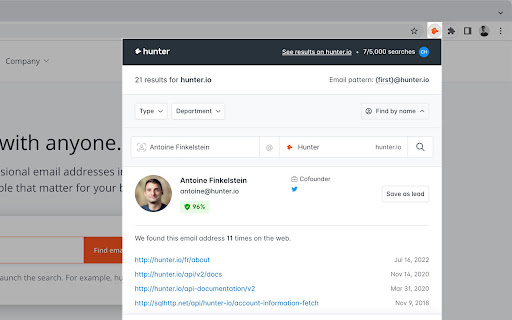
Find email addresses from anywhere on the web, with just one click. Hunter for Chrome lets you find immediately who to contact when you visit a website. The Domain Search is the most powerful email-finding tool of its kind. Click the icon in Chrome to find all the email addresses related to the website you’re visiting. It includes the most common email pattern used, department filters and the public sources. The email addresses are marked verified or returned with confidence scores. If an email address is not verified yet, you can do it by clicking the checkmark icon next to it. If you already know the name the person you would like to contact, type it in the search field. The Email Finder will return the found email address along with a confidence score and sources. If you're reading an article, Hunter's extension will look for the author's name and email address. Click the "+" next to a person to save this lead to a list. You can send email campaigns to your leads or save them to Salesforce, HubSpot, Pipedrive, Zoho and more than a hundred other CRMs and applications. Hunter (formerly Email Hunter) is used by salespeople, marketers, recruiters, bloggers, reporters and plenty of professionals who need to reach out. Hunter's email finder extension requires an account you can create immediately after the installation. You'll get 25 free searches/month and can upgrade your account for more. By installing the extension, you agree to Hunter's Privacy Policy (https://hunter.io/privacy-policy).

Discoverly
Find LinkedIn emails and reveal mutual connections across Gmail, Twitter, and Facebook to turn cold leads into warm introductions. Discoverly is the ultimate social intelligence and email-finding tool for professionals. Whether you are hunting for your dream job, sourcing top talent, or closing B2B sales, Discoverly gives you the complete picture of your prospect by instantly cross-referencing their social profiles. Find verified email addresses directly from LinkedIn, and uncover mutual connections across platforms to write personalized, high-converting outreach. 🚀 WHY CHOOSE DISCOVERLY? Most tools just give you an email. Discoverly gives you the conversation starter. By showing you mutual friends, recent tweets, and complete work histories right where you work, you can personalize your pitch and stand out in crowded inboxes. 📧 LinkedIn Email Finder: Instantly reveal contact information and email addresses directly from LinkedIn profiles. 📥 Supercharged Gmail: See your contacts' rich work histories and mutual connections from LinkedIn and Facebook without leaving your inbox. 👔 LinkedIn Context: See when you share mutual Facebook friends or recent Twitter/X activity with a LinkedIn connection to find common ground fast. 🐦 Twitter/X Intelligence: View a user’s LinkedIn professional info and mutual Facebook friends directly on their Twitter/X profile. 🎯 WHO IS THIS FOR? Sales Professionals & Founders: Personalize cold outreach, find decision-maker emails, and increase reply rates. Recruiters & Sourcers: Get a holistic view of candidates beyond their resumes and find their direct contact info. Job Seekers & Networkers: Map out mutual connections to get warm introductions to your dream companies. 🔒 PRIVACY & SUPPORT We are committed to keeping your data safe and your networking seamless. Need help or have feedback? We’d love to hear from you. ✉️ Email us directly at: yuri@discover.ly (Install Discoverly today and start networking smarter, not harder!)

Email Finder & Email Hunter
Help you get email data automatically, save time and focus on work. GMPlus-Email Extractor helps you get email data automatically, save time, and focus on work. During your web browsing, there's no need to spend time searching for email addresses. Utilize the GMPlus - Email Extractor to effortlessly extract email addresses from any web page. Maximize your efficiency and streamline your email outreach by taking advantage of these powerful resources today. Features: 💻Enter keywords to automatically search across Search Engine for relevant email leads. 📈Input up to 1000+ URLs to automatically find email leads on those sites. 💬 * Extracts emails from visited pages 📈 * Collect a list of the emails that you have viewed on the page 🔥 * Manage email leads in prospect 💻 *Download the list of emails in TXT or CSV format How it works: - Once the extension is installed, it automatically enables "Email Extraction" mode. - Collected emails are displayed in the browser toolbar. - The collected emails are presented in Prospect. - Click the "Download" button to obtain a list of extracted emails. ★ Top Audience 🤖 💰 Sales 👋 Marketers & Recruiters 🏫 Educators 💼 Bloggers&Reporters 🌱 Small Business and Entrepreneurs Speed through your repetitive tasks to get more done in the day. Personalize and get external messages 10X faster. More efficient than Email Hunter, Snov-Email Finder, Email Extractor Note: GMPlus-Email Extractor is an independent project that follows a freemium model and has no relationship to Gmail Inc.

Adapt - Find Emails On Websites
Find Emails On Social Networks and Websites Find work emails and phone numbers by clicking on the Adapt icon in Chrome’s address bar on any LinkedIn profile or website. - Get contacts from LinkedIn - Get company information across websites To enrich contacts in Salesforce, visit any contact / lead page and perform a right click ---> Get Email. # Features Get contact and company information of the person(s) behind a website: 1. Name 2. Job Title 3. Phone Number 4. Business Emails 5. Industry 6. Location 7. Revenue 8. Employee Count Add the contact and company data to your lead list and manage leads at our online Lead Builder. # Who is this for? - Sales professionals and lead generation teams - Recruiters, Human Resource Professionals - Business executives, Analysts, Consultants How to get started? * Create a free account at https://adapt.io * Add the free Adapt extension to your browser. * Visit any profile in LinkedIn. * Click on the Adapt icon from the address bar. * Get the contact and company information on your prospect. # Is it free? Yes, Adapt is absolutely free to use. You get 100 free business emails views/month and 10 free downloads/month. You can upgrade your account for more. You are just one click away from finding the right leads for your business for FREE! # Learn more about this extension https://www.adapt.io/blog/adapt-prospector-extension-2-0-is-here-get-contact-and-company-information-from-websites-and-social-networks/ # About Adapt Adapt provides the most accurate business emails for your sales and marketing efforts. Feel free to try our prospector. Already trusted users from leading companies like Amazon, Adobe, Intuit, Hubspot and Salesforce. For more information, please visit https://adapt.io Questions? Drop us a line at support@adapt.io

Email Finder for LinkedIn - LeadLeaper
LinkedIn email finder and leads engagement that significantly boosts your revenue $$$ Discover the ✔️verified business email address and phone number for any of over 900 million LinkedIn professionals worldwide LeadLeaper includes FREE monthly discovery credits, duplicate leads detection, a leads CRM and FREE leads email engagement When viewing LinkedIn profiles, LinkedIn searches or LinkedIn lists, employ LeadLeaper to discover VERIFIED business emails and phone numbers LeadLeaper supports both LinkedIn Premium and LinkedIn Sales Navigator with LinkedIn Sales Navigator the most popular with LeadLeaper users due to its advanced search filters and access to a larger network LeadLeaper does NOT modify the appearance or the functional behavior of your LinkedIn account LeadLeaper is employed daily by 1000s of startups to Fortune 500 companies such as NETFLIX, ZOOM, Amazon, Salesforce and Uber Creating a FREE LeadLeaper Account: After adding the LeadLeaper LinkedIn email finder extension, you will be asked to create a free LeadLeaper account by either "Signing In" employing your Google account (in which case Google manages your login including your password) or by creating a LeadLeaper login by providing a name (any name will do), a valid email address and a password
