
pcmgfhafhohdglihlglbibekcfnbpbfe
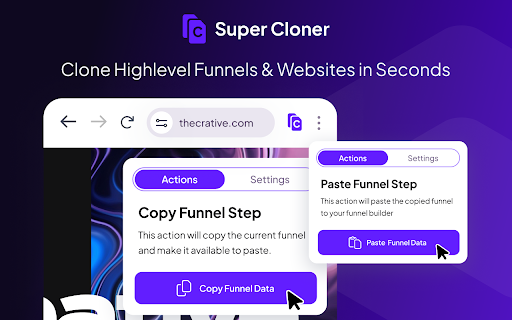
Quickly clone any GoHighLevel funnel or website page in one click. Spotted a GHL website or funnel design you love? Rebuilding it manually can take a funnel dev or VA anywhere from 4-8 hours and it still won't be exact. With Super Cloner, you can skip the heavy lifting and start customizing a pixel-perfect copy in seconds. Just copy, paste, and start tweaking the content and images to make it truly yours. It’s the ultimate shortcut to stunning funnels and websites, fast, easy, and stress-free!"

Link Grabber
An easy to use extractor or grabber for hyperlinks on an HTML page Extract links from an HTML page and display them in another tab. Permissions Required: Link Grabber requires permission to copy links to the clipboard. No other special permissions are required. Features: * No usage information / analytics are collected from you * Use either browser action button or context menu item to activate * Configurable list of blocked domains * Filter links by substring match * Copy links to clipboard * Show/hide links that appear more than once on the page * Show/hide links to the same origin as the source page * Group links by domain

Tiny URL Shortener
The Finest URL Shortening Service to convert long URLs or Links of websites to short. Simple Extension to convert long URLs or Links of websites to short or tiny ones. TOP Features: - Absolutely FREE - No sign-up or login required - Just one-click to get short URL - Auto-copy the short URL to clipboard - Sharing over social networks [Soon..] - Context Menu for direct links and selected text(auto-extract first link) - Notifications to sharing critical updates - All links are safely verified against adware, spyware, malware - Other features coming soon… For any issues, errors, bugs and enhancements, please contact us at - http://tiny.cc/exthelp

Super Drag for Google Chrome
Super Drag enables Google Chrome to easily search and open links just using drag & drop. Super Drag is an amazing extension for Chrome and Chromium-based browser users. It's an extremely enhanced feature for Chrome. With Super Drag, you can never be more easily open links or searches in one web page. Just hold on your left mouse button, performing a drag-n-drop, yeah, links open in the new tab. Default new tab opened in background tab, with SHIFT button holding on, drag-n-drop, your web page will be opened in an active state. The drag-to-search feature is also useful and friendly to use. Selecting the key words, then drag-n-drop the selection, it'll search them by your customized search engine. You can change the search engine by the extension popup settings. It's the minimal and simplest Chrome extension ever. Don't wait for any more, just try it right now. If you like it, please make an review 5 star, thank you! :P I create a Github project to track your requests and bugs: https://github.com/universeroc/super-drag/issues You can give me a reward if you find it helpful: https://github.com/universeroc/super-drag/blob/main/README.md add you.com Support drag direction recognition and using dedicated search engine to search keyword * 0.4.2 * update settings ui fix some warnings add installation & issues page to collect information * 0.3.2 * fix open more than one link/search page after 0.3.1 upgrade * 0.3.1 * fix drag file into page * 0.1.30 * fix conflicts with Gmail or others input even handler * 0.0.30 * * Add DuckDuckGo in the search engine list * Add domain whitelist * 0.0.24 * * Add toggle button to enable/disable on current page :) * 0.0.22 * * Fix bug: Not work until setting page opened :(. * 0.0.18 * * Fix undefined search queries with more lines selected. * 0.0.17 * * Fix bad tab index opened with multi-browser window

URL Shortener Plus
One Click URL Shortener. Create links with Bitly, TinyUrl, is.gd, to.ly or goo.gl. QR Code, fast copy paste for Google Chrome. ★★★★★ The best way to create a short urls 📌 using Bitly, Rebrandly, TinyUrl, is.gd and to.ly, and more 🚨 Want to quickly shorten a url in one click? Then this is the extension for you 👑 Just click the extension to shorten the current page URL or by right clicking on any link 😍 Shorten the page/selected URL (TinyURL) 🔎 Shortern URL using tinyurl.com services 💣 FEATURES ★ Easily shorten any link ⚡ ★ Automatically copies url to clipboard 🚀 ★ Right click to shorten url and copy to clipboard 🚧 ✔ Limited permissions 🤓 ✔ Generate QR code 📷 ✔ HTTPS for maximum security 🔑 No share of credentials to third party 🔓 💎 Building Apps and Extensions for Google Chrome and Android 🔥📣 📔 Available on the product page: https://jitt.wwevents.fun/project/url-shortener-plus/#changelog By installing this product you agree to our privacy policy & terms of service: https://jitt.wwevents.fun/privacy-policy/ You may consult the list of permissions and the reason why they are required on the product page: https://jitt.wwevents.fun/project/url-shortener-plus/#permissions “notifications” – Used to send desktop notification. For example when a new message arrive or App is updated. “contextMenus” – Allow to add more settings when right click in the App icon in the browser toolbar and browser context menu. “storage” – Used to save settings on your local computer. “system.display” – Used to detect the display size and position the Extension window. “unlimitedStorage” – Storage is limited to 5MB of data that may not be enough to store all configs. “host_permissions” – Permission to access to some hosts/domains that we must modify in order to provide the desired functionality detailed in the functionality. It also allows that you can share content (links or text) from other pages directly to inside the App and send it as a SMS/Android message to a friend for example. Also used to allow intercommunication with other WWEvents Apps (i.e. Emojis). “activeTab” – Permission to access the window that the extension is running and is show to the user. “tabs” - Used when the App is not in Popup mode to read the page URL in order to shorten it. “all_urls” – We cannot predict ahead of time witch hosts/domains the user want to shorten. The extension is capable to shorten any link/url/domain. This information is also available inside the App: Options -> About
