
ghkafclcjholabkaldcjpcojoegcfdcl

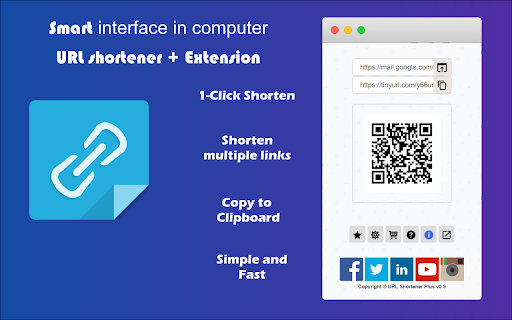
One Click URL Shortener. Create links with Bitly, TinyUrl, is.gd, to.ly or goo.gl. QR Code, fast copy paste for Google Chrome. ★★★★★ The best way to create a short urls 📌 using Bitly, Rebrandly, TinyUrl, is.gd and to.ly, and more 🚨 Want to quickly shorten a url in one click? Then this is the extension for you 👑 Just click the extension to shorten the current page URL or by right clicking on any link 😍 Shorten the page/selected URL (TinyURL) 🔎 Shortern URL using tinyurl.com services 💣 FEATURES ★ Easily shorten any link ⚡ ★ Automatically copies url to clipboard 🚀 ★ Right click to shorten url and copy to clipboard 🚧 ✔ Limited permissions 🤓 ✔ Generate QR code 📷 ✔ HTTPS for maximum security 🔑 No share of credentials to third party 🔓 💎 Building Apps and Extensions for Google Chrome and Android 🔥📣 📔 Available on the product page: https://jitt.wwevents.fun/project/url-shortener-plus/#changelog By installing this product you agree to our privacy policy & terms of service: https://jitt.wwevents.fun/privacy-policy/ You may consult the list of permissions and the reason why they are required on the product page: https://jitt.wwevents.fun/project/url-shortener-plus/#permissions “notifications” – Used to send desktop notification. For example when a new message arrive or App is updated. “contextMenus” – Allow to add more settings when right click in the App icon in the browser toolbar and browser context menu. “storage” – Used to save settings on your local computer. “system.display” – Used to detect the display size and position the Extension window. “unlimitedStorage” – Storage is limited to 5MB of data that may not be enough to store all configs. “host_permissions” – Permission to access to some hosts/domains that we must modify in order to provide the desired functionality detailed in the functionality. It also allows that you can share content (links or text) from other pages directly to inside the App and send it as a SMS/Android message to a friend for example. Also used to allow intercommunication with other WWEvents Apps (i.e. Emojis). “activeTab” – Permission to access the window that the extension is running and is show to the user. “tabs” - Used when the App is not in Popup mode to read the page URL in order to shorten it. “all_urls” – We cannot predict ahead of time witch hosts/domains the user want to shorten. The extension is capable to shorten any link/url/domain. This information is also available inside the App: Options -> About

Easy for X
Ex Twitter, now X for Chrome. A low profile and compact client with full X - Twitter features. Mobile interface now on X ★★★★★ Access to many Artificial Intelligence Apps and many more in a single Sidebar like OpenAI ChatGPT, Microsoft Bing AI or Google Bard 😱 See this link for a full list: https://jitt.wwevents.fun/project/multi-ai-sidebar/ 🚧 This Multi AI Sidebar allows to fast switch between all the AI Apps 🚨 You can enable/disable the AI Apps that you want to be active 🔥 Explore the amazing possibilities of AI, such as generating text, images, music, code and more in real time 🏆 Non-intrusive, by showing the number of active AI Apps in the Sidebar icon on the Browser Toolbar 🥊 FEATURES ★ Sidebar shows as a slide-out panel and runs the web versions of the available AI Apps meaning less CPU/RAM/Internet consumption 👑 ★ Your computer will run faster with more resources available without having to sacrifice functionality. ★ Choose your preferred AI App from a wide number of available options 😍 ★ Combine all the cutting-edge AI Apps into one simple panel! ★ Multi AI Sidebar is a wrapper for worldwide AI Apps. It allows you to have access to the official services quickly from a standalone sandboxed panel 🔥 ✔ Best extension for Artificial Intelligence 🔧 You can fast-switch between all AI Apps 🎓 ✔ Clean and simple interface 💻 ✔ Very Low CPU/RAM/Bandwidth consumption. ✔ HTTPS and on official platforms for maximum security 🔑 No share of credentials to third party 🔓 💎 Building Apps and Extensions for Google Chrome and Android 🔥📣 📔 Available on the product page: https://jitt.wwevents.fun/project/multi-ai-sidebar/#changelog Multi AI Sidebar is a trademark of WWEvents. All websites are a trademark of their own company's, registered in the U.S. and other countries. This is an independent project developed by WWEvents and has no relationship to them. By installing this product you agree to our privacy policy & terms of service: https://jitt.wwevents.fun/privacy-policy/ You may consult the list of permissions and the reason why they are required on the product page: https://jitt.wwevents.fun/project/multi-ai-sidebar/#permissions “notifications” – Used to send desktop notification. For example when a new message arrive or App is updated. “contextMenus” – Allow to add more settings when right click in the App icon in the browser toolbar and browser context menu. “storage” – Used to save settings on your local computer. “scripting” – Used to be able to insert JS or CSS on the required host/domains. “system.display” – Used to detect the display size and position the Extension window. “unlimitedStorage” – Storage is limited to 5MB of data that may not be enough to store all configs. “host_permissions” – Permission to access to some hosts/domains that we must modify in order to provide the desired functionality detailed in the functionality. It also allows that you can share content (links or text) from other pages directly to inside the App and send it as a SMS/Android message to a friend for example. Also used to allow intercommunication with other Apps (i.e. Emojis). “activeTab” – Permission to access the window that the extension is running and is show to the user. “all_urls” – Permission required for users be able to take screenshots of the current window – captureVisibleTab. “declarativeNetRequestWithHostAccess” - Used to get the iframe version of the websites. Only impact the Extension Window. “declarativeNetRequestFeedback” - Used to get the iframe version of the website by changing the iframe requests. “alarms” - Used to update App icon badge. This information is also available inside the App: Options -> About

Url Shortener
Generate short links for the current page. Introducing the free and user-friendly URL shortener that allows you to create short links with just one click! With the T.MR Chrome extension, you can generate short links within seconds, directly from the webpages you visit. Experience the ultimate convenience of creating short links using wz.my ov.cm zo.cm, and more! The T.MR URL Shortener Extension provides the perfect solution for those seeking a quick and effortless way to shorten URLs. Key features of the Rebrandly URL Shortener include: - Forever FREE (No sign-up or login required) - Instantly shorten any link with a single click. - Track link clicks to monitor engagement. - Personalize short URLs with relevant keywords. With just one click, this extension instantly shortens any URL using the popular URL Shortener service. No need to open a new tab or navigate away from your current page - simply click the extension icon, and your shortened link will be automatically copied to your clipboard for easy sharing.

URL Shortener - TinyURL Extension
Shorten URLs with ease. The only URL Shortener Extension that doesn't open a popup. Clicking the Extension Icon is all you need to do to shorten and copy the current URL, with no extra clutter to distract you from your browsing. The same functionality is added to Chrome's Context menu for links, right-clicking a link gives you the option to shorten and copy the clicked link with just one click. An 'OK' or 'ERR' badge is displayed on the Extension Icon to notify the user about a successful shortening and that the shortened URL is now copied to the user's clipboard, or to notify the user of an error. This extension uses TinyURL's URL Shortener Service to shorten the URLs. This extension does not store user data at any point. The current URL (or the URL from the clicked link) is the only thing that gets sent to the TinyURL API. The original URL or the shortened URL is not stored by this extension.

Work Hub for Teams
Manage your team on this low profile client for Microsoft Teams. Meetings, calls, video available on mobile looking App. ★★★★★ Access directly to Microsoft Teams platform in a standalone compact view 📱 Very Low CPU/RAM/Bandwidth consumption 📌 An easy-to-use and lite app 😇 Is the easiest way to open and use cloud meetings your desktop machine (PC, MAC or Linux) 📺 Clicking on the toolbar button, renders Teams in a standalone UI. The window is re-sizable to your desired choice and all the changes are auto saved to the memory 🔩🏅 This is a lite Addon and does not add any additional burden to your browser 🎯 The popup has a built-in "Always-On-Top" and Sidebar that enables you to do multi-tasking 🦇 FEATURES ★ Cloud Team work collaboration 🚨 ★ Cloud video conferencing with video, audio and screen-sharing. ★ Basic Web Interface with maximum savings of your computer CPU/RAM and Bandwidth 💣 ✔ Auto-Start when browser starts 💻 ✔ Organiza meetings anywhere 🔥 ✔ Audio alerts 🔔 ✔ Back/forward buttons for fast switching ✅ ✔ Refresh button to force self-actualization 😱 ✔ Configurations in a Options 🔧 section. ✔ Compact client interface much easier to work 😍 ✔ HTTPS and over Teams platform for maximum security 🔑 No share of credentials to third party 🔓 💎 Building Apps and Extensions for Google Chrome and Android 🔥📣 📔 Available on the product page: https://jitt.wwevents.fun/project/work-hub-for-teams/#changelog Teams is a trademark of Microsoft Inc., registered in the U.S. and other countries. This is an independent project developed by WWEvents and has no relationship to Teams or Microsoft Inc. By installing this product you agree to our privacy policy & terms of service: https://jitt.wwevents.fun/privacy-policy/ You may consult the list of permissions and the reason why they are required on the product page: https://jitt.wwevents.fun/project/work-hub-for-teams/#permissions “notifications” – Used to send desktop notification. For example when a new message arrive or App is updated. “contextMenus” – Allow to add more settings when right click in the App icon in the browser toolbar and browser context menu. “storage” – Used to save settings on your local computer. “scripting” – Used to be able to insert JS or CSS on the required host/domains. “system.display” – Used to detect the display size and position the Extension window. “unlimitedStorage” – Storage is limited to 5MB of data that may not be enough to store all configs. “host_permissions” – Permission to access to some hosts/domains that we must modify in order to provide the desired functionality detailed in the functionality. It also allows that you can share content (links or text) from other pages directly to inside the App and send it as a Chat to a friend for example. Also used to allow intercommunication with other WWEvents Apps (i.e. Emojis). “activeTab” – Permission to access the window that the extension is running and is show to the user. “all_urls” – Permission required for users be able to take screenshots of the current window – captureVisibleTab. This information is also available inside the App: Options -> About
