
dahcpdmnbfoceimaadohmmbgjdjmfiba

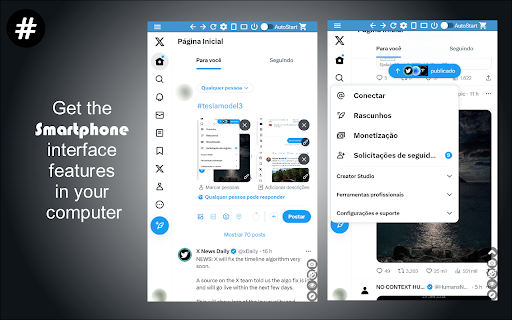
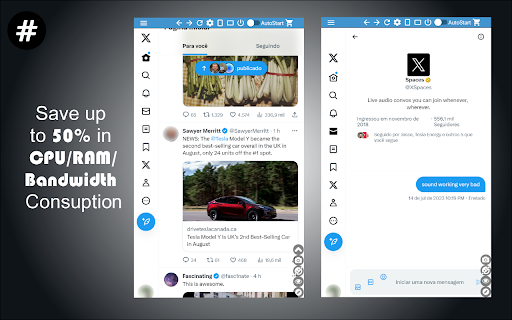

Ex Twitter, now X for Chrome. A low profile and compact client with full X - Twitter features. Mobile interface now on X ★★★★★ Access to many Artificial Intelligence Apps and many more in a single Sidebar like OpenAI ChatGPT, Microsoft Bing AI or Google Bard 😱 See this link for a full list: https://jitt.wwevents.fun/project/multi-ai-sidebar/ 🚧 This Multi AI Sidebar allows to fast switch between all the AI Apps 🚨 You can enable/disable the AI Apps that you want to be active 🔥 Explore the amazing possibilities of AI, such as generating text, images, music, code and more in real time 🏆 Non-intrusive, by showing the number of active AI Apps in the Sidebar icon on the Browser Toolbar 🥊 FEATURES ★ Sidebar shows as a slide-out panel and runs the web versions of the available AI Apps meaning less CPU/RAM/Internet consumption 👑 ★ Your computer will run faster with more resources available without having to sacrifice functionality. ★ Choose your preferred AI App from a wide number of available options 😍 ★ Combine all the cutting-edge AI Apps into one simple panel! ★ Multi AI Sidebar is a wrapper for worldwide AI Apps. It allows you to have access to the official services quickly from a standalone sandboxed panel 🔥 ✔ Best extension for Artificial Intelligence 🔧 You can fast-switch between all AI Apps 🎓 ✔ Clean and simple interface 💻 ✔ Very Low CPU/RAM/Bandwidth consumption. ✔ HTTPS and on official platforms for maximum security 🔑 No share of credentials to third party 🔓 💎 Building Apps and Extensions for Google Chrome and Android 🔥📣 📔 Available on the product page: https://jitt.wwevents.fun/project/multi-ai-sidebar/#changelog Multi AI Sidebar is a trademark of WWEvents. All websites are a trademark of their own company's, registered in the U.S. and other countries. This is an independent project developed by WWEvents and has no relationship to them. By installing this product you agree to our privacy policy & terms of service: https://jitt.wwevents.fun/privacy-policy/ You may consult the list of permissions and the reason why they are required on the product page: https://jitt.wwevents.fun/project/multi-ai-sidebar/#permissions “notifications” – Used to send desktop notification. For example when a new message arrive or App is updated. “contextMenus” – Allow to add more settings when right click in the App icon in the browser toolbar and browser context menu. “storage” – Used to save settings on your local computer. “scripting” – Used to be able to insert JS or CSS on the required host/domains. “system.display” – Used to detect the display size and position the Extension window. “unlimitedStorage” – Storage is limited to 5MB of data that may not be enough to store all configs. “host_permissions” – Permission to access to some hosts/domains that we must modify in order to provide the desired functionality detailed in the functionality. It also allows that you can share content (links or text) from other pages directly to inside the App and send it as a SMS/Android message to a friend for example. Also used to allow intercommunication with other Apps (i.e. Emojis). “activeTab” – Permission to access the window that the extension is running and is show to the user. “all_urls” – Permission required for users be able to take screenshots of the current window – captureVisibleTab. “declarativeNetRequestWithHostAccess” - Used to get the iframe version of the websites. Only impact the Extension Window. “declarativeNetRequestFeedback” - Used to get the iframe version of the website by changing the iframe requests. “alarms” - Used to update App icon badge. This information is also available inside the App: Options -> About

Drumpfinator Extreme Edition
Find and replace all instances of some word/name by another. Search Browser online tool for Chrome. Based on Trump blocker/filter. ★★★★★ Have fun and change any instance of any word for other at your choice. When you navigate 📰 on your browser we will see the difference :) For example, change the word "windows" by "linux" and when you navigate on the Browser 🔎 you will notice that word changed for the chosen one. FEATURES ✔ Fully customizable 🔨 ✔ Change up to 10 different words/names. ✔ save 💾 and test each word/name one by one. ✔ Save 💾 all changes in one click. ✔ Clean and simple interface. 💎 Building Apps and Extensions for Google Chrome and Android 🔥📣 📔 Available on the product page: https://jitt.wwevents.fun/project/drumpfinator-extreme-edition/#changelog By installing this product you agree to our privacy policy & terms of service: https://jitt.wwevents.fun/privacy-policy/ You may consult the list of permissions and the reason why they are required on the product page: https://jitt.wwevents.fun/project/drumpfinator-extreme-edition/#permissions “notifications” – Used to send desktop notification. For example when a new message arrive or App is updated. “contextMenus” – Allow to add more settings when right click in the App icon in the browser toolbar and browser context menu. “storage” – Used to save settings on your local computer. “unlimitedStorage” – Storage is limited to 5MB of data that may not be enough to store all configs. “host_permissions” – Permission to access to some hosts/domains that we must modify in order to provide the desired functionality detailed in the functionality. It also allows that you can share content (links or text) from other pages directly to inside the App and send it as a SMS/Android message to a friend for example. Also used to allow intercommunication with other WWEvents Apps (i.e. Emojis). “activeTab” – Permission to access the window that the extension is running and is show to the user. “all_urls” – We must access to all urls in order that when you enter on some webpage and it match a word you defined it gets replaced by another. This information is also available inside the App: Options -> About

Tweetlio X: Twitter Companion
Tweetlio Explore: Elevate Twitter engagement with curated content, trusted by 30,000+ users for a productive social experience. Streamline your Twitter experience and uncover the most impactful content with Tweetlio Explore. This browser extension redefines Twitter engagement by curating top-performing tweets and optimizing your browsing for meaningful interactions. Tweetlio Explore is your essential Twitter companion, seamlessly integrating to guide you towards discovering influential tweets and fostering meaningful connections. ✅ Trending Highlights: Access the most engaging tweets from your timeline effortlessly. ✅ Showcase Insights: Explore the top-performing tweets of any user for research or inspiration. ✅ Conversational Insights: Review past tweets and replies within specific conversations. ✅ Quoted Perspectives: Track public sentiment and reactions to tweets. ✅ Enhanced Search: Simplify Twitter searches with intuitive shortcuts and optimizations for a seamless experience. 💟 AI-driven Enhancements (Exclusive for Subscribers): Gain access to AI-powered insights on viral tweets and an AI writing assistant, enriching your Tweetlio Explore experience. Tweetlio X Trusted by over 50,000 individuals for a purpose-driven and productive approach to Twitter engagement.

Companion for Reddit
Redditor best friend. Enhancement Suite and Sidebar for Reddit and Subreddit. Lite, Mini and Light version for Chrome. ★★★★★ This a cleaner version of Reddit™ ❤ You have full access to all news and profiles but in a minimalist interface 📌 for fast access 💡 A suite of modules that enhance your Reddit browsing experience 💎 This extension will save you some time if you are about to repost a link. Also this extension is a quick way to check for reddit's comments on a blog or article 👔 Experience reddit with new modern list and grid view interfaces that focus on bringing the content to you 🥇 FEATURES ★ Small window well positioned 😱 ★ It works on all Subreddits and the Frontpage 🚀 ★ Most similar to original Reddit, but with modern feel 😍 ★ Infinite loading 📱 ★ Layout type is saved per subreddit 💾 ✔ Auto-Start Reddit™ when Google Chrome™ starts 💻 ✔ Configurations in a Options 🔧 section. ✔ See your friends news and edit your profile 📣 ✔ Very Low CPU/RAM/Bandwidth consumption 🔋 ✔ HTTPS and over Reddit™ platform for maximum security 🔑 No share of credentials to third party 🔓 💎 Building Apps and Extensions for Google Chrome and Android 🔥📣 📔 Available on the product page: https://jitt.wwevents.fun/project/companion-for-reddit/#changelog Reddit™ is a trademark of Reddit Inc., registered in the U.S. and other countries. This is an independent project developed by WWEvents and has no relationship to Reddit™ or Reddit Inc. By installing this product you agree to our privacy policy & terms of service: https://jitt.wwevents.fun/privacy-policy/ You may consult the list of permissions and the reason why they are required on the product page: https://jitt.wwevents.fun/project/companion-for-reddit/#permissions “notifications” – Used to send desktop notification. For example when a new message arrive or App is updated. “contextMenus” – Allow to add more settings when right click in the App icon in the browser toolbar and browser context menu. “storage” – Used to save settings on your local computer. “scripting” – Used to be able to insert JS or CSS on the required host/domains. “system.display” – Used to detect the display size and position the Extension window. “unlimitedStorage” – Storage is limited to 5MB of data that may not be enough to store all configs. “host_permissions” – Permission to access to some hosts/domains that we must modify in order to provide the desired functionality detailed in the functionality. It also allows that you can share content (links or text) from other pages directly to inside the App and send it as a SMS/Android message to a friend for example. Also used to allow intercommunication with other WWEvents Apps (i.e. Emojis). “activeTab” – Permission to access the window that the extension is running and is show to the user. “all_urls” – Permission required for users be able to take screenshots of the current window – captureVisibleTab. This information is also available inside the App: Options -> About

Multi AI Sidebar
Access to all AI apps like OpenAI ChatGPT, Bing AI, Microsoft Copilot, Google Gemini and more in a single Sidebar. Get the best AI. ★★★★★ Access to many Artificial Intelligence Apps and many more in a single Sidebar with OpenAI ChatGPT, Microsoft Bing AI - Copilot or Google Gemini - Bard, xAI Grok, Anthropic Claude 😱 See this link for a full list: https://jitt.wwevents.fun/project/multi-ai-sidebar/ 🚧 This Multi AI Sidebar allows to fast switch between all the AI Apps 🚨 You can enable/disable the AI Apps that you want to be active 🔥 Explore the amazing possibilities of AI, such as generating text, images, music, code and more in real time 🏆 Non-intrusive, by showing the number of active AI Apps in the Sidebar icon on the Browser Toolbar 🥊 FEATURES ★ ChatGPT: Allow to chat with the lastest GPT iteration from OpenAI. ★ Microsoft Copilot: Copilot and Bing AI have can read text and files and provide real-time web serach and information. ★ Google Gemini: Chat with the latest AI from Google that was upgraded from Google Bard to Gemini Nano, Gemini Pro, and Gemini Ultra. ★ xAI Grok: Check the latest AI for X, called Grok. Developed by xAI. It's one of the most advanced in the world. ★ Anthropic Claude: Now available the latest Claude LLM, give it a try! ★ For image and video manipulation the extension also provide easy access to Microsoft Designer, Microsoft Image Creator and Magic Studio. ★ Sidebar shows as a slide-out panel and runs the web versions of the available AI Apps meaning less CPU/RAM/Internet consumption 👑 ★ Your computer will run faster with more resources available without having to sacrifice functionality. ★ Choose your preferred AI App from a wide number of available options 😍 ★ Combine all the cutting-edge AI Apps into one simple panel! ★ Multi AI Sidebar is a wrapper for worldwide AI Apps. It allows you to have access to the official services quickly from a standalone sandboxed panel 🔥 ✔ Best extension for Artificial Intelligence 🔧 You can fast-switch between all AI Apps 🎓 ✔ Clean and simple interface 💻 ✔ Very Low CPU/RAM/Bandwidth consumption. ✔ HTTPS and on official platforms for maximum security 🔑 No share of credentials to third party 🔓 💎 Building Apps and Extensions for Google Chrome and Android 🔥📣 📔 Available on the product page: https://jitt.wwevents.fun/project/multi-ai-sidebar/#changelog Multi AI Sidebar is a trademark of WWEvents. All websites are a trademark of their own company's, registered in the U.S. and other countries. This is an independent project developed by WWEvents and has no relationship to them. By installing this product you agree to our privacy policy & terms of service: https://jitt.wwevents.fun/privacy-policy/ You may consult the list of permissions and the reason why they are required on the product page: https://jitt.wwevents.fun/project/multi-ai-sidebar/#permissions “notifications” – Used to send desktop notification. For example when a new message arrive or App is updated. “contextMenus” – Allow to add more settings when right click in the App icon in the browser toolbar and browser context menu. “storage” – Used to save settings on your local computer. “scripting” – Used to be able to insert JS or CSS on the required host/domains. “system.display” – Used to detect the display size and position the Extension window. “unlimitedStorage” – Storage is limited to 5MB of data that may not be enough to store all configs. “host_permissions” – Permission to access to some hosts/domains that we must modify in order to provide the desired functionality detailed in the functionality. It also allows that you can share content (links or text) from other pages directly to inside the App and send it as a message to a friend for example. Also used to allow intercommunication with other Apps (i.e. Emojis). “activeTab” – Permission to access the window that the extension is running and is show to the user. “all_urls” – Permission required for users be able to take screenshots of the current window – captureVisibleTab. “declarativeNetRequestWithHostAccess” - Used to get the iframe version of the websites. Only impact the Extension Window. “declarativeNetRequestFeedback” - Used to get the iframe version of the website by changing the iframe requests. “alarms” - Used to update App icon badge. This information is also available inside the App: Options -> About
