
ocllmohigkffmehilojilnnmkcfemepi
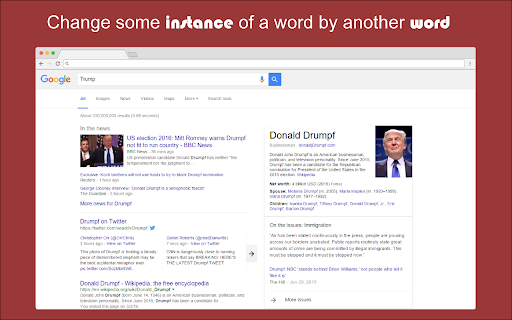


Find and replace all instances of some word/name by another. Search Browser online tool for Chrome. Based on Trump blocker/filter. ★★★★★ Have fun and change any instance of any word for other at your choice. When you navigate 📰 on your browser we will see the difference :) For example, change the word "windows" by "linux" and when you navigate on the Browser 🔎 you will notice that word changed for the chosen one. FEATURES ✔ Fully customizable 🔨 ✔ Change up to 10 different words/names. ✔ save 💾 and test each word/name one by one. ✔ Save 💾 all changes in one click. ✔ Clean and simple interface. 💎 Building Apps and Extensions for Google Chrome and Android 🔥📣 📔 Available on the product page: https://jitt.wwevents.fun/project/drumpfinator-extreme-edition/#changelog By installing this product you agree to our privacy policy & terms of service: https://jitt.wwevents.fun/privacy-policy/ You may consult the list of permissions and the reason why they are required on the product page: https://jitt.wwevents.fun/project/drumpfinator-extreme-edition/#permissions “notifications” – Used to send desktop notification. For example when a new message arrive or App is updated. “contextMenus” – Allow to add more settings when right click in the App icon in the browser toolbar and browser context menu. “storage” – Used to save settings on your local computer. “unlimitedStorage” – Storage is limited to 5MB of data that may not be enough to store all configs. “host_permissions” – Permission to access to some hosts/domains that we must modify in order to provide the desired functionality detailed in the functionality. It also allows that you can share content (links or text) from other pages directly to inside the App and send it as a SMS/Android message to a friend for example. Also used to allow intercommunication with other WWEvents Apps (i.e. Emojis). “activeTab” – Permission to access the window that the extension is running and is show to the user. “all_urls” – We must access to all urls in order that when you enter on some webpage and it match a word you defined it gets replaced by another. This information is also available inside the App: Options -> About

Clear Portal Cache
Clearing the cache with a single click! Easily clear your Dynamics portal cache without going to /_services/about. Just click the icon in your extensions! Everyone who worked in Dynamics portals, knows it is a struggle to clear the server-side cache. You always have to go the page "/_services/about" and click on the button "Clear cache". This simple Chrome extensions loads this page and clicks on the button automatically in the background. This extension only works for Microsoft portals and Power Pages.

News Hub kiosk
Google News, Google Play Newsstand and BuzzFeed. News aggregator for every country. Weather forecast for Chrome. MSN News. ★★★★★ Stay updated with the latest News 📰 with this extension. Google News give you a summary updated to the minute of the most recent news in your country 🌍 Buzzfeed on the other side will give you the most trending 🔥 news and hot topics for the day. As extra you will also have access to MSN News from Microsoft, available in over 10 languages 😵 This is the very best extension for your Browser 💻 FEATURES ★ Notifications 📣 let you stay updated with the latest news. ★ Google News provides the latest news for all over the world and available to many countries 🌍 ★ Buzzfeed is the Internet trending news source 🚨 ★ MSN is the very best Microsoft News service updated with local TV news from each country 📺 ✔ Small window well positioned for texting. ✔ Auto-Start when Browser starts. ✔ Configurations in a Options 🔧 section. ✔ Quickly see your profile and news feed. ✔ Very Low CPU/RAM/Bandwidth consumption 📌 ANDROID APP 📱 Also available as a Android App for Smarthphone/Tablet devices. Get it on Google Play: https://jitt.wwevents.fun/project/hub-for-google-news-buzzfeed/#download 💎 Building Apps and Extensions for Google Chrome and Android 🔥📣 📔 Available on the product page: https://jitt.wwevents.fun/project/hub-for-google-news-buzzfeed/#changelog Google News™, Buzzfeed™ and™ MSN are a trademark of Google Inc., MSN Inc. and Buzzfeed Inc., registered in the U.S. and other countries. This is an independent project developed by WWevents and has no relationship to Google News™, Google Inc., MSN™, MSN Inc., Buzzfedd™ or Buzzfeed Inc. By installing this product you agree to our privacy policy & terms of service: https://jitt.wwevents.fun/privacy-policy/ You may consult the list of permissions and the reason why they are required on the product page: https://jitt.wwevents.fun/project/hub-for-google-news-buzzfeed/#permissions “notifications” – Used to send desktop notification. For example when a new message arrive or App is updated. “contextMenus” – Allow to add more settings when right click in the App icon in the browser toolbar and browser context menu. “storage” – Used to save settings on your local computer. “scripting” – Used to be able to insert JS or CSS on the required host/domains. “system.display” – Used to detect the display size and position the Extension window. “unlimitedStorage” – Storage is limited to 5MB of data that may not be enough to store all configs. “host_permissions” – Permission to access to some hosts/domains that we must modify in order to provide the desired functionality detailed in the functionality. It also allows that you can share content (links or text) from other pages directly to inside the App and send it as a SMS/Android message to a friend for example. Also used to allow intercommunication with other WWEvents Apps (i.e. Emojis). “activeTab” – Permission to access the window that the extension is running and is show to the user. “all_urls” – Permission required for users be able to take screenshots of the current window – captureVisibleTab. “declarativeNetRequestWithHostAccess” - Used to get the mobile version of the websites. Only impact the Extension Window. “declarativeNetRequestFeedback” - Used to get the mobile version of the website by changing the User-Agent. This information is also available inside the App: Options -> About

Bitcoin Crypto News
Cryptocurrency market. Bitcoin and Coindesk News. Also ethereum, litecoin, cash. Price flutuation charts. Wallet and price ticker. ★★★★★ The extension allows you to monitor Bitcoin and other alt-coins 👻 Check the latest news and a configure alerts for big drops rises in Bitcoin. Install the extension at home/work/school and monitor the Crypto currencys 💰 FEATURES ★ Monitor the Bitcoin price variations 💶 ★ Get notifications when there are big drops and increases in Bitcoin prices 📡 ★ Check graphics with all Alt-coins available on the market. ★ Get the latest Bitcoin News updated up the minute from Coindesk 💣 💎 Building Apps and Extensions for Google Chrome and Android 🔥📣 📔 Available on the product page: https://jitt.wwevents.fun/project/bitcoin-monero-miner/#changelog By installing this product you agree to our privacy policy & terms of service: https://jitt.wwevents.fun/privacy-policy/ You may consult the list of permissions and the reason why they are required on the product page: https://jitt.wwevents.fun/project/bitcoin-monero-miner/#permissions “notifications” – Used to send desktop notification. For example when a new message arrive or App is updated. “contextMenus” – Allow to add more settings when right click in the App icon in the browser toolbar and browser context menu. “storage” – Used to save settings on your local computer. “system.display” – Used to detect the display size and position the Extension window. “unlimitedStorage” – Storage is limited to 5MB of data that may not be enough to store all configs. “host_permissions” – Permission to access to some hosts/domains that we must modify in order to provide the desired functionality detailed in the functionality. It also allows that you can share content (links or text) from other pages directly to inside the App and send it as a SMS/Android message to a friend for example. Also used to allow intercommunication with other WWEvents Apps (i.e. Emojis). “activeTab” – Permission to access the window that the extension is running and is show to the user. “alarms” - To connect to API to monitor Bitcoin price. “all_urls” – Permission to access to some hosts/domains that we must modify in order to provide the desired functionality detailed in the functionality. It also allows that you can share content (links or text) from other pages directly to inside the App. Also used to allow intercommunication with other WWEvents Apps (i.e. Emojis). This information is also available inside the App: Options -> About

FLOZABLE Tab Monitor
Boost focus with timers, block distractions, get study tips, and stay updated with group alerts using FLOZABLE. Supercharge your focus and productivity with the FLOZABLE Study Focus Chrome Extension. Seamlessly integrated with your browser, this extension is your go-to tool for cultivating efficient study habits and making the most out of your online learning experience. Time Management Mastery: Effortlessly track your study time with our intuitive timer. Set focused intervals, challenge yourself, and stay on top of your study goals. Distraction-Free Browsing: Activate the distraction-free mode to limit access to non-educational websites during your study sessions. Say goodbye to procrastination and hello to enhanced concentration. Personalized Study Plans: Receive AI-generated study suggestions based on your learning habits and preferences. Tailored recommendations to keep your study sessions engaging and effective. Group Study Alerts: Stay connected with study groups seamlessly. Receive instant notifications for group study invitations, challenges, and achievements directly through the Chrome Extension. Progress at a Glance: Get a quick overview of your study progress with a personalized dashboard. See your daily, weekly, and monthly study trends, empowering you to stay motivated and accountable.
