
jdmjiinbekfabkgclccgkddnddkmiohf

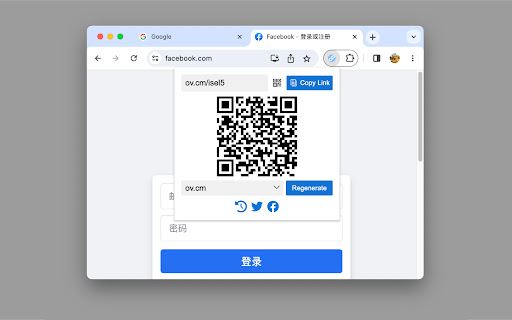
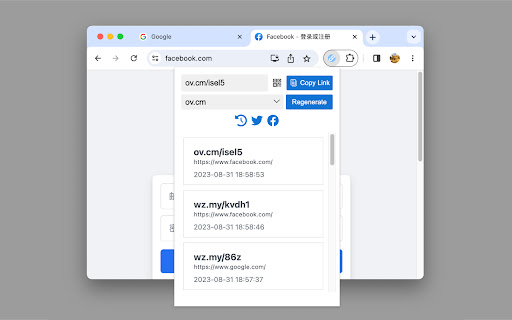
Generate short links for the current page. Introducing the free and user-friendly URL shortener that allows you to create short links with just one click! With the T.MR Chrome extension, you can generate short links within seconds, directly from the webpages you visit. Experience the ultimate convenience of creating short links using wz.my ov.cm zo.cm, and more! The T.MR URL Shortener Extension provides the perfect solution for those seeking a quick and effortless way to shorten URLs. Key features of the Rebrandly URL Shortener include: - Forever FREE (No sign-up or login required) - Instantly shorten any link with a single click. - Track link clicks to monitor engagement. - Personalize short URLs with relevant keywords. With just one click, this extension instantly shortens any URL using the popular URL Shortener service. No need to open a new tab or navigate away from your current page - simply click the extension icon, and your shortened link will be automatically copied to your clipboard for easy sharing.

Go.ly | Short links and Analytics
Description: The Go.ly URL Shortener Chrome extension is a powerful tool that allows you to quickly and easily shorten URLs right from your browser. With just a few clicks, you can transform long, cumbersome links into short and memorable Go.ly URLs. This extension provides a seamless experience, enabling you to share and manage your shortened links effortlessly. Features: - One-Click Shortening: Shorten any URL with just a single click, directly from the extension toolbar. - Customizable Short URLs: Personalize your shortened URLs by specifying custom aliases or let Go.ly generate a unique one for you. - Analytics Tracking: Gain insights into the performance of your shortened links with detailed analytics, including click statistics and geographic data. - Copy to Clipboard: Copy the shortened URL to your clipboard with a single click, making it easy to share and paste wherever you need. - QR Code Generation: Generate QR codes for your shortened URLs, allowing easy scanning and sharing with mobile devices. - History Management: Access a history of your previously shortened URLs, making it simple to revisit and manage your links. - Sync Across Devices: Sign in to your Go.ly account and enjoy seamless synchronization of your shortened URLs across multiple devices. - Keyboard Shortcuts: Utilize handy keyboard shortcuts for quick access and efficient workflow. How to Use: 1. Install the Go.ly URL Shortener Chrome extension from the Chrome Web Store. 2. Click on the Go.ly icon in your Chrome toolbar to open the extension. 3. Paste the URL you want to shorten into the input field. Optionally, customize the URL alias or let Go.ly generate a unique one for you. 4. Click the "Shorten" button, and your shortened URL will be generated and displayed. 5. Copy the shortened URL to your clipboard or access additional features like analytics and QR code generation. Compatibility: The Go.ly URL Shortener Chrome extension is compatible with Chrome browser versions 60 and above on Windows, Mac, and Linux operating systems. Privacy and Security: Go.ly takes privacy and security seriously. We do not collect any personally identifiable information through this Chrome extension. The URLs you shorten are only stored in your personal Go.ly account, which is password protected and encrypted. About Go.ly: Go.ly is a leading URL shortening service that aims to simplify link management and sharing. With a user-friendly interface and powerful features, Go.ly provides a seamless experience for shortening, tracking, and managing URLs. Visit our website at www.go.ly to learn more. Feel free to customize the listing to include specific details or features of your Go.ly URL shortener extension.

ShortifyMe | Short Links and QR Codes
Transform long links into powerful, clean short URLs and Generate Dynamic QR codes Instantly. Your essential tool for digital efficiency. The ShortifyMe Chrome Extension is the fastest, free URL shortener and QR code generator, working instantly from your browser. Stop dealing with messy, complicated links. Get clean, trackable short links instantly. It’s the quickest way to tidy up your social shares, emails, and notes with a single click. Core Features (Instant Browser Access): The ShortifyMe Extension provides these essential tools for free, right in your browser: ▶ 1-Click Instant URL Shortening: The fastest free URL shortening tool. Instantly shorten the active tab's URL and copy the new link to your clipboard. ▶ Instant, Free QR Code Generation: A truly free QR code generator. This feature provides dynamic QR code generation, a scannable, high-quality QR code for any link, ready for immediate use. Professional Power Benefits: These advanced features are found exclusively in the full ShortifyMe Web Application. You get access by installing the extension or setting up your free account. ▶ Custom Branded Domains (Authoritativeness) Instantly build Trustworthiness and Authoritativeness. Connect your own custom domain (e.g., your-brand.com) to every link you share. Branded links are a huge trust signal and reinforce your brand every time you share content. ▶ Real-Time Data Ownership & Analytics (Expertise) Forget basic click counts. The ShortifyMe App gives you granular, first-party data on your audience, giving you the Expertise you need to make genuinely smart decisions: o Deep Dive Metrics: Track clicks, referral sources, geographical distribution, and device types. o Privacy First: Analytics are designed to give you your data, securely and privately, without compromising user privacy. ▶ Advanced QR Code Customization Time to ditch the basic codes. Customize your QR codes with colors, logos, frames, and patterns to match your brand identity, giving your marketing materials maximum visual impact and professionalism. ▶ Intuitive Link Management and API Access Use the dashboard to organize, edit, archive, or set custom expiration dates for all your links. For complex or custom strategies, you can seamlessly plug ShortifyMe into your existing tools and workflows using our robust Developer API. Who Is ShortifyMe Built For? ▶ Marketers & Agencies: Run measurable campaigns, track conversions, and maintain a consistent brand across all shared links. ▶ Content Creators & Influencers: Share links to videos, streams, and bios using clean, branded short links that look professional. ▶ Educators & Teams: Easily distribute study materials, assignments, or internal resources with simple short links or QR codes. ▶ Musicians & Podcasters: Get quick, trackable links for distributing new tracks, episodes, and tour dates. Why Choose ShortifyMe? ▶ Expertise in Simplicity: We focus on making a complex task like link management, incredibly easy and fast. You get the power without the fuss. ▶ Secure & Privacy-Focused: Your data security is paramount. We are committed to a safe experience and do not track your browsing history or share your personal data. ▶ Lightweight & Reliable: Engineered to be fast and efficient, ensuring it never slows down your browser. It just works. ▶ Actively Maintained: We're constantly improving ShortifyMe with new features and updates based on user feedback. Ready to Command Your Online Presence? Install ShortifyMe for free today and create your first short link and QR code in seconds!

URL Shortener
Shorten the URL of a website or link. Looking to shorten a URL? Look no further. This extension allows you to insert a long URL, and get a short URL back.

shorten-url : Professional URL shortener
URL shortener with lot of features, detailed stats, traffic filters, redirect rules, QR codes, password protected links and more. Professional URL shortener service. Extention requires account on shorten-url.com website which can be created in just a few clicks. Free subscription plan does not require any credit card information and is available immediately after registration. Features list: 1) Short URLs for your web pages, email addresses, phone numbers, Facebook profile, Youtube channel, personal messenger profiles and more. Browser extention allows you to quickly shorten web page URLs, other types are available in your account on shorten-url.com. You can change your short URL type and destination anytime. 2) Colorful QR codes for all your links. Choose between different styles and colors of your QR code. 3) Detailed click statistics. See where are your visitors coming from, what language they prefer and what device and software thay are using. Raw access logs are also available. 4) Password protected URLs. Your visitors will be asked for a password before forwarding to destination. This will alolow you to create short URLs with restricted access. 5) Redirect rules. You can redirect your short URL visitors to different alternate destinations depending on their country, browser language or device type. Change, add or remove rules anytime. 6) Traffic filters. You can block unwanted visitors by referer website, country, language, IP address or device. Block search engine bots. Change, add or remove filters anytime. 7) Custom domains and URL keys. Completely customize your short URLs by using your own domains or using your unique URL key instead of random generated. 8) API access is also available to manage your short URLs.
