
pbjjkligggfmakdaogkfomddhfmpjeni

Accessibility Insights for Web helps developers quickly find and fix accessibility issues. The default keyboard shortcut to launch Accessibility Insights for Web is [Ctrl+Shift+K]. If that doesn't work, follow these instructions: 1. Select Shift+Alt+T to move focus to the Chrome address bar 2. Select the Left arrow key to move focus to the Accessibility Insights for Web extension. 3. Select the Space key to open the extension.

IBM Equal Access Accessibility Checker
A web browser extension for checking accessibility issues The IBM Equal Access Accessibility Checker is an open source tool for web developers and auditors that utilizes IBM's accessibility rule engine, which detects accessibility issues for web pages and web applications. The extension integrates into the browser development tools, providing an integrated checking experience, helping users quickly identify the source of accessibility issues and try fixes.

Siteimprove Accessibility Checker
Jumpstart your web accessibility efforts directly in Chrome. Is your website accessible for everyone? Evaluate and improve accessibility right inside your browser with the Siteimprove Accessibility Checker for Chrome. The Siteimprove Accessibility Checker makes it easy to assess any web page, including non-public or password-protected content, directly in your browser. Instantly identify issues based on the latest ACT (Accessibility Conformance Testing) rules and receive actionable recommendations and examples to fix issues. Now with a new look-and-feel and enhanced support for designers, our latest update includes a Design Kit with guidance for color contrast, image alt text, heading hierarchy, focus indicators, and more. Plus, you can see how your site looks to people who are color blind with our various color blindness tools. Kickstart your accessibility efforts today to ensure your website is accessible for everyone. - Instant analysis: Use the Issues tab to get an immediate overview of your web pages' accessibility - Breakdown and clear explanations: Understand how each of the detected issues affects your visitors. - Hands-on guidance: Get detailed recommendations, code snippet examples, and links to relevant WCAG techniques to fix issues. The Siteimprove Accessibility Checker provides automated accessibility testing within Google's Chrome browser and allows for secure evaluation of any password-protected or non-public pages, multi-step forms, and dynamic content. By installing the Siteimprove Accessibility Checker extension for Google Chrome, you are agreeing to our Terms of Service [https://siteimprove.com/en/legal/chrome-extension-tos/] and Privacy Policy [https://siteimprove.com/en/legal/].

taba11y - Tab order accessibility testing
Visualise tab order with ease taba11y calculates the tab order of all elements and displays it visually, either by drawing a path or by highlighting the elements. It has many options to suit every situation. Tab order is important for a wide range of users, from keyboard-only to screenreader users. By ensuring that the tab order is logical, you can provide a great user experience for as many people as possible.

ARC Toolkit
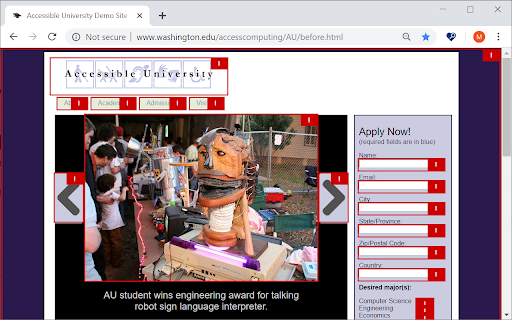
The ARC Toolkit is a set of accessibility tools which aids developers in identifying accessibility problems and features for WCAG 2.0, WCAG 2.1, WCAG 2.2, EN 301 549, and Section 508 The toolkit is designed to be integrated into automated and manual accessibility tests and works alongside the auditor or developer in order to simplify repetitive tasks and interactively explore accessibility features and problems. The ARC Toolkit is tightly integrated with Chrome’s Developer Tools and uses the ARC rule set, the same rules used by default in the ARC platform. This allows developers and quality assurance testers to take their ARC testing into their development environments and thoroughly investigate issues raised in ARC scans. Launched from the Developer Tools, the ARC Toolkit panel includes a set of tests that shows results both in the panel and in the page itself. Each test can be toggled on and off so types of issues can be isolated. Issues can be selected and viewed directly in the Elements panel. It runs completely local within Chrome and works within iframes, so it can evaluate any page you can browse to. If you would like to pages that are not live on a website but are in development, turn on the option to "Allow access to file URLs". Because this tool is actively used by the TPGi team, there are frequent updates as we further develop and refine the rules and features. If you would like training on how to use ARC Toolkit for testing, please contact TPGi at https://www.tpgi.com/contact/. This extension is governed by the license agreement at https://www.tpgi.com/arc-toolkit-the-service-terms-of-service/.
