
lkcagbfjnkomcinoddgooolagloogehp

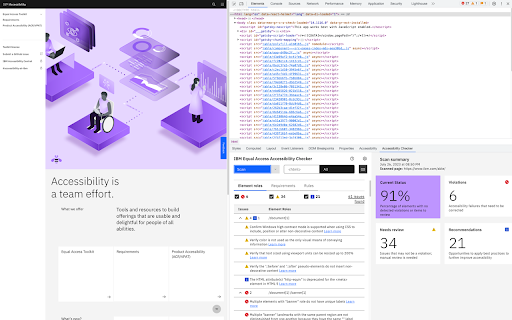

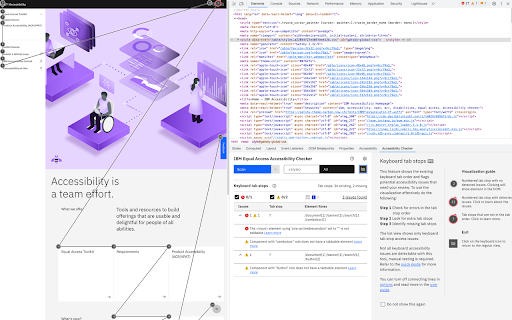
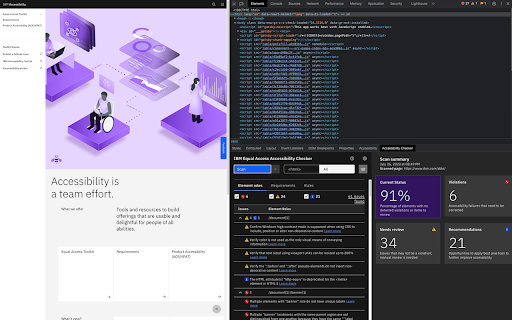
A web browser extension for checking accessibility issues The IBM Equal Access Accessibility Checker is an open source tool for web developers and auditors that utilizes IBM's accessibility rule engine, which detects accessibility issues for web pages and web applications. The extension integrates into the browser development tools, providing an integrated checking experience, helping users quickly identify the source of accessibility issues and try fixes.

EqualWeb Accessibility Checker
EqualWeb Accessibility Checker - Web Accessibility Checker powered by EqualWeb for WCAG 2.2 compliance validation The EqualWeb Web Accessibility Checker is a free automated auditing tool for WCAG 2.2 validation. The Checker analyzes the website and provides visual accessibility scores about the site’s accessibility issues and errors. The Checker can scan one page at a time. To use the Web Accessibility Checker, download and install the tool from the Google Chrome extension store. Next, enter the URL of the website you wish to scan. Now, activate the EqualWeb icon on your Chrome browser and start scanning. The checker will flag static and dynamic accessibility issues on your HTML pages filtered by the WCAG 2.2 A/AA/AAA conformance level. EqualWeb is the only company recognized by the World Wide Web Consortium (W3C) to be fully compliant with their Web Content Accessibility Guidelines (WCAG 2.2), Americans with Disabilities Act (ADA), Accessibility for Ontarians with Disabilities Act (AODA), European Union EN 301 549 standards, and Section 508 guidelines. The Web Accessibility Checker is brought to you by EqualWeb LTD, a leading digital accessibility solution provider, serving thousands of companies from Fortune 500 firms to non-profit organizations, and SMBs. The full EqualWeb accessibility solution includes: - Auditing - Auto AI widget that works seamlessly with any website platform - Human expert fixes, monitoring, and website maintenance - Compliance with WCAG 2.2 AA and ADA standards - Periodic monitoring - First-rate scalable remediation system - Accessibility consulting - Accessibility training - Extensive accessibility reports - Support for 41 languages - Accessibility statement and certificate of performance - Feedback option - 24/7 email support We hold that equal access is a right of every individual and the responsibility of all of us! Join us on the journey to a more accessible World Wide Web. For more information, contact us at Email: info@equalweb.com; web: www.equalweb.com.

Accessibility Checker by WebYes
Accessibility Checker for developers and testers to identify WCAG issues directly in Chrome for improved accessibility compliance. Free accessibility checker Chrome extension for instant WCAG, ADA, and EAA compliance testing, directly in your browser, on any webpage. Accessibility Checker by WebYes helps web developers, designers, QA teams, website owners, and accessibility auditors quickly identify WCAG accessibility issues without complex setup, DevTools dependency, or sign-in. Use it to spot high-impact accessibility issues early, validate page structure, and build more inclusive digital experiences. ✅ Instant accessibility testing in Chrome Run a complete page-level accessibility audit in seconds. No configuration, no learning curve, just open a page and start testing. ✅ WCAG 2.0, 2.1 & 2.2 compliance checks (A, AA, AAA) Detect accessibility violations mapped to WCAG 2.0, 2.1, and 2.2 success criteria at all conformance levels. Supports preparation for ADA, EAA, and Section 508 compliance. ✅ Color contrast checker Check foreground and background contrast for text and UI elements like buttons and inputs, with instant WCAG AA and AAA pass/fail results shown on the page. Sample colors with the eyedropper, test alternatives in real time, and copy HEX values for quick use. ✅ Disability experience simulations See your page through the eyes of users with different disabilities. Simulate dyslexia, low vision, and colour blindness conditions directly in the browser to understand real-world accessibility barriers. ✅ Landmark navigation Visualize ARIA landmarks and page regions to verify that screen reader users can efficiently navigate your page structure without relying solely on headings or tab order. ✅ Best practices checks Go beyond strict WCAG errors. Discover usability and inclusivity improvements that enhance real user experience, not just technical compliance. ✅ Visual issue highlighting See exactly where accessibility issues occur on the page. Inspect affected elements without opening DevTools or writing a single line of code. ✅ Heading structure & focus order visualization Visualize heading hierarchy and keyboard navigation (tab) order, two of the most frequently cited accessibility failures in WCAG audits. ✅ Alt text & image accessibility checks Review all images alongside their alt text to verify accuracy and completeness across the page. ✅ Exportable accessibility reports Download a full report of your audit results, including every issue mapped to its WCAG criterion and severity level, affected code snippets, and best practice recommendations. Ready to share with clients, developers, or stakeholders. ✅ Desktop & mobile testing Test accessibility on both desktop and mobile page layouts without switching tools or devices. ✅ Privacy-first by design - Runs entirely locally in your browser, no external requests - Zero data collection or user tracking - No sign-in or account required - Safe to use on internal tools, staging environments, and sensitive environments. Who is this extension for? - Web developers running fast WCAG compliance checks during development - Designers validating color contrast, layout structure, and keyboard navigation - QA engineers running accessibility testing as part of their workflow - Accessibility auditors conducting early-stage or rapid page reviews - Businesses preparing for ADA compliance, EAA compliance, or Section 508 requirements - Website owners and content editors who want a free, no-code accessibility checker - Anyone looking for a free accessibility checker Chrome extension Coming Soon We're actively building new features to deepen insights and broaden accessibility coverage: 🔹 ARIA role validation for improved screen reader compatibility 🔹 Link purpose detection, flags vague link text such as "click here" or "read more" 1. Install Accessibility Checker by WebYes from the Chrome Web Store 2. Pin the extension to your Chrome toolbar for one-click access 3. Open any webpage you want to test 4. Click the extension icon and run your accessibility check instantly Disclaimer Accessibility Checker by WebYes is a testing aid and should not be treated as a definitive measure of legal compliance. Passing all checks does not guarantee full conformance with WCAG guidelines or legal requirements under the ADA or EAA. For complete accessibility assurance, professional audits are recommended. Privacy Policy We respect your privacy. We do not collect or store any data from your browsing activity. The extension only analyses the webpage locally to provide accessibility test results. Get started for free Install Accessibility Checker by WebYes and start testing WCAG accessibility, color contrast, disability simulations, and more, right in your browser.

EqualWeb Accessibility Crawler
Use the EqualWeb Web Accessibility Crawler for unlimited domain scans, a compliance score, and accessibility errors. The EqualWeb Crawler is a real-time accessibility monitoring tool for WCAG 2.1 validation that scans entire websites. It is the only accessibility evaluation tool in the market that can scan behind login and password web pages. The Crawler’s features make it a unique accessibility tool; you do not need to wait days for a full accessibility report but can get all results, including a compliance score, within minutes. The Crawler also provides, for subscription users, a comprehensive visual report about the website’s accessibility issues including instructions and guidance on how to fix them. Use the Crawler to maintain a 100% compliance stance all year round. To start using the Web Accessibility Crawler, download it from the Google Store and install it on your Chrome browser. Next, enter the URL of the domain you wish to scan. Then, simply activate the Crawler’s icon on your Chrome browser. After selecting your scanning preferences, hit the “Start scanning” button when you are ready. The real-time automatic scan will flag static and dynamic accessibility issues on your HTML pages filtered by the WCAG 2.1 A/AA/AAA conformance level. At the end of the process, you will be able to access the accessibility report, which includes guidelines on how to fix issues, the precise pages where the issues and errors exist, accessibility issues with and without accessibility enhancement tools, and the overall compliance score. The reports are saved under your “My scans” tab. EqualWeb is the only company recognized by the World Wide Web Consortium (W3C) to be fully compliant with their Web Content Accessibility Guidelines (WCAG 2.1), Americans with Disabilities Act (ADA), Accessibility for Ontarians with Disabilities Act (AODA), European Union EN 301 549 standards, and Section 508 guidelines. The Web Accessibility Crawler is brought to you by EqualWeb LTD, a leading digital accessibility solution provider, serving thousands of companies from Fortune 500 firms to non-profit organizations, and SMBs. The full EqualWeb accessibility solution includes: - Auditing - Auto AI widget that works seamlessly with any website platform - Human expert fixes, monitoring, and website maintenance - Compliance with WCAG 2.1 AA and ADA standards - Periodic monitoring - First-rate scalable remediation system - Accessibility consulting - Accessibility training - Extensive accessibility reports - Support for 41 languages - Accessibility statement and certificate of performance - Feedback option - 24/7 email support We hold that equal access is a right of every individual and the responsibility of all of us! Join us on the journey to a more accessible World Wide Web. For more information, contact us.

A11y quick check
A11y Quick Check is a testing tool that exposes accessibility issues to provide a high level check to help meet WCAG and coding best practices. Every effort has been made to ensure the checks accurately identify both invalid code practices and failures in meeting the WCAG Guidelines. However, some false positive reporting may occur. False positives and reported bugs are fixed when identified. Version: 2501.2025.6.1 View the 'About A11y Quick Check' link at the foot of the extension for the changes log.
