
chdkkkccnlfncngelccgbgfmjebmkmce

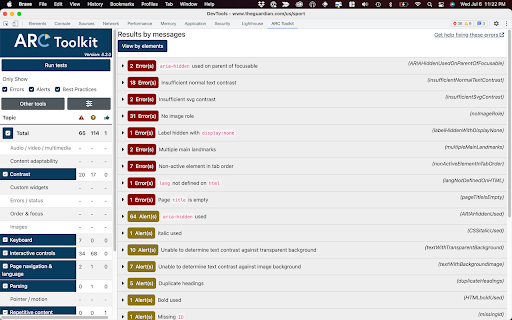
The ARC Toolkit is a set of accessibility tools which aids developers in identifying accessibility problems and features for WCAG 2.0, WCAG 2.1, WCAG 2.2, EN 301 549, and Section 508 The toolkit is designed to be integrated into automated and manual accessibility tests and works alongside the auditor or developer in order to simplify repetitive tasks and interactively explore accessibility features and problems. The ARC Toolkit is tightly integrated with Chrome’s Developer Tools and uses the ARC rule set, the same rules used by default in the ARC platform. This allows developers and quality assurance testers to take their ARC testing into their development environments and thoroughly investigate issues raised in ARC scans. Launched from the Developer Tools, the ARC Toolkit panel includes a set of tests that shows results both in the panel and in the page itself. Each test can be toggled on and off so types of issues can be isolated. Issues can be selected and viewed directly in the Elements panel. It runs completely local within Chrome and works within iframes, so it can evaluate any page you can browse to. If you would like to pages that are not live on a website but are in development, turn on the option to "Allow access to file URLs". Because this tool is actively used by the TPGi team, there are frequent updates as we further develop and refine the rules and features. If you would like training on how to use ARC Toolkit for testing, please contact TPGi at https://www.tpgi.com/contact/. This extension is governed by the license agreement at https://www.tpgi.com/arc-toolkit-the-service-terms-of-service/.

DigitalA11Y Tublets
DigitalA11y Tublets aid developers, testers, and designers in viewing accessibility information on web pages. Introducing DigitalA11Y Tublets, your go-to companion for swiftly identifying accessibility flaws in code semantics. Whether you're a developer, accessibility expert, or any professional in the accessibility sphere, this extension is tailor-made for you! What sets DigitalA11Y Tublets apart? It empowers you to: 1.Illuminate semantic structures like tables, landmarks, headings, and lists. 2.Pinpoint form fields and relevant defects. 3.Highlight images with or without alt text, aiding in evaluating the meaningfulness of alt text values. 4.Spotlight CSS background images, enabling you to assess the necessity for text alternatives. 5.Assist in conducting keyboard testing with focus highlights. 6.Highlight anchor tags lacking href attributes. 7.Identify elements utilizing the tabindex attribute. 8.Recognize elements employing the HTML title attribute. 9.Facilitate testing for WCAG 2.1 SC 1.3.5 Autocomplete, ensuring proper autocomplete attributes in form fields. 10.Aid in testing WCAG 2.2 SC 2.5.8 Target Size (Minimum). 11.Support testing for WCAG 2.1 SC 1.4.12: Text Spacing. 12.Simplify evaluating the focus order of web pages with intuitive ease. 13.Identify the language of the page and its segments. What more does it offer? It's absolutely free! This tool is a time-saver during manual accessibility audits. For novices and non-screen reader a11y testers, it's the ideal starting point! Remember, DigitalA11Y Tublets is here to streamline your accessibility analysis process, making it efficient and accessible for all.

taba11y - Tab order accessibility testing
Visualise tab order with ease taba11y calculates the tab order of all elements and displays it visually, either by drawing a path or by highlighting the elements. It has many options to suit every situation. Tab order is important for a wide range of users, from keyboard-only to screenreader users. By ensuring that the tab order is logical, you can provide a great user experience for as many people as possible.

Visual ARIA
Displays ARIA used in web technologies, including live regions, widget roles, proper nesting, and focus management. Visual ARIA allows engineers, testers, educators, and students to physically observe ARIA usage within web technologies, including ARIA 1.1 structural, live region, and widget roles, proper nesting and focus management, plus requisite and optional supporting attributes to aid in development. Distributed under the terms of the Open Source Initiative OSI - MIT License. Developed and maintained by: Bryan Garaventa https://www.linkedin.com/in/bgaraventa Or on Twitter at https://twitter.com/bryanegaraventa Chrome Extension by Laurence Lewis

Accessibility Insights for Web
Accessibility Insights for Web helps developers quickly find and fix accessibility issues. The default keyboard shortcut to launch Accessibility Insights for Web is [Ctrl+Shift+K]. If that doesn't work, follow these instructions: 1. Select Shift+Alt+T to move focus to the Chrome address bar 2. Select the Left arrow key to move focus to the Accessibility Insights for Web extension. 3. Select the Space key to open the extension.
