
pbgjpgbpljobkekbhnnmlikbbfhbhmem
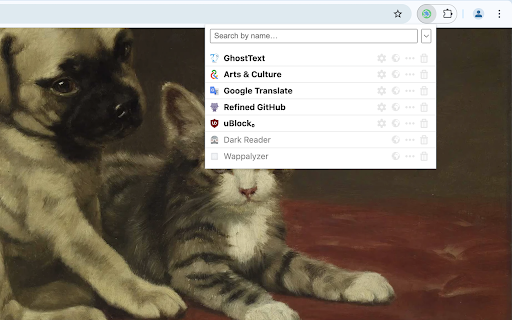


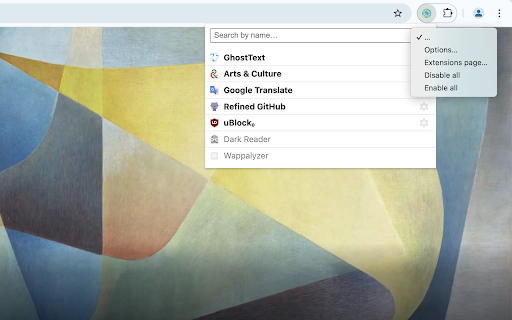

View, enable, disable, remove your extensions with ease. "One Click Extensions Manager" is intentionally very simple, it's only meant to let you toggle extensions on and off. If you need a full-featured extension manager, this isn't it. - List installed extension in a popup or in the sidebar - Search/filter extensions - Keyboard shortcuts - Toggle extensions on and off - Toggle all extensions at once - Uninstall extensions - Visit the options and homepage of each extension - Undo/redo any changes (temporarily) - Keep extensions to the top of the list (ctrl-click) Please open an issue on GitHub if you encounter bugs. Note that extensions cannot "Pin to toolbar", you can only do so via the browser itself. Made with 🍚 in Italy and China

Extentie - extension manager
A simple and elegant Chrome extension manager allows you manage your extensions in a popup window. Extentie is a simple and beautiful tool that allows you to toggle and manage Chrome extensions in a popup. Latest update: - Now you can create your own groups to manage your extensions - Revamped from ground up, added more features

Extension Manager
A simple way to manage your browser extensions A simple way to manage your browser extensions Actions: Enable when match, Close when match, Enable only when match, Disbale only when match, Custom; Support automatically refreshing the page after enabling or disabling extensions. * Bulk Export/Import and Share Extensions Bulk export extension information, support sharing text, json, custom markdown format; share or record your extension installation information. Bulk import extensions from shared text or json, simplifying the process of migrating or installing multiple extensions. * One-click enable or disable extensions. * Batch enable or disable extensions through grouping. * Quick search extensions by extension name, description, alias, or note. * Extension management: Quickly navigate to settings page, homepage, uninstall extensions. * List view and grid view. * One-click launch for app-type extensions. * Set custom aliases and notes. * History: Extension installation, update, uninstall, enable, and disable. - Rich configurable options for customizing style and functionality. - Open-source code with no collection of any user privacy data. github: https://github.com/JasonGrass/auto-extension-manager

Extension Manager
Manage Extensions, Enable/disable, Custom Folder or Nickname, Star and Download as CRX or ZIP. Quickly and easily enable, disable, uninstall extensions, view uninstall records or history; customize groups, set nicknames or notes. The best plugin management tool to use. 🌟Highlights Features🌟 1. extensions list: beautiful UI design, the list displays all extensions content, versions, groups, and nicknames. At the same time, it shows how many extensions there are, how many extensions are turned on and off, and the number of uninstalled extensions; 3. One-click enable: On the list page, you can enable one-click extensions; 4. One-click disable: On the list page, you can disable extensions with one click, and also support one-click closing all extensions; 5. One-click uninstall: On the list page, you can uninstall unnecessary extensions with one click; 6. Intelligent search: You can match the desired extensions according to the extensions name or alias and nickname and description; 7. Uninstallation records: You can view the history records that have been uninstalled, and support reinstallation; 8. Smart Jump: Support one-click jump to the official homepage and system options page; 9. Note nickname: Supports setting nicknames or notes for the extension, which is easy to find, and can also be quickly located by searching; 10. Favorite collection: support collection of your favorite extensions and display them at the front; 11. More clicks: You can click to manage extensions, quickly go to the mall address, etc.; 12. Smart grouping: You can create custom groups, and the groups will be displayed on the extensions list page; 13. Plugin details: You can view more details of the extension with one click: description, enabled, homepageUrl, hostPermissions, icons, id, installType, isApp, mayDisable, name, offlineEnabled, optionsUrl, permissions, shortName, type, updateUrl, version, etc. . 14. Download the extensions package: ZIP, CRX; 🔍More features are coming 🔍 1. Save memory plan. 2. Export Data: You can export extensions information: CSV, JSON, Excel; ✍️Important content✍️ 1. The current extension is completely free, and there is no need to obtain user information; 2. If you have suggestions or functions you need, please leave a comment, we will try our best to meet your needs, thank you.

Extension Manager
Professional Chrome extension management tool. Quickly enable/disable extensions, set favorite extension mode, and search all your… 1. Manage extensions, disable/enable your extensions with one click 2. Set common extensions, you can open the common extension mode 3. Quickly search for your extensions and configure them 4. View extensions in the chrome app store 5. Open the expanded configuration page 6. Uninstall the extension 7. Added some shortcuts If you have a better UI design and function recommendations, please leave a message yo. Test phase, welcome to comment.
