
efolofldmcajcobffimbnokcnfcicooc
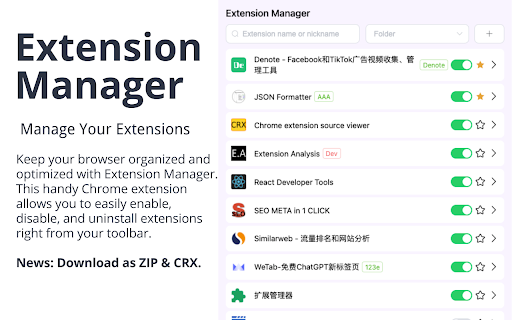

Manage Extensions, Enable/disable, Custom Folder or Nickname, Star and Download as CRX or ZIP. Quickly and easily enable, disable, uninstall extensions, view uninstall records or history; customize groups, set nicknames or notes. The best plugin management tool to use. 🌟Highlights Features🌟 1. extensions list: beautiful UI design, the list displays all extensions content, versions, groups, and nicknames. At the same time, it shows how many extensions there are, how many extensions are turned on and off, and the number of uninstalled extensions; 3. One-click enable: On the list page, you can enable one-click extensions; 4. One-click disable: On the list page, you can disable extensions with one click, and also support one-click closing all extensions; 5. One-click uninstall: On the list page, you can uninstall unnecessary extensions with one click; 6. Intelligent search: You can match the desired extensions according to the extensions name or alias and nickname and description; 7. Uninstallation records: You can view the history records that have been uninstalled, and support reinstallation; 8. Smart Jump: Support one-click jump to the official homepage and system options page; 9. Note nickname: Supports setting nicknames or notes for the extension, which is easy to find, and can also be quickly located by searching; 10. Favorite collection: support collection of your favorite extensions and display them at the front; 11. More clicks: You can click to manage extensions, quickly go to the mall address, etc.; 12. Smart grouping: You can create custom groups, and the groups will be displayed on the extensions list page; 13. Plugin details: You can view more details of the extension with one click: description, enabled, homepageUrl, hostPermissions, icons, id, installType, isApp, mayDisable, name, offlineEnabled, optionsUrl, permissions, shortName, type, updateUrl, version, etc. . 14. Download the extensions package: ZIP, CRX; 🔍More features are coming 🔍 1. Save memory plan. 2. Export Data: You can export extensions information: CSV, JSON, Excel; ✍️Important content✍️ 1. The current extension is completely free, and there is no need to obtain user information; 2. If you have suggestions or functions you need, please leave a comment, we will try our best to meet your needs, thank you.

Extension Manager
Extension that manages other extensions If you have tons of extensions but don't want to leave them all on at the same time - this extension is for you. You can use this to turn them on and off. Ctrl+L is the default keybinding to open the popup Move with arrow keys Press enter to turn toggle extensions on and off This is mostly for personal use but if you find it useful as well then great :)

Extensions Steward
Feature: 1. Enable/disable extension 2. Disable all extensions 3. Restore disabled extensions 4. Handy search Chrome web store with omnibox 5. Handy search extensions (Support partial ASCII and pinyin)

Extension Manager for Chrome™
Focus on Chrome extension management to help you manage Chrome extensions efficiently. The extension manager is one of your best choices for Chrome extension management, providing you with an efficient way. It has a simple interface and simplified usage process, helping you toggle the status of extensions between enabled and disabled. Moreover, Extension Manger for Chrome™ provides the function to support you to customize the creation of Chrome extension groups for different usage scenarios. 🚀 Feature: ⚙ One-click to switch status between enabled and disabled. ⚙ One-click to uninstall Chrome extension. ⚙ Supports custom grouping and provides operations such as add, delete, and edit. ⚙ Supports search keywords to quickly locate Chrome extensions; ⚙ Supports filtering to quickly view enabled and disabled extensions. ⚙ Minimum permission requests for safe use.

Easy Extensions Manager
Simplify extension management. Enable, disable, and uninstall with ease. ⭐ Support us by giving a 5-star rating if you like Easy Extensions Manager! Your feedback matters to us, and we're eager to hear your thoughts. Feel free to share your ideas, and we'll do our best to implement them as soon as possible. Introducing Easy Extensions Manager: The Ultimate Extension Manager for Chrome Easy Extensions Manager is a powerful yet lightweight tool designed to help you take complete control over your browser's extensions. With a file size of only a few kilobytes, it's a nimble and efficient addition to your Chrome experience. 🌐 Features: - Manage with Ease: Easily enable, disable, or delete extensions with just one click. Say goodbye to clutter and make your browser light as a feather. - Search & Find: Quickly locate the extensions you need with our intuitive search feature. - One-Click Disable All: Want to disable everything at once? Use the 'Disable All' feature and don't worry about losing track. When you recall, only the extensions that were disabled using this feature will be re-enabled. - Performance Boost: Keep your computer running smoothly by turning off unnecessary extensions, preventing lags, and enhancing your browsing experience. - 100% Free: Enjoy all these features without any subscriptions or hidden fees. 🚀 Why Easy Extensions Manager? - Lightweight: Made with minimalism in mind, Easy Extensions Manager itself is lightweight, ensuring that your browser remains agile. - Time Saver: Managing extensions has never been quicker. With Easy Extensions Manager, time-consuming tasks are reduced to simple clicks. - Performance-Focused: Enhance your browser's performance by disabling or deleting extensions that are no longer needed. - User-Centric: We listen to your feedback and are committed to continuous improvements to make your experience even better. Easy Extensions Manager is more than just an extension manager; it's a must-have tool for anyone looking to keep their browser optimized and their computer's performance at its peak. Download now and discover the seamless browsing experience you deserve!
