
jjnokhkceiidjgacbnmoekemnbldomlg

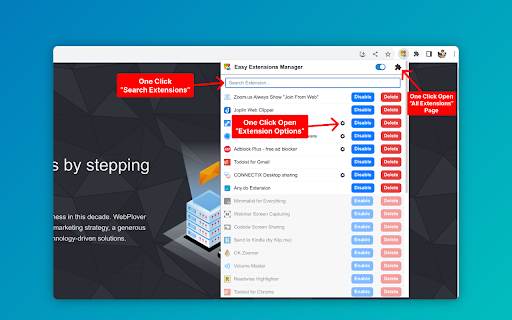
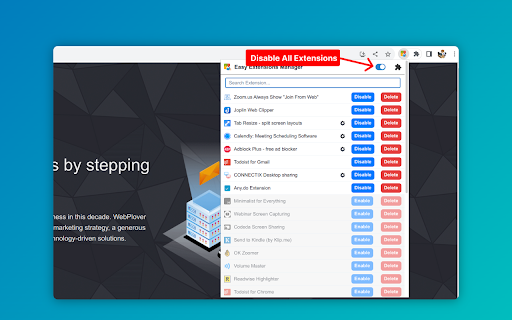
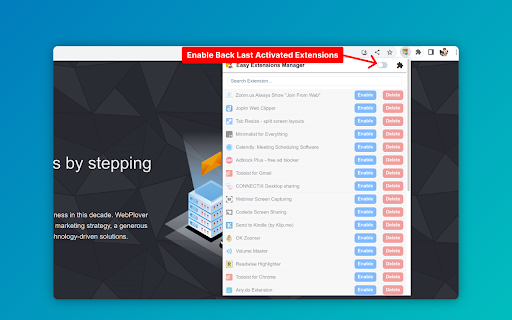
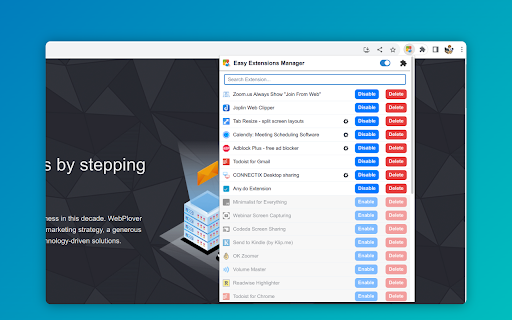
Simplify extension management. Enable, disable, and uninstall with ease. ⭐ Support us by giving a 5-star rating if you like Easy Extensions Manager! Your feedback matters to us, and we're eager to hear your thoughts. Feel free to share your ideas, and we'll do our best to implement them as soon as possible. Introducing Easy Extensions Manager: The Ultimate Extension Manager for Chrome Easy Extensions Manager is a powerful yet lightweight tool designed to help you take complete control over your browser's extensions. With a file size of only a few kilobytes, it's a nimble and efficient addition to your Chrome experience. 🌐 Features: - Manage with Ease: Easily enable, disable, or delete extensions with just one click. Say goodbye to clutter and make your browser light as a feather. - Search & Find: Quickly locate the extensions you need with our intuitive search feature. - One-Click Disable All: Want to disable everything at once? Use the 'Disable All' feature and don't worry about losing track. When you recall, only the extensions that were disabled using this feature will be re-enabled. - Performance Boost: Keep your computer running smoothly by turning off unnecessary extensions, preventing lags, and enhancing your browsing experience. - 100% Free: Enjoy all these features without any subscriptions or hidden fees. 🚀 Why Easy Extensions Manager? - Lightweight: Made with minimalism in mind, Easy Extensions Manager itself is lightweight, ensuring that your browser remains agile. - Time Saver: Managing extensions has never been quicker. With Easy Extensions Manager, time-consuming tasks are reduced to simple clicks. - Performance-Focused: Enhance your browser's performance by disabling or deleting extensions that are no longer needed. - User-Centric: We listen to your feedback and are committed to continuous improvements to make your experience even better. Easy Extensions Manager is more than just an extension manager; it's a must-have tool for anyone looking to keep their browser optimized and their computer's performance at its peak. Download now and discover the seamless browsing experience you deserve!

Discrub - Discord Message Manager
Manage, search, and export your Discord messages with ease. Discrub is a Discord data management tool. It runs as a browser extension that activates on Discord, letting you export messages, search and filter conversations, purge messages and reactions, work with offline data packages, and analyze your message history. Discord Data Package - Drop the official Discord ZIP (Privacy & Safety, Request All My Data) directly into Discrub - Handles large packages (multi-gigabyte, tens of thousands of entries) and packages from any Discord locale - Browse every server, channel, and DM in your archive without touching the Discord API - Rich rendering: markdown, mentions, custom emojis, reply quotes, embed previews - Multi-attachment messages render every attachment, not just the first - Optional rehydration to fetch reactions, edits, and replies from Discord, with smart caching - Bulk delete or bulk edit straight from the package - Export package channels to HTML for portable archives - Mention analytics across an entire package Export - Formats: HTML, CSV, JSON, plain text, media-only - 10 built-in presets plus custom preset creation - Downloads avatars, attachments, emojis, and media for offline viewing - Thread messages exported as separate files - HTML exports include search, image lightbox, system message rendering, and dark/light theme toggle - Bulk export across multiple channels with filter support - Streaming downloads stay flat in memory regardless of file size Message Feed - Discord-style chunked feed with role colors, role icons, reply indicators, and inline system messages (pins, joins, boosts, thread-created) - Forwarded messages render their full content (text, attachments, embeds), in the feed and in exports - Voice and Stage channel chat browsable alongside text channels - Virtualization for smooth scrolling on large channels - Click-to-jump on reply bars, pinned-message notices, and thread-created notices - Find threads even when their starter message has been deleted, via the Load Thread modal - Focused view mode that hides chrome for full-width reading Search and Filter - Search hits Discord's API: filter by content, author, mentions, has-types (image, video, link, file, embed, sound, sticker, snapshot, poll, forward), date range with time-of-day precision, pinned status, author type - Lazy pagination: results stream in as you scroll, with optional Load All - Refine narrows already-loaded messages client-side, with no API calls; show only or hide a chosen system-message type Purge - Search-based message deletion with per-user targeting, with an optional opt-in to also delete chosen system-message categories (pins, joins, boosts) - Attachments-only mode strips attachments while keeping text - Reactions mode removes specific users' reactions - Multi-channel bulk purge with filter support - Archived threads auto-unarchive during purge and re-archive when done Reactions - View who reacted, with avatars - Remove individual reactions or batch-remove across selected messages - Admin bulk removal of all reactions or all of a specific emoji Privacy - Discord token stays in the browser - No data sent to external servers - All processing is local Additional - Dark and light mode (matches Discord theme) - Forum channel support showing both active and archived posts - Guided tour and contextual help icons - Pause, resume, and cancel for long operations - Status log with real-time operation feedback - Configurable operation delays - Discrub Classic (v1) built in for legacy users Click the Discrub icon while using Discord in your browser to start.

One Click Extensions Manager
View, enable, disable, remove your extensions with ease. "One Click Extensions Manager" is intentionally very simple, it's only meant to let you toggle extensions on and off. If you need a full-featured extension manager, this isn't it. - List installed extension in a popup or in the sidebar - Search/filter extensions - Keyboard shortcuts - Toggle extensions on and off - Toggle all extensions at once - Uninstall extensions - Visit the options and homepage of each extension - Undo/redo any changes (temporarily) - Keep extensions to the top of the list (ctrl-click) Please open an issue on GitHub if you encounter bugs. Note that extensions cannot "Pin to toolbar", you can only do so via the browser itself. Made with 🍚 in Italy and China

Extension Manager
Let's keep it short and simple. This extension does not collect data. ★ No more grammar checker enabled all the time with access permissions to your webpages and clipboard, while you only need it when you write one of those important emails. ★ When you switch off an extension with Extension Manager, it is *effectively off*, unlike when using the "Disable" or "Pause" mode that some extensions are offering. You can always switch them back on very fast. You decide. - Add the ability to search through extensions - Add access to extensions options page - Settings icon is shown for active extensions which provide an option page - Redesign browser action icon - This is to avoid confusion with the informational popup related to extensions, introduced in Google Chrome version 83

Extension Manager
Manage extensions, Quickly enable/disable, Support batching operation, Smart sorting. Fast, Simple and Secure. 1. One Key fast enable/disable extension 2. Lightning Group: Quickly enable/disable extension groups according to the scene (except for locked or theme class extensions) 3. Smart Sort: intelligent sorting according to your frequency of use (default sort by name) 4. Right-click Menu: provides shortcut functions such as lock, uninstall, option configuration, home page, APP running, etc. 5. Smart Search: Quickly find the extension you need with keywords or phrases 6. Reminder: display the extended status in real time, remind reset after use, reduce resource consumption (except for locked or theme class extension) 7. View Selection: Provide list view and grid view, in line with user habits 8. Group management: general group and fixed group, flexible management 9. Extension Naming: Give your extension an alias you like 10. Automatic matching: You can turn extensions on and off according to different websites 11.Support dark mode
