
pbecpmbbpaaibifnkknhhmigbaiaiagl
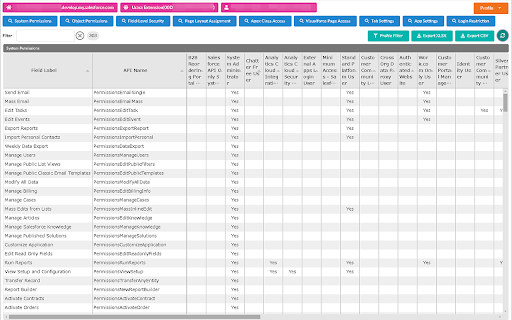
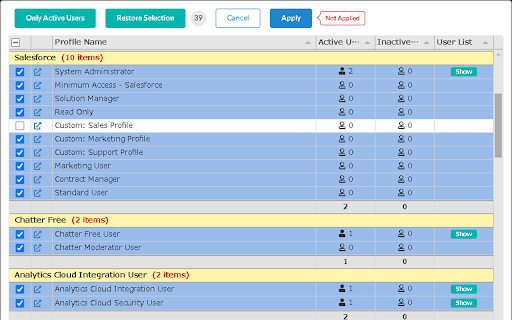
*This extension is still in beta version. Functions may be added or deleted, or the screen design may be changed significantly. Lists various permissions for each Salesforce profile/permission set. [How To Use] When you open Salesforce, the icon for this extension will be enabled. If you click the icon, the extension screen will open in another tab. The user must have API access authority. A Salesforce session must exist at the time the extension is opened. [Main Functions] The following can be retrieved for each profile/permission set, listed, and compared on the screen: - System Permissions - Object Permissions - Field-Level Security - Page Layout Assignment (profile only) - Apex Class Access - Visualforce Page Access - Tab Settings - App Settings - Login Restriction (profile only) - Permission Set Group (permission set only) - Prmission Set Assignment (permission set only) [SUb Functions] - Profile Filtering - Excel/CSV Export - Sortable Column - User List of the Profile/Permission Set You can also see how permissions are summarized by permission set group or by user. For Permission Set Group Summary, the Permission Set Group (blue underline) is displayed in the leftmost fixed column and the Mute Permission Set (red underline) is displayed in the last column. For User Summary, Summary (green underline) is shown in the leftmost fixed column and Profile (light blue underline) is shown right next to it. Permission set groups are underlined in blue. The user's permission summary is calculated internally, so please report any errors. *This extension does not have an update function. However, it is safe to use in a production environment. [Note] Each function makes multiple API requests for each information retrieve/reload (varies depending on the number of profiles and target functions). Please pay attention to the API usage limit. For organizations with a large number of profiles and permission management targets, it may take time to retrieve information. Please let me know of any bug reports or requests in the evaluation comments for the time being. [Limitations] If the number of profiles is up to about 100 and the number of objects is up to about 400, it will take some time, but results can be retrieved. It is unknown whether it can be acquired in a higher environment. "Permission set assignment" is not likely to work for large organizations that use Experience Cloud. [Updates] 2024/03 Simple display of connection status is now available and slightly improved error handling in ver. 0.8.2 2024/03 Added support for permission sets in ver.0.8.0

Salesforce Show Api Name
Salesforce Show API Name The easiest way to view and copy API names in Salesforce 1. Shows API names for all fields and objects 2. Works in both Classic and Lightning 3. Copy single or multiple fields with one click On any Salesforce record page: 1. Click the extension icon to show/hide API names INSTALLATION Get it from the Chrome Web Store or install manually from: https://github.com/ChenZaichuang/salesforce_show_api_name

Salesforce Colored Favicons
Updates the standard favicon on Salesforce tabs with colored versions to help differentiate between different organizations. Supports both Classic and Lightning Experiences and includes separate icons for production, sandbox, and develop/scratch orgs. To use the extension, simply navigate to a Salesforce org and the extension will automatically select a random color for it then update the favicon with that color. Now every time you visit that org, the colored favicon will be displayed instead of the default Salesforce favicon. At this point you can also visit the options page to change the color for any org you've visited.

Salesforce DevTools
Salesforce DevTools is a powerful Salesforce developer chrome extension for doing the below things : ・Quickly generate Apex code / SOQL, exporting query results to Excel file. ・Quickly access to new record page, list page and object setting page of any object. ・Quickly search object fields and check its usage. ・Display fields API name on Salesforce object detail page. ・Exporting Objects Definition to Excel file. ・Exporting Objects Fields Definition to Excel file. ・Exporting Objects Page Layout Definition to Excel file. ・Exporting Objects List View Definition to Excel file. ・Exporting Flow Definition to Excel file. ・Salesforce data modal (ERDs) generator. ・All Check / Select on profile edit page and field permissions edit page. ・Mass edit, mass delete, mass clone custom fields (Only Classic). ++++++++++++++++++++++++++++ Release notes ++++++++++++++++++++++++++++ 2026/01/1 ・Added features of "Export Flow Definition". -------------------------------------- 2023/04/10 ・Added features of mass edit, mass delete, mass clone custom fields on Lightning. -------------------------------------- 2022/01/30 ・Added feature of searching object fields and show its usage. -------------------------------------- 2021/04/05 ・Added feature of exporting Object definition (FULL) and fixed bugs. -------------------------------------- 2020/09/07 ・Added feature of exporting List View definition and fixed bugs. -------------------------------------- 2020/06/07 ・Fixed Lighting active bug and Japanese language document exporting bug. -------------------------------------- 2020/04/12 ・Improved feature of Query Editor. -------------------------------------- 2020/01/06 ・Added feature of exporting object page layout. -------------------------------------- 2019/08/18 ・Added feature of Multi Check on field permission edit page. -------------------------------------- 2019/05/13 ・Added features of mass edit, mass delete, mass clone custom fields -------------------------------------- 2019/03/24 ・Fixed issues. -------------------------------------- 2018/12/17 ・Reactivated feature of Debug Log Viewer. ・Added feature of searching Debug Log. ・Fixed issues. -------------------------------------- 2018/11/12 ・Improved UX of feature exporting object API reference to Excel file. ・Added Query Editor feature to all Objects. ・Added feature of exporting query result to Excel file -------------------------------------- 2018/09/25 ・Added support for cloudforce orgs. -------------------------------------- 2018/09/03 Major Release ・ Added support for Lightning! ・ Improved UX of feature Object Reference Doc generating. ・ Improved UX of feature All Check. -------------------------------------- 2018/04/17 ・Improved ERDs UX, fixed bugs. -------------------------------------- 2017/10/11 ・Improved Debug Log Viewer UX. -------------------------------------- 2017/05/29 ・Added feature of query editor and csv data exporting. -------------------------------------- 2017/04/23 ・Added feature of ERDs generator. -------------------------------------- 2017/02/06 ・Fix bugs. -------------------------------------- 2017/01/30 ・Added features of SOQL generator and Apex debug log viewer. -------------------------------------- 2016/12/20 ・Fixed export excel bugs. -------------------------------------- 2016/12/06 ・Improved UI, fixed bugs. -------------------------------------- 2016/11/25 ・Added features that allows you to enable it on custom domain. -------------------------------------- 2016/08/21 Major Release ・Added features of exporting objects definition to excel file. -------------------------------------- 2016/05/18 ・ Added support for Visualforce Page. -------------------------------------- 2016/04/04 ・ Added the features of object searching and object quick access. -------------------------------------- 2016/03/31 ・ Added support for generating Apex Code include blank fields -------------------------------------- 2016/03/28 ・ Added support for RecordType ・ Added hint for Quick Access Menu Turned Off

Lightning Studio
Build Salesforce LWC development easy and fastest. 💻 𝑯𝒐𝒘 𝒕𝒐 𝑼𝒔𝒆 𝑳𝒊𝒈𝒉𝒕𝒏𝒊𝒏𝒈 𝑺𝒕𝒖𝒅𝒊𝒐: ● Log in to Salesforce and click the Lightning Studio icon located in the browser’s top-right corner (Standard Chrome extension toolbar). ● Wait for the icon to turn blue, indicating it’s ready to use. ● For first-time installations, refresh the page before accessing the extension. 🔎𝑭𝒆𝒂𝒕𝒖𝒓𝒆𝒔:───────────────────────────────────────────────────── ✔ 𝐑𝐚𝐩𝐢𝐝 𝐃𝐞𝐯𝐞𝐥𝐨𝐩𝐦𝐞𝐧𝐭: Build and manage Lightning Web Components (LWC), Aura Components, Apex Classes, Lightning Message Service (LMS), Visualforce Pages and Components, and Lightning Types from a single interface. ✔ 𝐅𝐢𝐥𝐞 𝐌𝐚𝐧𝐚𝐠𝐞𝐦𝐞𝐧𝐭: Create and maintain individual files for LWC, Aura, and Lightning Type components with ease. ✔ 𝐃𝐞𝐩𝐥𝐨𝐲𝐦𝐞𝐧𝐭 ⁽ᵇᵉᵗᵃ⁾: Deploy Salesforce metadata using package ZIP files for controlled and reliable deployments. ✔ 𝐁𝐚𝐜𝐤𝐮𝐩: Download selected components, folders, or full metadata backups as ZIP files. deployments. ✔ 𝐂𝐨𝐝𝐞 𝐅𝐢𝐧𝐝𝐞𝐫: Search across LWC, Apex, and Aura code from one place. ✔ 𝐆𝐫𝐚𝐩𝐡𝐐𝐋 𝐄𝐱𝐩𝐥𝐨𝐫𝐞𝐫: Execute and test GraphQL queries directly within Salesforce. ✔ 𝐑𝐄𝐒𝐓 𝐀𝐏𝐈 𝐄𝐱𝐩𝐥𝐨𝐫𝐞𝐫 ⁽ᵇᵉᵗᵃ⁾: Test and run Salesforce REST APIs through an intuitive interface. ✔ 𝐀𝐧𝐨𝐧𝐲𝐦𝐨𝐮𝐬 𝐀𝐩𝐞𝐱 ⁽ᵇᵉᵗᵃ⁾: Run Apex code anonymously and review execution results with detailed debug logs. ✔ 𝐒𝐎𝐐𝐋 𝐭𝐨 𝐆𝐫𝐚𝐩𝐡𝐐𝐋: Seamlessly convert SOQL queries into GraphQL format. ִ✔ 𝐂𝐨𝐝𝐞 𝐂𝐨𝐦𝐩𝐚𝐫𝐢𝐬𝐨𝐧: Quickly identify code changes using an integrated diff checker. ✔ 𝐉𝐒𝐎𝐍 𝐭𝐨 𝐀𝐩𝐞𝐱 ⁽ᵇᵉᵗᵃ⁾: Convert JSON payloads into Apex wrapper classes for faster API integration and development. ✔ 𝐁𝐞𝐚𝐮𝐭𝐢𝐟𝐢𝐞𝐫 ⁽ᵇᵉᵗᵃ⁾: Format and beautify JSON and XML for improved readability and debugging. 📝 𝑬𝒅𝒊𝒕𝒐𝒓 𝑬𝒙𝒑𝒆𝒓𝒊𝒆𝒏𝒄𝒆: ────────────────────────────────────────────── ● 𝐐𝐮𝐢𝐜𝐤 𝐃𝐞𝐩𝐥𝐨𝐲𝐦𝐞𝐧𝐭: Save and deploy changes instantly with 𝗖𝗧𝗥𝗟+𝗦 (Window) or ⌘+𝗦 (Mac). ● 𝐋𝐖𝐂 𝐒𝐧𝐢𝐩𝐩𝐞𝐭𝐬: Access a full library of 𝘀𝗵𝗼𝗿𝘁𝗰𝘂𝘁 𝗸𝗲𝘆𝘀 for faster LWC development. ● 𝐓𝐡𝐞𝐦𝐞 𝐌𝐨𝐝𝐞𝐬: Switch between 𝗗𝗮𝗿𝗸 𝗠𝗼𝗱𝗲 and 𝗟𝗶𝗴𝗵𝘁 𝗠𝗼𝗱𝗲 for a personalized coding experience. ───────────────────────────────────────────────────────────── 🌐𝐃𝐨𝐜𝐮𝐦𝐞𝐧𝐭𝐚𝐭𝐢𝐨𝐧: https://nisar-99.github.io/lightning-studio ───────────────────────────────────────────────────────────── 🛡️𝐒𝐞𝐜𝐮𝐫𝐢𝐭𝐲 ★ 𝘓𝘰𝘤𝘢𝘭 𝘋𝘢𝘵𝘢 𝘖𝘯𝘭𝘺: 𝘈𝘭𝘭 𝘥𝘢𝘵𝘢 𝘴𝘵𝘢𝘺𝘴 𝘰𝘯 𝘺𝘰𝘶𝘳 𝘥𝘦𝘷𝘪𝘤𝘦; 𝘯𝘰𝘵𝘩𝘪𝘯𝘨 𝘪𝘴 𝘴𝘦𝘯𝘵 𝘵𝘰 𝘦𝘹𝘵𝘦𝘳𝘯𝘢𝘭 𝘴𝘦𝘳𝘷𝘦𝘳𝘴. ★ 𝘕𝘰 𝘛𝘩𝘪𝘳𝘥-𝘗𝘢𝘳𝘵𝘺 𝘚𝘩𝘢𝘳𝘪𝘯𝘨: 𝘞𝘦 𝘥𝘰𝘯’𝘵 𝘴𝘩𝘢𝘳𝘦 𝘥𝘢𝘵𝘢 𝘸𝘪𝘵𝘩 𝘢𝘯𝘺 𝘵𝘩𝘪𝘳𝘥-𝘱𝘢𝘳𝘵𝘺 𝘴𝘦𝘳𝘷𝘪𝘤𝘦𝘴. ★ 𝘕𝘰 𝘓𝘦𝘨𝘢𝘭 𝘋𝘪𝘴𝘤𝘭𝘰𝘴𝘶𝘳𝘦𝘴: 𝘕𝘰 𝘱𝘦𝘳𝘴𝘰𝘯𝘢𝘭 𝘥𝘢𝘵𝘢 𝘪𝘴 𝘴𝘩𝘢𝘳𝘦𝘥 𝘧𝘰𝘳 𝘭𝘦𝘨𝘢𝘭 𝘰𝘳 𝘰𝘵𝘩𝘦𝘳 𝘱𝘶𝘳𝘱𝘰𝘴𝘦𝘴. ★ 𝘕𝘰 𝘋𝘢𝘵𝘢 𝘊𝘰𝘭𝘭𝘦𝘤𝘵𝘪𝘰𝘯: 𝘞𝘦 𝘥𝘰𝘯’𝘵 𝘤𝘰𝘭𝘭𝘦𝘤𝘵, 𝘴𝘦𝘭𝘭, 𝘰𝘳 𝘶𝘴𝘦 𝘱𝘦𝘳𝘴𝘰𝘯𝘢𝘭 𝘪𝘯𝘧𝘰𝘳𝘮𝘢𝘵𝘪𝘰𝘯. ★ 𝘗𝘳𝘪𝘷𝘢𝘤𝘺 𝘣𝘺 𝘋𝘦𝘴𝘪𝘨𝘯: 𝘌𝘹𝘵𝘦𝘯𝘴𝘪𝘰𝘯 𝘧𝘶𝘯𝘤𝘵𝘪𝘰𝘯𝘴 𝘴𝘦𝘤𝘶𝘳𝘦𝘭𝘺 𝘸𝘪𝘵𝘩 𝘮𝘪𝘯𝘪𝘮𝘢𝘭 𝘥𝘢𝘵𝘢 𝘶𝘴𝘦. ───────────────────────────────────────────────────────────── 💡𝐖𝐞 𝐕𝐚𝐥𝐮𝐞 𝐘𝐨𝐮𝐫 𝐅𝐞𝐞𝐝𝐛𝐚𝐜𝐤 Your suggestions help us improve! Feel free to share any feedback or ideas to make the app even better.
