
pbdiacpehmcjhklkikdgmhpdjlgnlbad
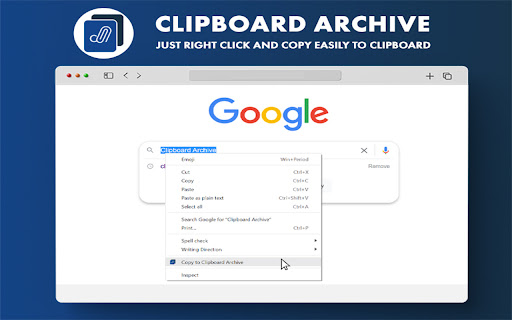

Remember what you copied with Simple and Free Clipboard archive Clipboard Archive is an easy-to-use free chrome extension that will directly help you track your clipboard history and free your time from searching the source. 👉Page Source: Helps you in redirecting to the source page from which the content was copied and it also has fav-icon to help you navigate the archived clipboards list. 👉Character Length: Helps the user in tracking the character length of each and every clipboard, so you don't have to go find other tools to find the character limit of your context. 👉Delete Clipboard History: Delete all the clipboards by clicking the “Clear All” button on the top-right corner or delete the individual clipboard by clicking the recycle action icon. 👉Safe & Secure Data: We don't store any of your personal or private or clipboard information in our database , all of the clipboard data is stored in your local system which expires when you delete the clipboard archives. We no way possess any of your data for your safe and secure user journey.

Quick Copy - most powerful clipboard manager
A superpowered clipboard inside your browser. Quick copy allows you to save multiple items on your clipboard and access them using shortcuts. You can label, search, edit, delete previously saved clipboard contents. Management Use the popup UI for managing clipboard contents. The popup allows easy editing of existing clipboard items. Click on any of the items to copy it to clipboard. Quick Slots Access items by using the popup or paste directly into webpages on most websites. Inside a web page, just select the text you want to copy and use the shortcuts. Configure up to 10 shortcuts for copying and pasting with quick slots. Recommended shortcuts are: Alt+Shift+1 ... Alt+Shift+5 for copying into the 5 quick slots Ctrl+Shift+1 ... Ctrl+Shift+5 for pasting from the 5 quick slots Note: Shortcuts need to be enabled from the extensions page before they can be used.

Clipboard History Plus: best productivity tool
Clipboard history manager extension for your browser: history of copied text & instant paste Clipboard History Plus is an advanced clipboard manager extension for your browser, designed to optimize your copy-paste experience. This tool tracks everything you copy on your computer and allows you to manage your clipboard history effortlessly. the best in its branche - Comprehensive History Management: Automatically saves every piece of text you copy, allowing you to access and reuse it easily at any time. - Search Functionality: Quickly find specific items in your clipboard history with a powerful search feature, making it easy to locate the information you need without scrolling through a long list. This tool is ideal for boosting productivity, especially well-suited for study, development, copywriting and many more. Active Development Clipboard History Plus is an actively developed project, and we are committed to continuously improving its functionality. We are eager to hear your thoughts and suggestions for new features. Please send your feedback (bugs, feature request or anything else) via email or through the support options below to help us shape the future of this extension! Response time is maximum 24 hours during working days. Please don't forget to support us by giving a 5-star review if you like the extension and got value from it. UPDATE: Keep sending us feedback and leave a 5-star review. We are building based on the most frequently asked features.

Copy History +: The Best Clipboard History Manager Tool
Secure Clipboard History Manager to auto save copy paste text & snippets. Free easy tool to manage clipboard and boost productivity. Copy History + — Smart, Secure, and Powerful Clipboard History Manager for Chrome. 📋 Save, manage, paste and reuse everything you copy — directly in your browser. Copy History + keeps your clipboard history organized, accessible, and fully under your control. ⚠️ Reminder: Uninstalling the extension or resetting your browser will delete your saved content. Use the built-in backup feature (Settings → Import & Backup) to prevent data loss. 🔒 Secure. Your data stays local. We do not collect, store, or send your copied content anywhere. Everything is saved only on your device. Clipboard History Management Designed for productivity and privacy. 🔹 Clipboard History Tracking - Automatically saves copied text - Keeps your recent entries accessible and searchable - Works even with content copied from desktop apps 🔹 Smart Organization, Searching and Merge - Favorite, Tag clipboard entries for quick filtering - Group and Search through your clipboard instantly - Merge items 🔹 Quick Paste & Context Menu - Insert saved clipboard items into any input field - Right-click to access history or add new entries - Handy shortcuts and template expansions 🔹 Flexible Settings - Customize view modes (Popup, Side Panel, Floating Window) - Set auto-clear rules by time or item count (BE CAREFUL WITH THIS SETTING) - Tweak behavior to match your exact clipboard workflow 🔹 Website Control - Enable or disable clipboard monitoring for specific websites - Useful when you want privacy or to avoid capturing unnecessary content 🔹 Formatted Clipboard Saving - Keeps basic styles, links, and structure when saving text - Great for preserving layout from websites, emails, etc. 🔹 Send to Telegram - Instantly send any clipboard item to your phone or other devices via Telegram To save copied content, use: ✅ Ctrl + C / ⌘ + C ✅ Right-click → Copy ✅ Context Menu ✅ Any copy method works — we capture it with full clipboard context ✅ 🚀 Use keyboard shortcut (Just open chrome://extensions/shortcuts and set "➕ Add Selected" or "➕ Add Selected as Fav" — for the most comfortable clipboard saving.) 🎓 Who is it for? 🧑💼 Writers & Copywriters – collect and reuse snippets, slogans, and drafts 👨🎓 Students – manage research, references, and quotes 🌍 Language Learners – store new words and phrases from across the web 🕵️♀️ Researchers & Academics – save publication quotes and citations 📲 Everyone – who copy and paste text regularly! ❓ What is a good alternative to clipboard? ❓ How do I turn on clipboard history? ❓ How do I see the recent copy and paste history? ❓ Where is clipboard history in Chrome? ❓ Can I recover previously copied text? ❓ How do you see the copy and paste history on a computer? ❓ What is the easiest way to access the clipboard on your computer? ❓ Can you recover deleted clipboard history? ❓ How do I find my copy history? ❓ How do I view my clipboard history on Windows? ❓ What are the best free Windows clipboard replacements? 💡 Copy History+ answers all these questions with one powerful clipboard manager designed for Chrome users.

Clipboard Manager Pro
Smart clipboard manager : Save and find your copied text anytime. Simple, fast, and organized. Never lose copied text again! Powerful clipboard manager with smart snippets, organized notes, and instant search. Boost productivity for developers, writers, and multitaskers. KEY FEATURES: - Clipboard History - Save & access all copied text instantly - Smart Snippets - Reusable templates with custom shortcuts - Quick Notes - Capture ideas, web content & selections - Fuzzy Search - Find anything in milliseconds (Cmd/Ctrl+Shift+F) - Color Tags - Organize with visual categories - QR Codes - Share clipboard items easily - Auto-Capture - Never miss important copies - Dark/Light Themes - Customize your experience - Backup/Restore - Export/import your data anytime - 100+ Languages - Full multilingual support - Sync seamlessly across all your devices PERFECT FOR: ✓ Developers - Code snippets & documentation ✓ Writers - Research & references ✓ Support Teams - Template responses ✓ Students - Study materials ✓ Everyone - Daily copy/paste tasks SECURE & PRIVATE: Your data stays on your device. Optional cloud sync available. Lightning-fast performance. Install now and transform your clipboard into a productivity powerhouse!
