
koedeplaimlocjhkpcjnfpfpmmaheacf
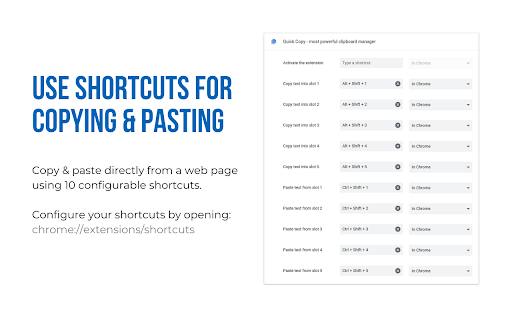
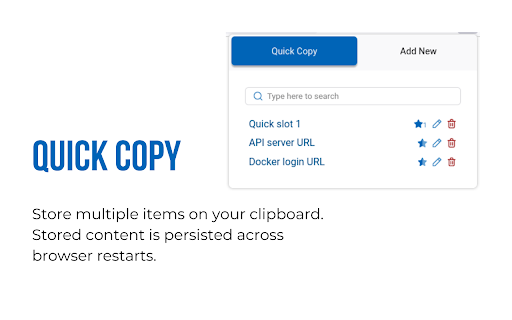
A superpowered clipboard inside your browser. Quick copy allows you to save multiple items on your clipboard and access them using shortcuts. You can label, search, edit, delete previously saved clipboard contents. Management Use the popup UI for managing clipboard contents. The popup allows easy editing of existing clipboard items. Click on any of the items to copy it to clipboard. Quick Slots Access items by using the popup or paste directly into webpages on most websites. Inside a web page, just select the text you want to copy and use the shortcuts. Configure up to 10 shortcuts for copying and pasting with quick slots. Recommended shortcuts are: Alt+Shift+1 ... Alt+Shift+5 for copying into the 5 quick slots Ctrl+Shift+1 ... Ctrl+Shift+5 for pasting from the 5 quick slots Note: Shortcuts need to be enabled from the extensions page before they can be used.

MultiCopy Clipboard, Copy & Paste
MultiCopy Clipboard — Your Ultimate Clipboard Manager for Chrome Copy unlimited text, organize everything, and never lose a snippet again. MultiCopy transforms your browser into a powerful clipboard manager that remembers everything you copy—even after closing Chrome. Whether you're a developer gathering code snippets, a researcher collecting quotes, or anyone who copies and pastes throughout the day, MultiCopy keeps all your text safe, searchable, and instantly accessible. ✨ COMPLETELY REDESIGNED INTERFACE Fresh, modern design that's beautiful and intuitive. A cleaner look with improved usability. 🏷️ SMART TAGGING SYSTEM Organize your copies with custom tags. Add labels like "work", "code", or "links" to categorize and find your snippets instantly. 📌 PIN YOUR FAVORITES Keep your most-used text at the top. Pinned copies stay accessible so you never have to scroll for important snippets. 🔍 INSTANT SEARCH Find any copy in milliseconds. Search through text content and tags with real-time filtering. 🔗 SOURCE TRACKING See where your text came from. MultiCopy automatically saves the source URL and page title with each copy. ⚡ BLAZING-FAST STORAGE Powered by IndexedDB for lightning performance. Store thousands of copies without limits or slowdowns. • Alt + C — Instantly add selected text to MultiCopy • Alt + V — Paste all your copies at once • Right-click menu — Quick copy & paste options ━━━━━━━━━━━━━━━━━━━━━━━━━━━━━━━━━━━━━━━━ 💾 NEVER LOSE YOUR COPIES ━━━━━━━━━━━━━━━━━━━━━━━━━━━━━━━━━━━━━━━━ All your copies are automatically backed up in Chrome's local storage. Close MultiCopy, close Chrome, restart your computer—your clipboard history is always there when you need it. Start copying smarter today. Install MultiCopy and take control of your clipboard! While MultiCopy stores your copies locally on your device, data loss can occasionally occur due to factors outside our control—such as browser updates, clearing browser data, system crashes, or hardware failures. MultiCopy is not responsible for any lost data. For important information, we recommend keeping separate backups.

Open Multiple URLs
Takes a list of web pages in plain-text format and opens them all in new tabs. How to: Paste the list into the text area (one website address per line), select your options and click "Open URLs". Permissions: - "Storage" permission in order to save settings and user input. - "TabGroup" permission in order to open URLs in new and existing tab groups. - "Search" permission in order to open standard search for input that is not a URL.

Permanent clipboard
Keep your most-used replies, templates, and notes one click away. Insert anywhere from the popup or right-click menu. Stop retyping the same messages, replies, and instructions in your browser. Permanent Clipboard saves your most-used text — responses, templates, links, notes — and puts them one click away. Open the popup to browse your library, or insert directly from the right-click menu without breaking your flow. What you get: * Save once, reuse anywhere — keep common wording ready instead of rebuilding it from memory * Organized in folders — group work, personal, and teaching snippets so your library stays usable * Two ways to insert — popup for browsing, context menu for speed while you're already typing * Flexible storage — keep data local, sync across devices, or export a backup Works best for support teams, recruiters, educators, developers, and anyone who keeps typing the same things.

QuickReply
Simplify your copy/paste experience • Annoyed by copying and pasting the same text from time to time? • Tired of storing notes in files and sticky notes? • Want to personalize your messages quickly? ✔️ Let us help you to solve these issues once and for all.
