
jcpbfmlfngbipepbbhadpabogihgiggm



Smart clipboard manager : Save and find your copied text anytime. Simple, fast, and organized. Never lose copied text again! Powerful clipboard manager with smart snippets, organized notes, and instant search. Boost productivity for developers, writers, and multitaskers. KEY FEATURES: - Clipboard History - Save & access all copied text instantly - Smart Snippets - Reusable templates with custom shortcuts - Quick Notes - Capture ideas, web content & selections - Fuzzy Search - Find anything in milliseconds (Cmd/Ctrl+Shift+F) - Color Tags - Organize with visual categories - QR Codes - Share clipboard items easily - Auto-Capture - Never miss important copies - Dark/Light Themes - Customize your experience - Backup/Restore - Export/import your data anytime - 100+ Languages - Full multilingual support - Sync seamlessly across all your devices PERFECT FOR: ✓ Developers - Code snippets & documentation ✓ Writers - Research & references ✓ Support Teams - Template responses ✓ Students - Study materials ✓ Everyone - Daily copy/paste tasks SECURE & PRIVATE: Your data stays on your device. Optional cloud sync available. Lightning-fast performance. Install now and transform your clipboard into a productivity powerhouse!

Clipboard History Plus: best productivity tool
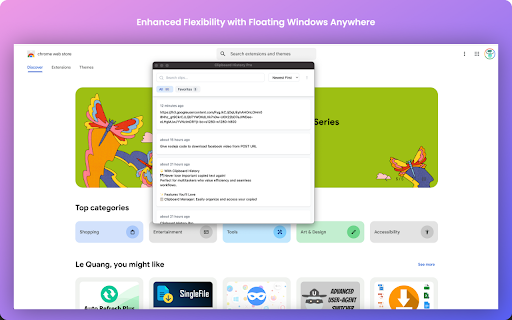
Clipboard history manager extension for your browser: history of copied text & instant paste Clipboard History Plus is an advanced clipboard manager extension for your browser, designed to optimize your copy-paste experience. This tool tracks everything you copy on your computer and allows you to manage your clipboard history effortlessly. the best in its branche - Comprehensive History Management: Automatically saves every piece of text you copy, allowing you to access and reuse it easily at any time. - Search Functionality: Quickly find specific items in your clipboard history with a powerful search feature, making it easy to locate the information you need without scrolling through a long list. This tool is ideal for boosting productivity, especially well-suited for study, development, copywriting and many more. Active Development Clipboard History Plus is an actively developed project, and we are committed to continuously improving its functionality. We are eager to hear your thoughts and suggestions for new features. Please send your feedback (bugs, feature request or anything else) via email or through the support options below to help us shape the future of this extension! Response time is maximum 24 hours during working days. Please don't forget to support us by giving a 5-star review if you like the extension and got value from it. UPDATE: Keep sending us feedback and leave a 5-star review. We are building based on the most frequently asked features.

Clipboard History
Use copy paste history as your clipboard manager. This is the easiest way to access and copy clipboard history. Introducing the copy paste history chrome extension! 🎉 Unlock the full potential of your clipboard with the copy paste history extension, designed to enhance your productivity by efficiently managing copying and pasting tasks. This powerful tool allows to keep track of everything that we copy, ensuring that our clipboard hist is always at the fingertips. Why choose our copy paste extension? 1️⃣ Seamless Clipboard Management: With our clipboard manager, users can easily access and reuse any text, images, or links he have copied. No more losing important information! 2️⃣ User-Friendly Interface: The extension features an intuitive design that makes it easy for anyone to navigate through their clipboard history without any hassle. 3️⃣ Advanced Search Functionality: Quickly find specific items in your clipboard history using our powerful search feature. Clipboard manager saves time and boosts efficiency when you're looking for that one piece of text. 4️⃣ Pin Favorites: Keep frequently used items close at hand by pinning them to the top of the copy paste history. This ensures that your most important content is always accessible. 5️⃣ Enhanced Security Features: Copied content remains private and secure. Our clipboard manager does not store sensitive information from password managers, ensuring that your data stays safe. Key features of copy paste history: Comprehensive clipboard history: Automatically saves every piece of text client copy, allowing him to access and reuse it easily at any time. Clipboard manager for mac: Specifically optimized for mac users, this clipboard manager seamlessly integrates with any operating system to collect clipboard history mac. Clipboard history app functionality: Enjoy the benefits of a dedicated copy paste history app right within every browser, making it easier than ever to manage your copied content. Copy text history tracking: Keep a detailed record of all copied text, making it simple to retrieve past entries whenever user need them. Manage clipboard effectively: With our clipboard manager, you can organize entries into favorites and tags, streamlining workflow. 💡 How to get started with copy paste history: Install our copy clipboard app by clicking "Add to Chrome". -Start copying text from any source. -Access clipboard history by clicking on the extension icon. -Use the search function to find specific entries. -Pin important items for quick access in the future. 🌟 Why you need a clipboard manager: Using a clipboard manager like copy paste history can significantly improve productivity: Efficient workflow: By keeping track of all copied items, there is a possibility to streamline tasks and reduce time spent searching for information. Increased organization: The ability to tag and favorite entries helps maintain a tidy workspace, making it easier to find what clients need when clients need it. Enhanced collaboration: Share snippets of information quickly and easily with colleagues or friends without losing context. 📝 Features that set us apart: Multi-Language support: Our copy paste history manager supports multiple languages, making it accessible for users around the world. Customizable settings: Tailor the extension's behavior to fit your personal workflow preferences, ensuring maximum efficiency. Regular updates: We are committed to continuously improving the clipboard manager based on user feedback and technological advancements. 🔍 Frequently asked questions (FAQs): 📌 How does copy paste hist work? The copy clipboard extension saves everything you copy into a local database. You can then access this database to retrieve past entries whenever needed. 📌 Can I use this extension on mac? Absolutely! Our clipboard history manager is fully compatible with Mac systems, providing a seamless experience for Mac users. 📌 Is my data safe? Yes! The extension prioritizes user privacy by not storing sensitive information from password managers or other secure sources. 📌 How many items can I store in my clipboard history? There is a possibility to store up to 1000 recent copied items, ensuring that you'll never run out of space for important snippets. 📌 Is there a mobile version available? Currently, the extension is designed for desktop use; however, we are exploring options for mobile compatibility in future updates. 💼 Maximize your productivity today! With copy paste history, you'll never have to worry about losing track of important information again. This powerful copy paste hist app is designed to make managing tasks easier than ever before. Whether you're a student, professional, or creative individual, our clipboard manager will help you stay organized and efficient in all endeavors. ✨ Start using copy paste history now and transform how you manage your clipboard! For any questions or feedback regarding the extension, please reach out via our support email at devbycores@gmail.com💌

Clipboard Archive
Remember what you copied with Simple and Free Clipboard archive Clipboard Archive is an easy-to-use free chrome extension that will directly help you track your clipboard history and free your time from searching the source. 👉Page Source: Helps you in redirecting to the source page from which the content was copied and it also has fav-icon to help you navigate the archived clipboards list. 👉Character Length: Helps the user in tracking the character length of each and every clipboard, so you don't have to go find other tools to find the character limit of your context. 👉Delete Clipboard History: Delete all the clipboards by clicking the “Clear All” button on the top-right corner or delete the individual clipboard by clicking the recycle action icon. 👉Safe & Secure Data: We don't store any of your personal or private or clipboard information in our database , all of the clipboard data is stored in your local system which expires when you delete the clipboard archives. We no way possess any of your data for your safe and secure user journey.

Chrome Clipboard - Type less, browse faster.
Save your frequently used info and never type them again. Chrome Clipboard makes your browsing journey less frustrating. Instead of having to type too often the same info such as your e-mail, just paste them! Save them only once in the extension, and retrieve them from any synced devices. Edit and delete your information within a cutting-edge user experience. Filter your info using the search bar.
