
pbajmkgfblpcnmbceefnjbhbhkflameh

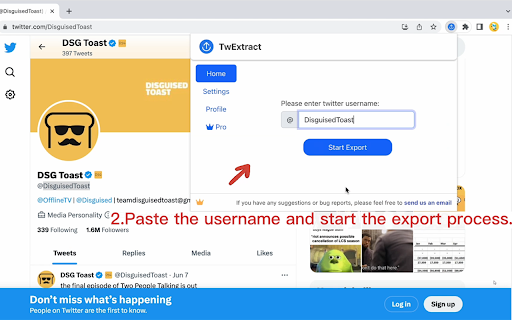
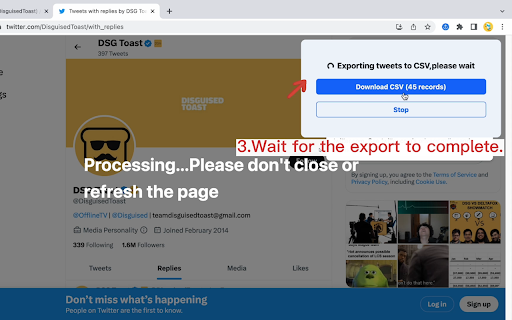
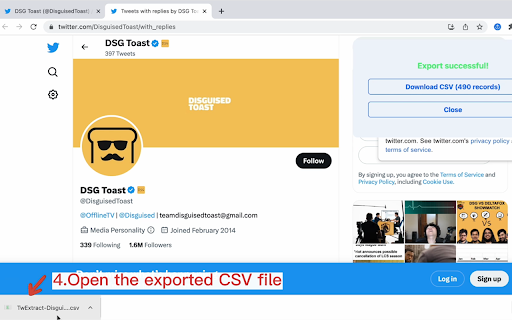

Export and download all tweets from a user to CSV/Excel for Twitter If you're looking for a way to export all the tweets of a specific Twitter user to a CSV file, you might find Twitter Exporter to be a helpful Chrome extension. With Twitter Exporter, you can quickly and easily copy and paste the Twitter username of the user you're interested in and start exporting their tweets. 🙂How it works: 1. Copy the Twitter handle(e.g., @NASA, copy NASA) and paste it into the extension. 2. If you need to export tweets from specific dates, you can select a start date and an end date. 3. Click the "Start Export" button. 📋The exported CSV file contains the following columns: 1.id: The unique identifier for the tweet. 2.tweetText: The text of the tweet. 3.tweetURL: The URL of the tweet. 4.tweetType 5.tweetAuthor 6.handle: If it is a tweet, show the tweet author's handle, and if it is a retweet, show the original author's handle of the tweet being retweeted. 7.replyCount: The number of replies to the tweet. 8.quoteCount: The number of times the tweet has been quoted. 9.retweetCount: The number of times the tweet has been retweeted. 10.likeCount: The number of likes the tweet has received. 11.views: The number of views the tweet has received.(a retweet does not include views data and will be represented by a "-") 12.bookmarkCount: The number of times the tweet has been bookmarked. 13.createdAt: The date and time the tweet was created. 14.allMediaURL: The URLs of any media (e.g., images, videos) included in the tweet. 15.videoURL: if the tweet contains a video, this URL is the source address of the highest quality video. 🔒Data Privacy: Protecting the security and privacy of user data is of utmost importance to us, and we highly value the trust of our users. Therefore, we adhere to all privacy regulations and guidelines, including the General Data Protection Regulation (GDPR) and the California Consumer Privacy Act (CCPA). 📘Disclaimer: Twitter is a trademark of Twitter, Inc. TwExtract is an independent browser extension and is not affiliated with Twitter. By using our product, users acknowledge that they have read and agreed to this disclaimer. For any questions or concerns, please contact us. 📝Changelogs: 2023/6/24 version 1.1.0:Fix bugs 2023/6/29 version 1.2.0:Fix the occasional issue of views column not appearing in the exported data 2023/8/8 version 2.0.0: 1. Added a new setting option: `scrape interval`. This allows users to set the interval for bulk fetching tweets. We recommend setting this to 15 seconds. 2. Twitter has introduced rate limits. TwExtract will now automatically handle these rate limits. You don't need to do anything - the rate limits will not affect you or your account in any way. 3. Fix bugs 2023/8/30 version 2.1.0:Fix bug 2023/8/31 version 2.2.0:Fix bug 2023/10/12 version 2.3.0:Fix bug 2023/10/15 version 2.4.0: 1. You can choose whether to include retweets in the exported CSV. 2. You can choose whether to include replies in the exported CSV 2024/1/7 version 2.5.0: 1. Add a field named 'handle' to display the user's handle; if it is a tweet, show the tweet author's handle, and if it is a retweet, show the original author's handle of the tweet being retweeted. 2. Add a field named 'videoURL'; if the tweet contains a video, this URL is the source address of the highest quality video. 3. Add the ability to select a start date and an end date to help you export tweets from specific dates. 2024/5/18 version 2.7.0: Compatible with X 2025/1/3 version 2.8.1 2025/4/30 version 2.8.2: Fix issue 2025/10/18 version 2.8.11: Fix issue 2026/2/3 version 2.9.0: Fix issue ✉️Contact us: we're constantly developing new features to make your browsing experience even better. If you have any feedback or suggestions, please don't hesitate to reach out to us at xtcodetech@gmail.com. We'd love to hear from you and improve our extension to meet your needs. Please note, TwExtract is a freemium software. You can export up to 200 tweets per export for free. You need to upgrade to export more.

TweetExtract - Export Tweet from any User
One click to export tweet and post list of any X/Twitter account, save as CSV/Excel/JSON file. Scrape and Extract tweet list of any users, Save tweet (threads / posts) list to CSV / Excel / JSON. Save tweet thread information and all analytics data, included view count, reply count, retweet count, bookmark, favorites count, quote count. 1. Enter a Tweet User link or User name 2. Click the start button V1.6.0 UPDATE - Fix the init issue V1.5.0 UPDATE - Fix the can_dm, location fields issue - Fix the user info stuck issue V1.3.3 UPDATE - Fix the 404 error issue V1.3.2 UPDATE - Fix the full text truncated issue, use retweet full text and expanded full text instead. V1.3.1 UPDATE - Added export posts, replies and highlights - Extract & Save all posts/tweets and conversations. 🔥 Upgrade ✔︎ Support X.com and Twitter.com link ✔︎ Add websites, first name and last name fields. You can find emails with domain and name by some email hunters. ✔︎ Save export history to local storage ✔︎ Continue task progress from history 👋 FAQ https://tweetexport.extensionsfox.com/#faq If you have any questions, please keep in touch via help@extensionsfox.com. 🔒 DATA PRIVACY All data is processed in your local computer, never passing through our web server, and no one knows what you save.

TwSearchExporter - Export Twitter Search Results
TwSearchExporter is a powerful tool to export Twitter search results to CSV. It supports nearly all types of search links. Simply build your search link using keywords, hashtags, or Twitter's advanced search. Then, copy the search link into our extension, and we will export all the results to CSV. This allows you to analyze tweet data, archive content, and manage your social media strategy more effectively. Features - Support nearly all kinds of search links - Export tweets from the search tabs "Top", "Latest" and "Media" - Export users from the search tab "People" - Automatically handling Twitter's rate limit - Save as CSV / Excel Note - TwSearchExporter follows a freemium model, enabling you to export up to 200 tweets or users at no cost. If additional exports are required, consider upgrading to our premium version. - Twitter imposes rate limits to manage the volume of requests to its API and prevent abuse. Typically, the most common rate limit interval is 15 minutes. However, rest assured that our app already handles these rate limits seamlessly. It will automatically pause and retry, ensuring uninterrupted exports. What type of data can you export? For the search tabs "Top", "Latest" and "Media": - Tweet ID - Tweet Text - Type - Author Name - Author Username - Creation Time - Reply Count - Retweet Count - Quote Count - Like Count - View Count - Bookmark Count - Language - Possibly Sensitive - Source - Hashtags - Tweet URL - Media Type - Media URLs - External URLs For the search tab "People": - User ID - Username - Name - Location - Category - Creation Time - Follower Count - Following Count - Tweet Count - Media Count - Like Count - Public List Count - Is Verified - Is Protected - Can DM - Can Tag in Media - Possibly Sensitive - Biography - User Homepage - Avatar URL - Profile Banner URL How to export Twitter search results with TwSearchExporter? To use our Twitter Search or Hashtag Scraper, simply add our extension to browser and create an account. Once you have signed in, you can input the search link that you want to export and click the "Export" button. The result data will be exported to a CSV or Excel file, which you can then download to your computer. Data Privacy All data is processed on your local computer, never passing through our web servers. Your exports are confidential. FAQ https://twsearchexporter.toolmagic.app/#faqs Feel free to contact us if you have any other questions. Disclaimer Twitter is a trademark of Twitter, LLC. This extension is not affiliated with or endorsed by Twitter, Inc.

Tweets2PDF - Convert All Tweets to One PDF/EPUB
Save anyone's Twitter tweets as a beautiful PDF/EPUB eBook with text copying,selection,and full-text search With our Chrome extension Tweets2PDF, you can easily save any user's tweets including images as a beautifully crafted PDF/EPUB ebook with ONE CLICK, ensuring that you never lose access to your favorite content. 🙂How it works: 1. Copy the Twitter/X handle(e.g., @NASA, copy NASA) . 2. Paste the handle into the extension. 3. You can choose a date range as needed, and then click the "Start Generate" button. 4. Select the image size for tweets. 5. Select the tweets order: old to new or new to old 6. Click the "Generate PDF Ebook" button and choose "Save as PDF," and then select your preferred paper size (usually A4,A3). For the best-looking ebook, we recommend unchecking "Headers and Footers" and checking "Background Graphics",Then click "Save". 7. Click the "Generate EPUB Ebook" button to generate a well-structured EPUB ebook with a table of contents organized by year and month 📋Features: 1.The exported PDF/EPUB will include images from tweets, with options to select the image size as small, medium, or large. Alternatively, users can choose to not display images at all. 2.You can choose between displaying tweets from oldest to newest or newest to oldest. 3.You can click on a button next to each tweet to view the original tweet on the Twitter/X website at any time. 4.Unroll multiple tweets from a thread into a single, complete tweet for improved readability. 5.The generated PDF/EPUB can be read on all devices. 6.The generated PDF/EPUB supports text selection and copying, as well as full-text search. 7.You can print the PDF/EPUB to create a physical copy of the ebook for your collection. 8.The generated EPUB ebook will have a clear table of contents organized by year and month, making it convenient to read on various devices like computers, tablets, smartphones, or e-readers like Kindle, Kobo, and Nook. 9.You can specify the start and end dates for the tweets to better control the ebook that will be generated. 10.You can view the historical records in the History tab, continue tasks that were interrupted or left unfinished due to exceptions, and also regenerate the ebook from previous task. 11. The generated PDF offers 27 color options for you to choose from, including light background and dark mode backgrounds. 🔒Data Privacy: At our company, safeguarding the security and privacy of user data is our top priority, and we deeply respect the trust our users place in us. To that end, we strictly adhere to all applicable privacy regulations and guidelines, such as the General Data Protection Regulation (GDPR) and the California Consumer Privacy Act (CCPA). 📘Disclaimer: Please be advised that Twitter is a registered trademark of Twitter, Inc. Tweets2PDF is an independent browser extension and is not in any way associated with Twitter. 👍Changelogs: 2023/7/8 version 1.1: Fix bug 2023/7/15 version 1.2: Fix bug 2023/8/22 version 1.3: Fix bug, Automatically manage Twitter's rate limit. 2023/8/30 version 1.4: Fix bug 2023/8/31 version 1.5: Fix bug 2023/9/7 version 1.6: Users now have the option to toggle on/off including retweets when exporting tweets to PDF 2023/10/10 version 1.7: Add a user interface for managing subscriptions. 2024/2/5 version 1.8: The PDF can display all images from tweets, with options for the image size to be small, medium, or large, as well as an option to not display images at all. 2024/4/26 version 1.9: Added the option to choose between displaying tweets from oldest to newest or newest to oldest.Introduced the ability to generate well-structured EPUB ebooks with a table of contents organized by year and month for easy navigation. 2024/5/8 version 2.0: Unroll multiple tweets from a thread into a single, complete tweet for improved readability and aesthetics.Displayed the unrolled thread in the correct reading order. 2024/5/17 version 2.1: Compatible with x.com 2024/8/11 version 2.4: Supports up to Unlimited tweets. 2024/10/21 version 2.5: 1. Add a date selection feature to specify the date range of tweets before starting the task. 2. Add a History tab for viewing historical records, allowing you to continue tasks that were abnormally interrupted or left unfinished, and also to regenerate ebook from previous task. 3. The generated PDF now includes 27 background color options, with both light and dark themes, and the corresponding tweet colors have been optimized for clearer reading. 2025/1/3 version 2.5.4: Fix the tweet ordering issue in the thread 2025/4/30 version 2.5.6: Fix issue 2025/10/19 version 2.5.10: Fix issue 2026/2/3 version 2.6.8: Fix issue 2026/2/28 version 2.6.9: Added monthly PDF/EPUB export (automatically splits exports by tweet date into separate files per month) 2026/4/11 version 2.7.6: Fix issue 2026/4/23 version 2.8.0: 1. Added support for updating existing tasks from History, so you no longer need to scrape everything again from scratch. 2. Added a setting to display the original tweet that each reply is replying to. 3. Added a setting to display the original quoted tweet. 2026/5/18 version 2.8.3: 1. Added a favorites feature to History, allowing users to organize their preferred records. 2. Added a table of contents feature for PDF exports. ✉️Contact us: We are always working on enhancing the experience for our users by introducing new features. Your feedback and suggestions are highly valued, and we encourage you to share them with us via email at xtcodetech@gmail.com. We are dedicated to improving our extension to meet your needs and would be delighted to hear from you.

X Twitter Scraper
Chrome extension for scraping X (formerly known as Twitter profile) The Chrome extension allows you to scrape X (formerly known as Twitter) tweets from any user to help you analyze and build your profile. With this extension, you can easily gather data on a specific user's tweets and use it to gain insights and create a more comprehensive understanding of their online presence. Whether you're a marketer looking to gather data on your competitors or a social media manager looking to better understand your audience, this extension provides a quick and convenient way to gather the information you need.
