
pejnadmicnlplkikkehepadeikcknjll
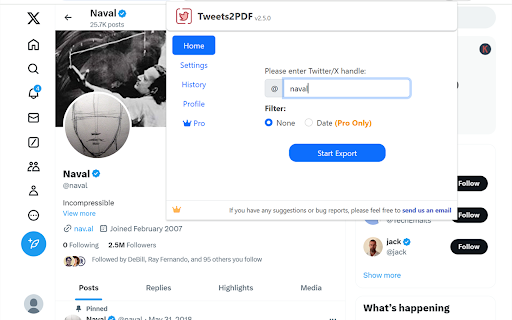


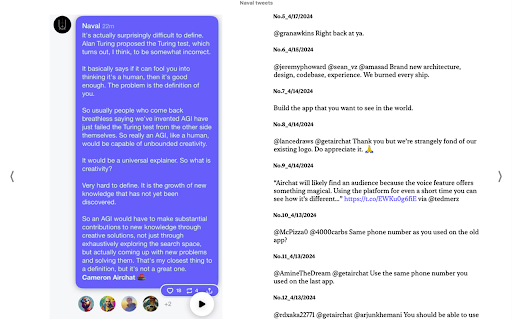
Save anyone's Twitter tweets as a beautiful PDF/EPUB eBook with text copying,selection,and full-text search With our Chrome extension Tweets2PDF, you can easily save any user's tweets including images as a beautifully crafted PDF/EPUB ebook with ONE CLICK, ensuring that you never lose access to your favorite content. 🙂How it works: 1. Copy the Twitter/X handle(e.g., @NASA, copy NASA) . 2. Paste the handle into the extension. 3. You can choose a date range as needed, and then click the "Start Generate" button. 4. Select the image size for tweets. 5. Select the tweets order: old to new or new to old 6. Click the "Generate PDF Ebook" button and choose "Save as PDF," and then select your preferred paper size (usually A4,A3). For the best-looking ebook, we recommend unchecking "Headers and Footers" and checking "Background Graphics",Then click "Save". 7. Click the "Generate EPUB Ebook" button to generate a well-structured EPUB ebook with a table of contents organized by year and month 📋Features: 1.The exported PDF/EPUB will include images from tweets, with options to select the image size as small, medium, or large. Alternatively, users can choose to not display images at all. 2.You can choose between displaying tweets from oldest to newest or newest to oldest. 3.You can click on a button next to each tweet to view the original tweet on the Twitter/X website at any time. 4.Unroll multiple tweets from a thread into a single, complete tweet for improved readability. 5.The generated PDF/EPUB can be read on all devices. 6.The generated PDF/EPUB supports text selection and copying, as well as full-text search. 7.You can print the PDF/EPUB to create a physical copy of the ebook for your collection. 8.The generated EPUB ebook will have a clear table of contents organized by year and month, making it convenient to read on various devices like computers, tablets, smartphones, or e-readers like Kindle, Kobo, and Nook. 9.You can specify the start and end dates for the tweets to better control the ebook that will be generated. 10.You can view the historical records in the History tab, continue tasks that were interrupted or left unfinished due to exceptions, and also regenerate the ebook from previous task. 11. The generated PDF offers 27 color options for you to choose from, including light background and dark mode backgrounds. 🔒Data Privacy: At our company, safeguarding the security and privacy of user data is our top priority, and we deeply respect the trust our users place in us. To that end, we strictly adhere to all applicable privacy regulations and guidelines, such as the General Data Protection Regulation (GDPR) and the California Consumer Privacy Act (CCPA). 📘Disclaimer: Please be advised that Twitter is a registered trademark of Twitter, Inc. Tweets2PDF is an independent browser extension and is not in any way associated with Twitter. 👍Changelogs: 2023/7/8 version 1.1: Fix bug 2023/7/15 version 1.2: Fix bug 2023/8/22 version 1.3: Fix bug, Automatically manage Twitter's rate limit. 2023/8/30 version 1.4: Fix bug 2023/8/31 version 1.5: Fix bug 2023/9/7 version 1.6: Users now have the option to toggle on/off including retweets when exporting tweets to PDF 2023/10/10 version 1.7: Add a user interface for managing subscriptions. 2024/2/5 version 1.8: The PDF can display all images from tweets, with options for the image size to be small, medium, or large, as well as an option to not display images at all. 2024/4/26 version 1.9: Added the option to choose between displaying tweets from oldest to newest or newest to oldest.Introduced the ability to generate well-structured EPUB ebooks with a table of contents organized by year and month for easy navigation. 2024/5/8 version 2.0: Unroll multiple tweets from a thread into a single, complete tweet for improved readability and aesthetics.Displayed the unrolled thread in the correct reading order. 2024/5/17 version 2.1: Compatible with x.com 2024/8/11 version 2.4: Supports up to Unlimited tweets. 2024/10/21 version 2.5: 1. Add a date selection feature to specify the date range of tweets before starting the task. 2. Add a History tab for viewing historical records, allowing you to continue tasks that were abnormally interrupted or left unfinished, and also to regenerate ebook from previous task. 3. The generated PDF now includes 27 background color options, with both light and dark themes, and the corresponding tweet colors have been optimized for clearer reading. 2025/1/3 version 2.5.4: Fix the tweet ordering issue in the thread 2025/4/30 version 2.5.6: Fix issue 2025/10/19 version 2.5.10: Fix issue 2026/2/3 version 2.6.8: Fix issue 2026/2/28 version 2.6.9: Added monthly PDF/EPUB export (automatically splits exports by tweet date into separate files per month) 2026/4/11 version 2.7.6: Fix issue 2026/4/23 version 2.8.0: 1. Added support for updating existing tasks from History, so you no longer need to scrape everything again from scratch. 2. Added a setting to display the original tweet that each reply is replying to. 3. Added a setting to display the original quoted tweet. 2026/5/18 version 2.8.3: 1. Added a favorites feature to History, allowing users to organize their preferred records. 2. Added a table of contents feature for PDF exports. ✉️Contact us: We are always working on enhancing the experience for our users by introducing new features. Your feedback and suggestions are highly valued, and we encourage you to share them with us via email at xtcodetech@gmail.com. We are dedicated to improving our extension to meet your needs and would be delighted to hear from you.

Web to PDF
Use Web to PDF converter to save a web page as a pdf and download it instantly. Perfect for offline reading and sharing. 📃 Looking for a quick and reliable way to save a web page as pdf? This chrome extension is a web to pdf converter, perfect for anyone who needs to download content for offline access, sharing, or archiving. With just a single click, convert a web page to pdf without hassle: ✅ Preserve Styles and Links: Keeps original styles and clickable links. ✅ Flexible Layouts: Choose page breaks or a single-page format. ✅ High Quality: Uses Chrome’s PDF tool for fast, clear results. ✅ Secure: Saves directly to your device, protecting privacy. If you’re looking to save a web document to pdf, this tool makes it easy with smooth, intuitive functionality. All images, links, and formatting remain intact, giving you a faithful reproduction of the web content in one file. 💡 How to Use Web Page to PDF Converter 1️⃣ Open the web page you want to save. 2️⃣ Click on the Web to PDF extension icon. 3️⃣ Select Format to set the view size. 4️⃣ Choose Layout for page breaks or a single page. 5️⃣ Download your PDF — your file is ready in seconds! 📄 Tips for Best Conversions 1. Ensure the page loads fully before converting. 2. Adjust format and layout settings for optimal page fit. 3. Avoid pop-ups or overlays, as they may appear in the PDF. 4. Refresh the page if the first conversion doesn’t capture everything accurately. 💡 Why Save Internet Page to PDF? ◆ Access files offline anytime ◆ Share content without needing internet access ◆ Archive page for future reference ◆ Print web content easily in a structured format Web to pdf extension is the easiest way to convert web page to pdf quickly, ensuring you don’t lose valuable content or formatting. Almost anyone! This tool is ideal for: 1) Students who need to reference articles and papers 2) Professionals who want to save web data for reports 3) Researchers who need offline access to resources 4) Bloggers and writers who save content inspiration Imagine the convenience of accessing all your important web content as pdf files. You no longer need to bookmark endless links or worry about pages disappearing. Just convert the webpage to pdf and keep everything organized and secure. ❓ How to save a page as a PDF? 👉 Open the page, click the extension icon, choose settings, and save webpage as pdf. ❓ Will the file look like the original webpage? 👉 Yes, we ensure that your document retain the look and feel of the original. ❓ Does this extension work offline? 👉 Once a web document is saved, you can access it offline If you see a notice about the developer console, don’t worry — it’s simply due to Web to PDF using Chrome’s own PDF-printing system. Chrome provides an optimized, high-quality conversion method that outperforms other PDF tools in quality and speed. This message is a standard notification for Chrome extensions that use advanced browser functions. While screenshots capture images, PDFs provide a more functional and versatile way to save web pages. Here’s why this extension is the superior choice: ➤ Selectable Text: Easily select, copy, and highlight text. ➤ Clickable Links: Keep all links active for quick access. ➤ Accurate Layouts: Preserve the page’s original look and feel. ➤ Custom Page Options: Choose page breaks or single-page view. ➤ High Quality: PDFs retain clarity and detail better than screenshots. ✳️ News Articles: Save important news articles before they get archived or moved behind a paywall. ✳️ Legal Documents: Keep copies of terms and conditions, privacy policies, or legal agreements. ✳️ Receipts and Confirmations: Save confirmation pages after online transactions for your records. ✳️ Recipes: Save cooking recipes with all the links and notes intact for your culinary adventures. ✳️ Event Information: Capture details of events, schedules, or tickets for easy access. Whether you need a web page to pdf converter for work, school, or personal use, this extension is here to help. Get started today and discover the easiest way to download a web page as a PDF whenever you need it.

Tweet Copier - Copy Twitter / X Threads
Copy tweets and full X (Twitter) threads in one click. Instantly save clean text for research, notes, writing, and archiving. Tweet Copier is a Chrome extension that lets you copy tweets and entire Twitter/X threads instantly with one click. Save clean, structured tweet text directly to your clipboard for research, writing, archiving, or reuse. 🚀 Key Features ✅ Copy Single Tweet Instantly copy the full text of any tweet, including quoted tweets and emojis. Copy tweet text instantly without screenshots or manual selection. ✅ Copy Twitter / X Threads Automatically detects and copies the entire thread by the same author. ✅ Auto-Scroll for Long Threads Loads hidden tweets so you can copy long Twitter threads in one click. ✅ Clean, Structured Formatting Preserves emojis, line breaks, and auto-numbers tweets (e.g., 1/12, 2/12). ✅ Native X Integration Adds Copy and Thread buttons directly to the X action bar (left of Grok). 👨💻 Who This Is For Content Creators – Save tweets and threads for blogs, newsletters, or social media. Researchers & Students – Archive Twitter discussions and primary sources. Journalists – Preserve tweets and threads before edits or deletion. How to Use - Install Tweet Copier. - Refresh X (Twitter). - Click Copy or Thread on any tweet. - The tweet text is copied instantly to your clipboard. 🔒 Privacy-First Twitter Extension No data collection No tracking or analytics No external servers Runs entirely locally Tweet Copier does not automate engagement, modify content, or interact with your account. It only reads tweet text you explicitly choose to copy.

Free PDF Editor & Reader — Compress, Merge, Convert PDFs · PDFly
PDFly extension gives you everything you need to work with PDF files — right inside Google Chrome and easy-to-use. • PDF reader with smooth scrolling and zoom controls • Handle large PDF files with optimized rendering • Navigate via Thumbnails, Bookmarks, or Headlines • Annotate PDF - add comments, highlights, text, and free hand drawings • View PDF comments, reply and add new comments • Fill PDF forms with automatic form detection • PDF to Word (DOCX) converter including OCR • Word to PDF - create PDF from Word documents instantly • PDF to JPG and JPG to PDF conversion • PDF to PNG and PNG to PDF transformation • PDF to Excel for data extraction and editing • Batch mode to convert multiple files at once • Merge PDF files - combine multiple PDFs into one document • Split PDF - separate large PDFs into smaller files • Extract PDF pages - save specific pages as new documents • Rotate PDF pages and delete unwanted pages • Reorder PDF pages with drag-and-drop simplicity • Delete PDF pages - delete any PDF page from your PDF document • Reduce file size while keeping quality • See preview which files require optimization • Choose from two advanced compression levels • Option to preserve Metadata, Bookmarks, Annotations and advanced PDF compatibility • Batch mode to compress multiple files at once • Password protect PDF files with encryption • Custom allow printing, text copying, form filling even for password-protected PDF • Unlock PDF - remove password protection from secured files • Secure PDF sharing with built-in protection • 256-bit encryption as standard • Batch mode to password-protect multiple files at once • Translate PDF - translate entire documents to 50+ languages with auto-detection of document language • Copy the translated output • Translations are processed securely using cloud connectivity • Summarize PDF - get instant AI summaries of long documents • Choose summary length, focus of summary (general, technical points, key points) and output langauge • Summaries are processed securely using cloud connectivity PDF editor, PDF reader, PDF converter in one app Replace multiple PDF tools with this single solution Compatible with Adobe PDF standards and all PDF formats Handle large PDF files with optimized rendering Batch process multiple PDF documents simultaneously Modern, intuitive interface designed for Windows Free: Unlimited free PDF reader and all basic PDF editing tools Pro: Advanced options, batch mode, no ads, AI tools (summaries, translate, OCR), unlimited files

Convert: Web to PDF — Save Any Webpage as PDF
Convert any webpage into a clean, high-quality PDF — right from your browser. No servers. No uploads. No data collection. Every conversion runs entirely on your device using Chrome’s built-in rendering engine, so your data never leaves your machine. Unlike most web-to-PDF tools, this generates real PDFs — not screenshots. That means selectable text, working links, proper formatting, and consistent layout across pages. Most extensions fall into one of three traps: • They generate low-quality, screenshot-based PDFs • They send your page data to external servers • They hide basic features behind a paywall You get fast, high-fidelity PDFs with full control — completely free and fully local. • One-click conversion — click the icon or press Ctrl+Shift+P • 7 page sizes — A3, A4, A5, Letter, Legal, Tabloid, Ledger • Portrait or Landscape orientation • Adjustable margins — None, Minimal, Normal, Wide • Scale from 25% to 200% • Include or exclude background graphics • Optional headers & footers (title, URL, page numbers) 🧹 CLEAN UP BEFORE YOU CONVERT • Remove Elements — click anything to remove ads, popups, or clutter • Undo changes instantly (Ctrl+Z) • Article Mode — extract only the main content (no navigation, no noise) • Hide Sticky Elements — remove floating headers and banners • Load All Images — ensures lazy-loaded images appear in your PDF 👀 PREVIEW BEFORE YOU SAVE ⚡ BUILT FOR SPEED • Right-click → Convert page, selection, or link • Keyboard shortcuts: - Ctrl+Shift+P → Convert page - Ctrl+Shift+S → Article mode 🔒 YOUR DATA STAYS ON YOUR DEVICE This matters — many popular tools send your page content to external servers. If you're converting sensitive data (financial reports, internal dashboards, legal documents), local processing isn’t optional. It’s essential. 👥 WHO THIS IS FOR • Students saving research and notes • Professionals exporting reports and dashboards • Legal teams preserving web evidence • Researchers archiving papers • Journalists saving pages before they change • Anyone who wants clean PDFs without paying monthly Convert unlimited pages with full customization — completely free.
