
aokgkfmlcopoihbnjjobmkkebimoklim

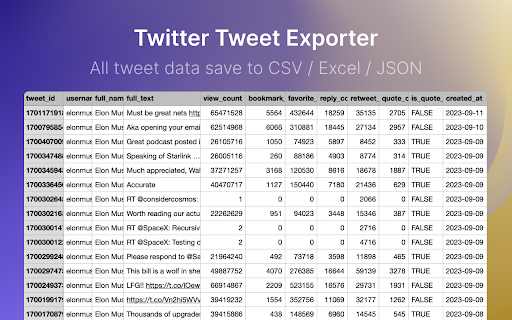
One click to export tweet and post list of any X/Twitter account, save as CSV/Excel/JSON file. Scrape and Extract tweet list of any users, Save tweet (threads / posts) list to CSV / Excel / JSON. Save tweet thread information and all analytics data, included view count, reply count, retweet count, bookmark, favorites count, quote count. 1. Enter a Tweet User link or User name 2. Click the start button V1.6.0 UPDATE - Fix the init issue V1.5.0 UPDATE - Fix the can_dm, location fields issue - Fix the user info stuck issue V1.3.3 UPDATE - Fix the 404 error issue V1.3.2 UPDATE - Fix the full text truncated issue, use retweet full text and expanded full text instead. V1.3.1 UPDATE - Added export posts, replies and highlights - Extract & Save all posts/tweets and conversations. 🔥 Upgrade ✔︎ Support X.com and Twitter.com link ✔︎ Add websites, first name and last name fields. You can find emails with domain and name by some email hunters. ✔︎ Save export history to local storage ✔︎ Continue task progress from history 👋 FAQ https://tweetexport.extensionsfox.com/#faq If you have any questions, please keep in touch via help@extensionsfox.com. 🔒 DATA PRIVACY All data is processed in your local computer, never passing through our web server, and no one knows what you save.

X Scraper
Introducing a specialized Chrome add-on crafted for content extraction from X (formerly known as Twitter profiles). This innovative Chrome extension empowers users to efficiently retrieve tweets from X (previously identified as Twitter) accounts, streamlining comprehensive analysis and profile construction. By utilizing this extension, users can effortlessly amass data on an individual's tweet activity, facilitating the extraction of valuable insights and the development of a nuanced understanding of their online presence. Whether you're a marketer seeking to gather competitive intelligence or a social media strategist looking to unravel the intricacies of your target audience, this extension stands as a prompt, intuitive tool for acquiring the necessary information.

TwQuoteExport - Export X/Twitter Quotes
One click to export quote list of any x/twitter tweets to CSV/Excel/JSON. scrape and save x.com quotes. Scrape and Extract quote list of any tweet, Save quote tweet content and user info list to CSV / Excel / JSON. HOW TO USE? 1. Enter a X/Tweet link 2. Click the start button v1.5.0 CHANGE LOG - Add realtime check if a user can receive DM from your account. - Fix the init issue. v1.3.0 CHANGE LOG - Fix can_dm, location fields issue - Fix the user info stuck issue v1.1.1 CHANGE LOG - Fix the 404 error issue 🔥 Upgrade ✔︎ Support X.com and Twitter.com tweet links. ✔︎ Add websites, first name and last name fields. You can find emails with domain and name by some email hunters. 👋 FAQ https://twquotesexport.extensionsfox.com/#faq If you have any questions, please keep in touch via help@extensionsfox.com. 🔒 DATA PRIVACY All data is processed in your local computer, never passing through our web server, and no one knows what you save.

TwExportly: Export Tweets From Any Account
TwExportly is a Chrome extension for Twitter, allows you to export & download tweets from any account into an CSV or Excel file. 🎉 While Twitter/X only permits downloading of your own tweet archive, TwExportly enables effortless exporting and downloading of tweets from any Twitter/X account. After downloading, you can export the details of each tweet to CSV for further analysis and use. The CSV file would include finely detailed information such as the text of the tweet, the number of likes and retweets it has received, the tweet type, whether it contains rich media, and the time it was created, among other details. 🎯 How it works 1. Enter a Twitter username 2. Click the export button 🔒 Data Privacy All data is processed in your local computer, it is never passing through our web server, no one knows what you exported. 📄 Terms TwExportly is a freemium app. You can use it for free with certain limitations. You can upgrade to the Premium version on a subscription basis. 🆕 Changelog v2.26 fixed some bugs v2.25 fixed some bugs v2.23 fixed some bugs v2.7 fixed some bugs v2.5 You can now filter tweets by date. v2.3 fixed bugs v2.2 new features: - auto download - wait and retry if rate limit v2.0 fixed bugs v1.9 fixed some bugs

TwSearchExporter - Export Twitter Search Results
TwSearchExporter is a powerful tool to export Twitter search results to CSV. It supports nearly all types of search links. Simply build your search link using keywords, hashtags, or Twitter's advanced search. Then, copy the search link into our extension, and we will export all the results to CSV. This allows you to analyze tweet data, archive content, and manage your social media strategy more effectively. Features - Support nearly all kinds of search links - Export tweets from the search tabs "Top", "Latest" and "Media" - Export users from the search tab "People" - Automatically handling Twitter's rate limit - Save as CSV / Excel Note - TwSearchExporter follows a freemium model, enabling you to export up to 200 tweets or users at no cost. If additional exports are required, consider upgrading to our premium version. - Twitter imposes rate limits to manage the volume of requests to its API and prevent abuse. Typically, the most common rate limit interval is 15 minutes. However, rest assured that our app already handles these rate limits seamlessly. It will automatically pause and retry, ensuring uninterrupted exports. What type of data can you export? For the search tabs "Top", "Latest" and "Media": - Tweet ID - Tweet Text - Type - Author Name - Author Username - Creation Time - Reply Count - Retweet Count - Quote Count - Like Count - View Count - Bookmark Count - Language - Possibly Sensitive - Source - Hashtags - Tweet URL - Media Type - Media URLs - External URLs For the search tab "People": - User ID - Username - Name - Location - Category - Creation Time - Follower Count - Following Count - Tweet Count - Media Count - Like Count - Public List Count - Is Verified - Is Protected - Can DM - Can Tag in Media - Possibly Sensitive - Biography - User Homepage - Avatar URL - Profile Banner URL How to export Twitter search results with TwSearchExporter? To use our Twitter Search or Hashtag Scraper, simply add our extension to browser and create an account. Once you have signed in, you can input the search link that you want to export and click the "Export" button. The result data will be exported to a CSV or Excel file, which you can then download to your computer. Data Privacy All data is processed on your local computer, never passing through our web servers. Your exports are confidential. FAQ https://twsearchexporter.toolmagic.app/#faqs Feel free to contact us if you have any other questions. Disclaimer Twitter is a trademark of Twitter, LLC. This extension is not affiliated with or endorsed by Twitter, Inc.
