
pbafopkihldjbcececbibklapleogfdf

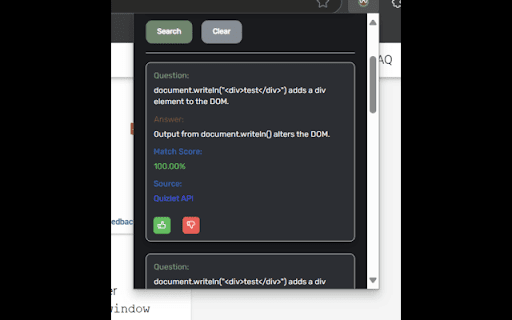


Ask WinkWink and rapidly find answers to quiz and study questions! 🎓 **WinkWink Search 2.0** - Your Comprehensive Answer Finder via Quizlet & More 🌟 WinkWink Search 2.0 is a powerful Chrome extension that transforms your study sessions by providing instant access to Quizlet flashcards and study set all in a sleek, user-friendly interface built with React and Mantine. Whether you're researching for exams/homeowrk or satisfying a sudden burst of curiosity, WinkWink 2.0 has you covered! 🌐 **Intuitive Search Options:** • ➡️ **Manual Input:** Type your question directly into the search box and hit **Search** for immediate results. • 👉 **Right-Click Context:** Simply highlight text anywhere on a webpage, right-click, and select **Search with Wink** for on-the-spot answers. 🎨 **Customizable Results Display:** • 🎚️ **Adjustable Matches:** Use the slider in settings to decide how many matching answers or study sets get displayed. • 💡 **Detailed Result Cards:** Each card shows the question, answer, match score, and source with interactive hover details for extra insights. 👍 **User Feedback & Real-Time Updates:** • ✨ (Beta) **Instant Feedback:** Like or dislike results with a tap, helping to refine future searches. • 🔔 **Live Notifications:** Receive real-time alerts when searches complete or if errors occur for a smooth experience. 👁️🗨️ **Enhanced Viewing Modes:** • 🌙 **Dark Mode:** Toggle a comfortable dark theme for those late-night study sessions. • 👻 **Hidden Mode:** Activate to minimize clutter and focus solely on the content behind the Floating UI. • 🖥️ **Floating UI Mode:** Enable a floating search icon that stays accessible on any webpage. ⚙️ **Easy Settings & Support:** • 🔧 **Customizable Settings:** Quickly adjust display options, search parameters, and interface modes in the settings drawer. • ❓ **In-App Help:** Access a detailed help modal with step-by-step instructions to make the most of all features. • 💖 **Donate & Support:** Enjoying WinkWink? Consider donating to support ongoing development! 🔒 **Legal Notice:** WinkWink Search 2.0 is designed solely as a study tool to enhance your learning experience. It accesses publicly available data from Quizlet and other sources. **Important:** This tool must be used in accordance with academic integrity guidelines and is not intended to facilitate cheating on any exams, tests, or assignments. ✨ **Elevate your study game** with WinkWink Search 2.0 experience a smarter, faster, and more personalized way to find the answers you need, all without switching tabs!

Quizlet Live Autocomplete Bot Pro
Solve Quizlet Live questions automatically with Quizlet Live Autocomplete Bot Pro, the best Quizlet Live hacker bot around! Overview: Quizlet Live Autocomplete Bot Pro is a Chrome extension designed to enhance performance during Quizlet Live games by providing automated answer suggestions. Ideal for students seeking to optimize their learning experience, this extension quickly identifies correct answers, allowing users to focus on learning more efficiently. • Automated Answer Selection: The extension analyzes questions and suggests or selects the correct answer with a simple click of the “Get Answer” button, streamlining the Quizlet Live experience. • Study Set Compatibility: Works seamlessly with both small and large study sets, even when terms have multiple definitions. Compatible with both Term → Definition and Definition → Term game modes. • User Interface: The extension features a clean, intuitive interface accessible via a browser toolbar popup, where users can configure the study set and monitor extension status. 1. Install the extension. 2. Click the extension icon and paste the link to the study set used in your Quizlet Live game. 3. When the game starts, click the “Get Answer” button to receive answer suggestions.

Canvas Hack
Cheat on quizzes easily, and maintain a low-profile on all Canvas tests. Introducing the Canvas Hack, an extension which allows any student to side-step canvas cheating detection. It prevents your teacher or professor from detecting tab switching, window switching, or any similar actions during Canvas quizzes and tests. You can also save your correct answers in quizzes with multiple attempts, allowing you to retake tests with ease. This extension has been rigorously tested to make sure that you are 100% cloaked on Canvas while this extension is activated. Join 2,000+ students acing their tests effortlessly with the CanvasHack! All CanvasHack features/hacks: - Tab Detection Bypass: Prevents Canvas from detecting when you leave the testing tab. - Undetectable Activity: Makes all actions on Canvas appear normal, even when cheating. - Split Screen Bypass: Allows for split-screen usage without detection. - Automatic Activation: The CanvasHack is able to be used right after activation, no waiting around! - Save Feature: Saves correct answers from previous quiz attempts for reuse on later retakes. - Kiosk Mode: Mimics the Canvas kiosk app within the browser, for students who need to spoof the app and cheat undetected. - Extensive Testing: Successfully tested by over 80 college and high school students, plus 7,000 beta testers and not a SINGLE report of the CanvasHack not working. - Cross-Domain Support: Works on ALL Canvas website domains/urls, all college urls, including non- .instructure.com ones. Everything above is activated directly upon installing the extension and purchasing the cheap subscription or one time payment✌️(for more details visit the CanvasHack website listed below ↘️) Learn more about the extension at: https://canvashack.com/ In order to book a call to test the CanvasHack before purchasing, join the discord server linked below, you'll able to see the tool working 1-on-1! If you have any questions/issues feel free to contact the development team through discord -> (https://discord.gg/eEWFw9th8D) Full YouTube Video Demo with Teacher & Student POV. Displays results cheating with & without the CanvasHack activated: https://www.youtube.com/watch?v=IX1TamSlnj8 Disclaimer: Canvas Hack is an unofficial tool and is not endorsed by or affiliated with any educational institution, including Canvas™. All trademarks belong to their respective owners. Canvas™ is a trademark of Instucture® Inc.

Homework Helper - Study, Quiz, & Test Answers Solver with AI
Get INSTANT answers to homework, quizzes, and tests. Private. ALL websites work including Canvas, BlackBoard, McGrawHill, D2L Want to get answers and study help in a click? Get INSTANT answers with homeworkhelper+. Never have to search for answers again. HomeworkHelper+ gives you answers to your homework, quiz, and test questions directly on your screen with the click of a button. Take it for a test drive! **NEW HIGHLIGHT/RIGHT CLICK & ASK FEATURE is universal It's even free to download and try out! Take it for a test drive. You see, it uses datasets and AI to get the right answer and display it on your screen. It's smart. It's passed AP exams, the bar exam, and medical exam with flying colors. Pass with ease = no stress. If you are interested in checking yourself or getting answers, then this could be for you. It works on all question types: Multiple choice, true or false, it even will provide answers for essay / free response questions. NEW RIGHT CLICK & ASK FEATURE is universal and works on all platforms and websites (including Canvas, McGrawHill, Blackboard, Moodle, D2L, and more). The extension is downloaded right on your web browser so it is private and discrete (no one will know unless you tell them) so no need to worry about privacy. So, if you're interested in getting answers or using it to check your gut, go ahead and download Homework Helper+ by clicking the "add to chrome" button above now. So go ahead and give it a go. You could be using it in less than 30 seconds from now. Simple click the "add to chrome" on this screen now. We hope you like it (but are pretty confident you will based on our current student reviews and customer service:) ) Our team is here to help with any questions that come up (we send a video tutorial after you download it). See you on the other side! Note From Developer Team: Some people have reported problems seeing/using the extension, make sure you "refresh" after you download to ensure it works. This resolves any potential issues reported by customers and ensures it works for you. Go ahead and give it a try! November 2025: - Text and description update September 2025: - Text and description update February 2025: - Fixed issues customers reported around extension not working - Additional updates and bug fixes based on feedback November 2024: - Updates and bug fixes based on user feedback March 2024: 1.1.1 - Updated pop up and design to be tell user how to user right click feature. March 2024: 1.0.9: - Ugraded highlight and right click feature to work better across ALL websites for students. - Updated highlight and right click answer popup design to work on McGraw Hill, Blackboard, D2L and more. - Increased answer accuracy December 2023: 1.0.8: - Added highlight and right click feature to work across all website - Updated design to be more intuitive and fix bug issues. It's like your own homeworkhelper answersai quizmate quiz whiz study buddy transcript virtual professor quizlet canvas quiz tool chrome extension homework helper answers ai coursology studdybuddy study fetch AI plugin my jot bot jenniai homeworkhelper+ sidekick!

Quizzard
Quick and easy tool to rapidly search for homework questions, definitions and quiz answers. Quizzard is a browser extension that allows you to rapidly search for questions and answers from thousands of different study sets using the widely popular online study website application, Quizlet. Quickly check your homework or find answers to tests and exam questions by simply searching your question and hitting enter! Quizzard is the ultimate tool for students taking online classes due to COVID-19 😷. Use Quizzard to find, study, and ace those online tests, quizzes, and exams in a matter of seconds! Search with incredible accuracy and sort answers by confidence. Use Quizzard to find multiple solutions and automatically pick the most confident results. Tired of copy and pasting? Right-click on a phrase and rapidly search for answers in the background! Quizzard is a browser extension search tool that is solely intended to assist users in rapidly finding Quizlet-hosted question sets. It is strictly prohibited to use this tool to facilitate any form of academic misconduct on assessed material as follows, but not limited to: quizzes, tests, exams, and alike.
