
pamimfbchojeflegdjgijcgnoghgfemn
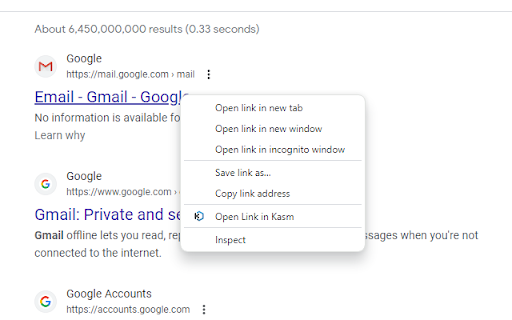

Kasm - Open in Isolation , provides users a convenient way to open links inside a Kasm Workspaces session. The page is rendered inside the Kasm session, allowing users so safely interact with the webpage. None of the site's code runs on the user's computer only safely inside the remote Kasm session.

Joplin Web Clipper
Capture and save web pages and screenshots from your browser to Joplin. This is a web clipper that allows you to save web pages to Joplin and take screenshots while you're browsing the internet. You can either save complete web pages or simplified versions of it. You will need the Joplin desktop application to use this extension.

GNOME Shell integration
This extension provides integration with GNOME Shell and the corresponding extensions repository https://extensions.gnome.org You MUST install native connector for this extension to work. For Arch Linux, Debian, Fedora, Gentoo and Ubuntu you can install package named "chrome-gnome-shell". You also can install connector manually. See https://gnome.pages.gitlab.gnome.org/gnome-browser-integration/pages/installation-guide.html for install instructions.

Shodan
The Shodan plugin tells you where the website is hosted (country, city), who owns the IP and what other services/ ports are open. The Shodan plugin for Chrome automatically checks whether Shodan has any information for the current website. Is the website also running FTP, DNS, SSH or some unusual service? With this plugin you can see all the info that Shodan has collected on a given website/ domain.

Passbolt - Open source password manager
Passbolt extension for the open source password manager for teams. Passbolt is an open source password manager designed for collaboration. You can securely generate, store, manage and monitor your team credentials. Get access to all of your logins and passwords from multiple browsers or even your mobile phone. Create strong random passwords, thanks to the fully customizable password generator, and share them instantly with your team. Passbolt is built on top of an open API made for developers and agile teams. Passbolt is extensible and yet usable by everyone. No technical knowledge is required to use it. This is why Passbolt is trusted by small businesses, as well as government offices, regulated industries, and privacy-conscious organizations: Boost collaboration & productivity: - Easily share one password, or a folder with a single user or a group of users; - Use personal or shared tags to identify passwords and secrets; - Give specific access rights to a user or group; - Get detailed reporting on access & change history. Security by design. Audited and certified: - True end-to-end encryption; - Interoperable cryptography based on OpenPGP; - Full control your own encryption key; - Access revocation that actually works; - Regularly audited by independent auditors. Made in Europe. Privacy by default: - Host it in our cloud, located in Europe; - Or self-host it for full data ownership; - No tracker, no strings attached. Passbolt source code comes under an AGPL license (yes even the commercial version) and is publicly available. You are free to audit it, contribute to it, or redistribute it. This add-on is required to use the software, in order to provide advanced security features as well as functionality such as password auto filling on web pages. Get started now: https://www.passbolt.com/cloud/signup Check the source code: https://github.com/passbolt
