
pabnknalmhfecdheflmcaehlepmhjlaa
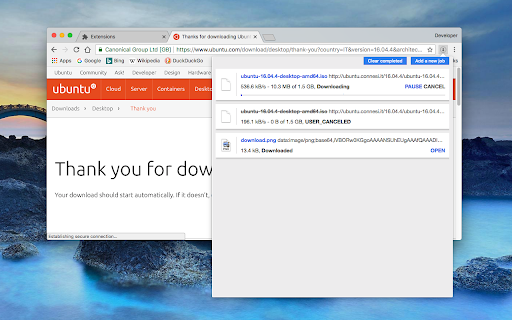
A download manager with speed acceleration, site spider, dynamic segmentation, resume, pause, and download recovery "Turbo Download Manager" (edition 3) is a download management extension that employs multi-threading techniques and incorporates an embedded HTML spider for extracting video, audio, and image content from web pages. Much like IDM (Internet Download Manager) and JDownloader, this extension includes a feature to enhance download speeds by fetching multiple file segments simultaneously. This downloader is written entirely in JavaScript and does not rely on external dependencies. Features: 1. Resume and Error Recovery: You can resume downloads and recover from interruptions, such as lost connections, computer shutdowns, or unexpected power outages, without restarting from scratch. 2. Pause Active Tasks: Pause ongoing downloads when necessary to reduce network traffic. 3. Dynamic Segmentation and Speed Boost: Turbo Download Manager divides files into multiple sections and downloads them concurrently within an internal IndexedDB database, ensuring optimal download speeds regardless of your connection type. 4. Enhanced Media File Support: It includes an internal HTML spider module for detecting media content like videos, audio, and images. 5. Integrated M3U8 Parser and Live Stream Downloader: This tool supports HLS (HTTP Live Streaming) and features AES-128 decryption capabilities. 6. Custom "Referrer" Header Support: You can specify custom "Referrer" headers for download jobs. Whether you want to accelerate your download speeds or enhance download stability on unreliable networks, this download manager integrates with your browser's download manager to provide a smooth experience.

Turbo Download Manager (Classic)
a download manager with multi-threading support Key Features: 1. Speeds up downloads (speed depends on the number of segments and your network capacity) 2. Allows resuming interrupted downloads by introducing fresh links 3. Supports downloading from multiple sources 4. Permits previewing media files while they are being downloaded 5. Extensible and accessible from other extensions and applications 6. Open source and free Please note that this extension is still under development. For bug reports, kindly submit them to https://github.com/inbasic/turbo-download-manager/issues How to Use: Right-click on any link, image, video, or audio element, then select the "Download Now" option. The download manager interface will open, enabling you to initiate the download. Difference between "Turbo Download Manager (3rd Edition)" and "Turbo Download Manager (Classic)" extensions: The classic version of this downloader is the initial edition developed as a Chrome app. As Chrome Apps are deprecated, it has been transitioned to the manifest v3 extension platform.

Download with Download Accelerator Plus (DAP)
Send download links to the DAP download manager by interrupting the built-in download manager or using the right-click context menu This extension integrates the well-known DAP (SpeedBit's Download Accelerator Plus) download manager to your browsers at different levels. DAP Features: 1. Pause and Resume: Resume broken or interrupted downloads and resume all paused downloads at once 2. Download Security: Know if the file you downloaded is safe before you open it! 3. Mirror Sites Speed Boost: Search for the fastest download sources and switch to faster mirror sites while downloading Usage: 1. Simple use: right-click over a link, image, audio, or video element and select "Download with DAP" options. 2. Advanced usage: You can get links from the current page or a selected area. You may also pass downloading jobs to the DAP manager by interrupting the built-in download manager. In case the download URL is not supplied directly by a website, this option is handy. 3. You can enable and disable the interruption feature directly from the browser action button. Notes: 1. For the extension to work, you need to have Download Accelerator Plus (DAP) installed; http://www.speedbit.com/dap/ 2. For the extension to be able to start Download Accelerator Plus (DAP) and communicate with it, a small native client is required. This native client can be found at https://github.com/belaviyo/native-client/releases. You will get instructions on how to install this native client when the extension tries to communicate for the first time. 3. Even without the native client, this extension works if you manually start DAP once. The extension uses the DAP's HTTP server to communicate with this download manager.

Elite Download Manager
Easily manage all your downloads from toolbar popup! Elite Download Manager is an extension that lets you easily access the download library from the browser toolbar popup. You can manage all downloads without opening the download tab in your browser. Using this add-on could save you time while you are browsing as it gives you quick access to all your downloaded items from the toolbar popup UI. Please note that what happens in the popup gets updated in the download library simultaneously and vice-versa. There are also several buttons for each item within the toolbar that have a tooltip title and are self-explanatory. If you want to report bugs or have a feature request, please fill out the bug report form on the addon's homepage (https://mybrowseraddon.com/download-manager.html).

Download Tools - Multi threaded
Multi-threaded download utility with aria2 engine for your browser! Download Tools is a simple and yet powerful add-on that allows you to easily download files with a multi-threaded technique in your browser. It uses an open-source software called - aria2. According to the aria2 website (https://aria2.github.io/), it is a lite multi-protocol and multi-source command-line download utility. It supports HTTP/HTTPS, FTP, SFTP, BitTorrent and Metalink. This add-on uses nativeMessaging (https://developer.chrome.com/apps/nativeMessaging) technology to communicate with aria2 utility on your machine. Before using this add-on, you need to have aria2 executable on your system. You also need the native-client patch to build the communication between aria2 and your browser. First, please visit this (https://github.com/aria2/aria2/releases) page to download and install the aria2 engine on your system. Then, please visit this (https://github.com/alexmarcoo-nt/open-in-native-client/releases) GitHub repo and download the related patch for your machine. Follow the instruction in the above GitHub page to install the patch in your system. After installing, download tools add-on in your browser can communicate with aria2 client on your machine (Window, Linux, or Mac). If you have a feature request or found a bug to report, please fill the bug report form in the add-on's homepage (https://mybrowseraddon.com/multithreaded-download-manager.html).
