
paahiifbajkfokamacmmaakejigmgoke

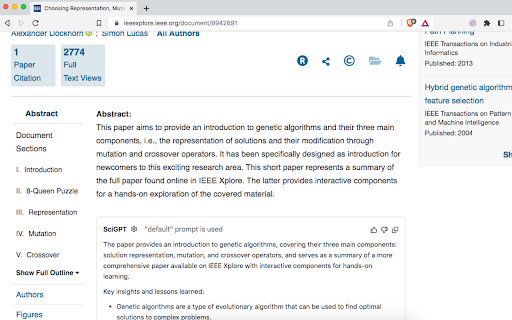
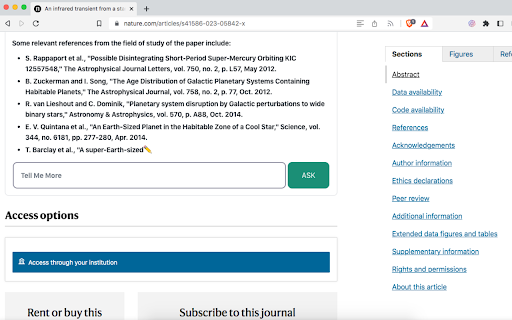


Summarize a scientific paper on journal's websites and provide key insights using ChatGPT. Generates insights, suggestions, questions and references when you browse a paper on a scientific journal website like Arxiv directly from the abstract using ChatGPT. 48 websites are currently supported. For full list of supported websites check out our website(github). Feel free to send a pull request if you need for any other website. LEGAL: Disclaimer: SciGPT is not official ChatGPT™ application. It is an unofficial extension that is developed and maintained independently and has no affiliation to OpenAI .

Scientific Paper Advisor
Present information about connotations of the article in the scientific field. A tool for easier exploration of Google Scholar archives. It shows how a particular research article occurs in its domain by displaying a graph of its citation connotations and by mapping it on a linguistic similarity plane with other related publications. ➤ How it works? It sends to our server the research paper that you are about to read. Next, we are collecting all the information about publications connected with it by citations and domain. Then we display it to show you the contexts in which this article occurs. ➤ Category Field It is the first plot that you will see after pressing the extension button. It creates points in 3D space that are representing your article and others from its domain. The similarity is measured in two ways. The default mode displays future directions of study in the current category. You can also compare those publications based on their titles and abstracts, which may show you more papers similar to the current one. ➤ Connection Graph The majority of scientific papers are based on the accomplishments of other researchers. It is reflected in bibliographies which are showing the influence of one publication on others. Those relations enable the creation of a directed graph from the oldest papers to the latest ones. Our extension reveals some parts of this huge Connection Graph by displaying connotations of the currently analyzed record. You can easily track how this particular scientific domain has developed and expanded over the years by moving forward and backward in time from your chosen publication. ➤ Is it too slow? Well, let's see… The first plot renders almost instantly even tho it requires running a complex transformer model for text analysis. The graph of connections might seem like a waste of time. But let’s see the numbers. If one publication on average cites 30 others and is cited by 30, then in a default view we have to scrape from the web 60 often not-so-small articles. On deeper levels, the problem grows exponentially more complex. We also have to decide which research papers are worth mentioning, as the graph is too small to contain all the information. If you are still concerned, think about a time of doing it manually 😉

CPGPT - Competitive Programming Assistant
Generates hints and references when you browse a problem on a competitive programming website. Leetcode, spoj, codeforces , 19 such competitive programming platforms are currently supported. Check out our website(github) for details of supported competitive programming platforms. Feel free to send a pull request if you need for any other website. LEGAL: Disclaimer: CPGPT extension is not official ChatGPT or OpenAI™ application. It is an unofficial extension that is developed and maintained independently and has no affiliation to OpenAI . Disclaimer: Please do not use this for live contests. It is primarily meant for speeding up the learning process. We hold no responsibility if your account gets banned for using it in a live contest.

Faro
Save pages with highlighted taglines - Bookmark manager ⨯ web highlighter Chaos in your bookmarks? Can't find what you want? They end up gathering dust? Or you don't even try and end up with 100s of open tabs? Faro is made to fix that! It's the simplest way to save & keep track of pages. With it, even thousands of saves don't get overwhelming. When saving, you highlight a sentence to act as a tagline. It helps you remember what the page is about and why you saved it. If unsure - just save whatever sentence you're reading. All saves appear on your dashboard. They come most-recent-first by default, so you don't forget what you recently saved. You can pick up your reading where you left off - no need for a separate reading list. You can also pin & archive to further arrange it. Organize them with tags. Since you're reminded what you saved and why, you can do it later. It makes your saves much easier to manage than bookmarks. Faro supports nested tags (eg: recipes/vegan), so combines the best of tags and folders. Clicking a save takes you right back to your highlight - especially useful for longer articles. Also: ➣ export to bookmarks to keep them if you uninstall Faro ➣ copy links to highlights and share them or paste into Notion, Obsidian, etc. ℹ️ About your data: When installing you can read: "it can read and change all your data on all websites" The only information that ever gets uploaded (when signed in) when you use it to save: ➣ Open page address ➣ Saved highlight/quote - what's visible in the sidebar ➣ Timestamp ➣ Debug info e.g. errors The extension also keeps track the currently open tab for each window - to update the sidebar as you navigate - but doesn't save or upload that data.

StudyMateAI
A browser extension for accessing GPT-3 while browsing or viewing PDF files 📚 Are you looking for a way to study smarter, not harder? Introducing StudyMateAI – the ultimate AI-powered study assistant! With StudyMateAI, you can take your studying to the next level by accessing GPT-3's advanced natural language processing and machine learning algorithms. This browser extension allows you to easily access AI tools such as text summarization, flashcards, and question answering, all while browsing or viewing PDF files. But that's not all – StudyMateAI also features advanced AI browsing and search capabilities, allowing you to quickly and easily find the information you need, right when you need it. Plus, with our state-of-the-art Chat GPT AI model developed by OpenAI, you can get instant definitions and explanations for any word or concept you're struggling with. The StudyMateAI extension is perfect for students, researchers, or anyone who wants to learn more efficiently. It enhances the interface and adds new features that will help you improve your workflow and save time. And with our easy-to-use browser integration, you can seamlessly use StudyMateAI while browsing, googling, or viewing a PDF in your browser. 🚀 We're always looking to improve StudyMateAI, so click "support" to send us your feature requests. 🤝 Current Features • Access to GPT-3 for text summarization, flashcards, and question answering • Advanced AI browsing and search capabilities • Instant definitions and explanations for any word or concept you're struggling with • Seamless browser integration for effortless use 🧑💻 Next Features • Additional AI tools for more efficient studying • Multiple themes for personalized studying experience • Compatibility with more file types 📆 Planned Features • Integration with more educational platforms • Enhanced AI-powered note-taking • Collaborative study features • More personalized learning suggestions • Website with version features, FAQ & help, contact, and more information Transform the way you learn with StudyMateAI – the world's AI-powered study assistant. Download StudyMateAI today and start studying smarter!
