
opmibphegngmljhikklndacjdpkmhocp
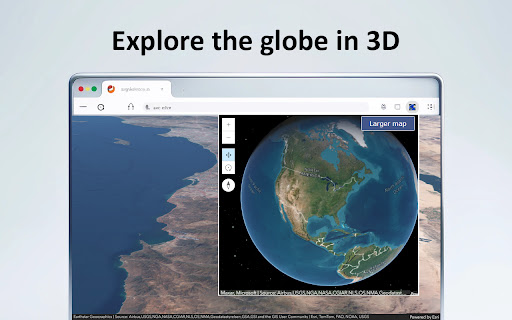


Explore bird’s eye 3D maps of the Earth – cities, mountains, wonders and new places. Travel virtual around the Earth with 3D maps. Plan your next real-world adventure by exploring destinations virtually with Earth 3D Maps: bringing the wonders of the world directly to your screen through your Chrome browser. Discover new destinations from the comfort of home — install Earth 3D Maps and start your virtual journey today! On the popup of the extension Earth 3D Maps you will explore the globe in 3D. When you click the "Open larger map" button, a new 3D map of the Earth opens on an external website. You can zoom in and out, rotate and move around on the 3D maps. We have created this extension to plan your next vacation in popular cities and places on Earth. Earth 3D Maps Chrome extension uses ArcGIS embed code in iframe. User Agreement Use the Chrome extension “Earth 3D Maps” at your own risk. No guarantee or warranty is given. The author shall not be held liable for any damage or loss of data caused by its use. Usage of “Earth 3D Maps” means that you agree to these terms. We collect information about your Web Browser, IP, ISP, the time and date of your visit with Google Analytics. This is standard procedure and most of the extension do the same. Disclaimer The Chrome extension “Earth 3D Maps” is have no affiliations with the popular website Google Maps. All copyrights belong to their respective owners. Google doesn’t endorse or sponsor this Chrome extension. This Chrome extension is not owned by, is not licensed by and is not a subsidiary of Google Inc. All copyrights belong to their respective owners. Contact Us We will be very happy to help. Please send us a message on the support tab. Uninstall of Earth 3D Maps To the right of your address bar, look for the extension's icon - a blue Earth circle. Right-click the icon and select Remove from Chrome.

CCTV View
Watch up to 20 webcams or CCTV cams within your browser. This extension allows you to define up to 16 cctv or webcam urls. Every time the toolbar button is clicked it will show an updated version of the image. I wrote it to be able to look at my cctv cameras with the click of a button. I use Zoneminder (http://www.zoneminder.com), an open source cctv monitoring system. you can either use the image url from the watch window or the jpeg stream url from the montage window. For still images just copy the image url from the watch window (should look something like http://server/cgi-bin/nph-zms?mode=single&monitor=13&scale=100&connkey=193577&rand=1314794770 and paste this in the image url fields on the CCTV View options page. For streaming jpeg images you'll need to copy the url parameter from the video stream on the montage window. This extension needs access to connect.facebook.net to allow the facebook like button. It also needs access to tabs which unfortunately includes browsing activity, this is needed to allow the monitor page to be loaded and for the target links you can set for each camera. 1.1.0.6 - Removed paypal donation button (Apparently Google doesn't like it...) - Replaced minified jquery and jquery-ui by the non-minified versions (Another thing Google may not like) 1.1.0.5 - Updated jquery to 2.1.1 - Updated jquery-ui to 1.10.4 - Removed unused javascript and css files 1.1.0.0 - Settings are now synchronised to all your chrome instances on other computers when logged into chrome - some minor layout changes and code improvements. 1.0.9.5 - Fixed manifest.json again. - Fixed issue with html element creation (createElement('image') no longer works, should be createElement('img') now). - Replaced background page with a script - Updated jQuery to a more recent version 1.0.9.4 - updated manifest to version 2 - removed the 'Share' tab from the options page until I can work out how to make that work again - moved all javascript to separate files as per Google's requirements 1.0.9.3 - Major overhaul of the options page 1.0.9.2 - Added tabbed support for up to 16 cameras 1.0.8.6 - Added Facebook like button to the options page 1.0.8.5 - Added fadeIn effect to images in popup - Added 'Target Url' fields on the settings page. This allows you to add a url to each cam image. Clicking on the cam image will open a new tab to the Target Url. - Added a Monitor Page, clicking the 'Monitor Page' link on the popup will open a new tab with all camera images, this allows you to keep your cameras open. - Opens the CCTV View wiki page at first installation 1.0.8.4 - fixed layout issue with the homepage link 1.0.8.2 - Added tool tips on the options page - Fixed a javascript issue that caused 4 (broken) images to be displayed when less than 4 images were added on the option page - Fixed scaling of the popup depending on the amount of images configured - Added an option to display a link to your CCTV homepage in the popup. This option requires access to tabs. 1.0.8.1 - Cosmetic fixes - Popup window scales to the amount of images - Removed default image for empty image fields - Added options to hide donation and help box on the options page - Display Advanced Options is now persistent Leave a comment with any bugs/requests @Dai Saabaru: Authentication will be added in one of the next releases.

Privacy Test
Checks whether you have enhanced private data protection and prevents tracking of your on-line activity. Privacy Test formerly known as C&C App is a small but powerful utility for Chrome and Chromium based browsers. Checks Whether You Have Enhanced Private Data Protection and will Help You to Prevent Tracking of Your On-Line Activity. ★ Monitors Safe Browsing state to protect against websites, extensions, and downloads, that are known to be malicious. ★ View and Manage sideloaded Extensions - applications that aren't from an official source, such as the Chrome Web Store and possibly installed without your knowledge. ★ Privacy Test > Open Menu > Automatically scans the current tab's URL for malware and other threats by using Safe Browsing and other solutions. ★ View your IP address and current tab's domain IP address and DNS info. PRIVACY POLICY: https://www.hotcleaner.com/privacy-test-extension-policy.html SUPPORT: https://www.hotcleaner.com/security-and-privacy-software-feedback.html

Earth View from Google Earth
Experience a beautiful image from Google Earth every time you open a new tab. Earth View displays a beautiful landscape from Google Earth every time you open a new tab. 1,000+ NEW VIEWS: More views from more places around the globe. BETTER QUALITY: Sharper, more colorful images, optimized for today's high-DPI screens. GLOBAL COLOR MAP: Explore all 2,500 images by region and color on our new map: g.co/ev/map

Online Alarm Clock
- alarm clock; - calendar; - stopwatch; - timer; - kitchen timer; - countdown timer to any date; - Christmas countdown; - metronome; - widgets for embedding into other websites and blogs. All applications are very simple to use and at the same time have a lot of options. The alarm clock features includes: - built-in radio with many stations; - various kinds of clock (digital, LED, analog, flip); - multiple alarm signals, including video (YouTube-based) and talking wake up voice; - flexible configuration; - the set of background images and sounds; - cuckoo; - full-screen mode; - the ability to automatically open Web pages; - if your internet connection fails, the alarm clock will still work; - remembers the settings; - do not require registration; - absolutely free. This extension allows you to open Onlive Clock not only in the usual way, but also using the Alt + 3 hotkey. If you wish, you are free to assign a preferred key combination using the UI exposed at chrome://extensions/shortcuts Also, users who have installed this extension receive an additional level of reliability in case the online alarm clock sound does not go off. This is extremely unlikely, but if for some reason the sound in the alarm clock web app does not work, the audio signal will be played using the extension.
