
pdabfienifkbhoihedcgeogidfmibmhp

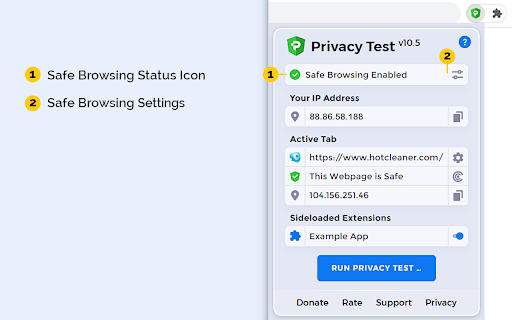


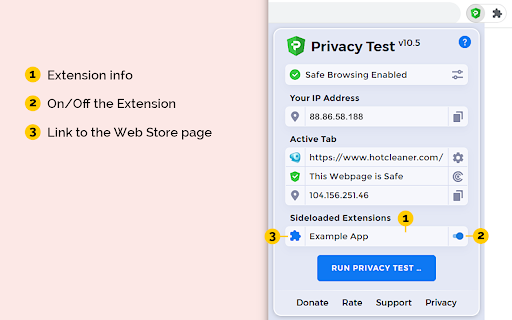
Checks whether you have enhanced private data protection and prevents tracking of your on-line activity. Privacy Test formerly known as C&C App is a small but powerful utility for Chrome and Chromium based browsers. Checks Whether You Have Enhanced Private Data Protection and will Help You to Prevent Tracking of Your On-Line Activity. ★ Monitors Safe Browsing state to protect against websites, extensions, and downloads, that are known to be malicious. ★ View and Manage sideloaded Extensions - applications that aren't from an official source, such as the Chrome Web Store and possibly installed without your knowledge. ★ Privacy Test > Open Menu > Automatically scans the current tab's URL for malware and other threats by using Safe Browsing and other solutions. ★ View your IP address and current tab's domain IP address and DNS info. PRIVACY POLICY: https://www.hotcleaner.com/privacy-test-extension-policy.html SUPPORT: https://www.hotcleaner.com/security-and-privacy-software-feedback.html

Popup my Bookmarks
A more efficient way to view and manage your bookmarks menu. - Search bookmarks when you type - Do what Bookmark manager can do and more (e.g., Sort bookmarks by name, Add separator) - Save 24px of your vertical workspace (Rock on Chromebook!) - Take as few permissions as possible, we never put your privacy at risk - No background running application, save computer memory and your privacy!

Shortcuts for Google™ Products
The "Shortcuts for Google Products" extension lists all Google products in your browser's toolbar popup. Clicking on an icon will open the product in a new tab. Operation: Click: Opens in a new active tab next to the current tab Shift + Click: Opens in a new window Ctrl + Click or Command + Click: Open in a background tab next to the current tab Updates: 1. Drag & drop to re-arrange your icons. 2. Re-size popup and also icons. 3. Add a new custom product to the list Notes: 1. In order to change the popup width, please enter an integer value from 5 to 24 in the designated space. This value represents the number of columns in the popup. 2. In order to change the icon's size, please enter an integer value from 16 to 64 in the designated space. This value represents the icon size in pixels. 3. in order to see the new icons after each update (not for the first install), you need to reset the toolbar popup once. To do so, open the toolbar popup, click on the settings icon at the bottom left corner, and then click on the reset button.

Cookie Editor
A powerful and easy-to-use Cookie Editor. Cookie Editor is a free, powerful and easy-to-use Visual Cookie Editor. Manage all your cookies stored within your browser, including 3rd party cookies. The interface is clean and well organized. Standard Features: + Add a new cookie + Edit a cookie properties + Delete a cookie + Delete all cookies at once + Copy as string + Support internationalized domain names IDN + Support for partitioned cookies Advanced Features: + Password protected Encrypted Storage + Ability to create your own custom cookie sets + Backup and Restore + Export to a file + Import from a file REQUIRED PERMISSIONS: "cookies" and "all_urls" - to query and modify cookies for any hosts. "contextMenus" - to open Cookie Editor from context menu. "storage" - to store extension options. FEEDBACK & SUPPORT: https://www.hotcleaner.com/security-and-privacy-software-feedback.html

Online Alarm Clock
- alarm clock; - calendar; - stopwatch; - timer; - kitchen timer; - countdown timer to any date; - Christmas countdown; - metronome; - widgets for embedding into other websites and blogs. All applications are very simple to use and at the same time have a lot of options. The alarm clock features includes: - built-in radio with many stations; - various kinds of clock (digital, LED, analog, flip); - multiple alarm signals, including video (YouTube-based) and talking wake up voice; - flexible configuration; - the set of background images and sounds; - cuckoo; - full-screen mode; - the ability to automatically open Web pages; - if your internet connection fails, the alarm clock will still work; - remembers the settings; - do not require registration; - absolutely free. This extension allows you to open Onlive Clock not only in the usual way, but also using the Alt + 3 hotkey. If you wish, you are free to assign a preferred key combination using the UI exposed at chrome://extensions/shortcuts Also, users who have installed this extension receive an additional level of reliability in case the online alarm clock sound does not go off. This is extremely unlikely, but if for some reason the sound in the alarm clock web app does not work, the audio signal will be played using the extension.
