
oplmnnimmmpiofnckcojgkonjfajgfhl
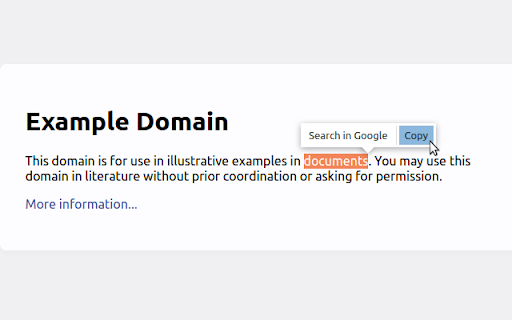

Pop-up menu after selection with copying and searching for selected text in Google (or other search engines) Select the text and click on one of the buttons in the pop-up menu (copy or search in Google (or other search engines)). See extension preferences to choose your own search engine.

Multi Context Menu Search
Select text to search it on your favorite search engines. It adds many popular search engines to the context menu appearing on text selection. Users can also add their custom search engines.

Easy Extensions Manager
Simplify extension management. Enable, disable, and uninstall with ease. ⭐ Support us by giving a 5-star rating if you like Easy Extensions Manager! Your feedback matters to us, and we're eager to hear your thoughts. Feel free to share your ideas, and we'll do our best to implement them as soon as possible. Introducing Easy Extensions Manager: The Ultimate Extension Manager for Chrome Easy Extensions Manager is a powerful yet lightweight tool designed to help you take complete control over your browser's extensions. With a file size of only a few kilobytes, it's a nimble and efficient addition to your Chrome experience. 🌐 Features: - Manage with Ease: Easily enable, disable, or delete extensions with just one click. Say goodbye to clutter and make your browser light as a feather. - Search & Find: Quickly locate the extensions you need with our intuitive search feature. - One-Click Disable All: Want to disable everything at once? Use the 'Disable All' feature and don't worry about losing track. When you recall, only the extensions that were disabled using this feature will be re-enabled. - Performance Boost: Keep your computer running smoothly by turning off unnecessary extensions, preventing lags, and enhancing your browsing experience. - 100% Free: Enjoy all these features without any subscriptions or hidden fees. 🚀 Why Easy Extensions Manager? - Lightweight: Made with minimalism in mind, Easy Extensions Manager itself is lightweight, ensuring that your browser remains agile. - Time Saver: Managing extensions has never been quicker. With Easy Extensions Manager, time-consuming tasks are reduced to simple clicks. - Performance-Focused: Enhance your browser's performance by disabling or deleting extensions that are no longer needed. - User-Centric: We listen to your feedback and are committed to continuous improvements to make your experience even better. Easy Extensions Manager is more than just an extension manager; it's a must-have tool for anyone looking to keep their browser optimized and their computer's performance at its peak. Download now and discover the seamless browsing experience you deserve!

Select and Search
Search for selected text on any search engine. You can add or remove search engines to context menu. You can also search for images, videos, dictionaries and shopping or use translations and more. 《 URL format for search settings in the option page 》 Your selected text will be replaced from %s in URL for search or that is placed at the end of the URL. https://www.google.com/search?q=%s or https://www.google.com/search?q= * If you need a separator, set TITLE and URL to "-"(minus sign). * Search engine URL examples available, please see my web page (Firefox version).

LightWindow: link preview, browser-in-browser
While browsing the web — reading, clicking links, searching — it’s easy to lose track and open dozens of tabs. A search results page has 10 links, and you open each one in a new tab. Then every page you open has more links — and you open even more tabs. Soon your browser is overflowing with dozens or even hundreds of open tabs. You lose focus, forget why you opened a page, and can’t even tell where you are anymore. But the problem isn't you — it's the outdated 2D browsing model. 🌐 How 3D browsing helps solve the too many tabs problem While traditional solutions like tab managers still operate within the flat 2D model, LightWindow introduces a fundamentally new approach: adding a third dimension to viewing pages. Instead of opening every link in a new tab, you can open a floating preview window directly over the current page to take a quick look. Clicking a link inside this preview opens another nested window. This creates a tree of views — all inside a single tab. Preview windows don’t get lost, don’t clutter the interface, and most importantly — don’t overload your tab bar. You stay in the same flow and can quickly return to where you were. This reduces the pressure on the second dimension — tabs — keeping only the most essential pages there. 🧠 Why the third dimension is the logical next step To understand this, let’s recall the evolution of browsing: — In the 1D web, clicking a link replaced the current page. Navigation was linear — forward/back only. — In the 2D web, tabs arrived — a breakthrough that allowed multiple pages to stay open at once. But now the second dimension is overloaded. Countless tabs are breaking context and structure. It's time to go beyond the flat tab system. 3D browsing introduces depth and clarity. LightWindow brings this new model to life with a simple and intuitive hierarchy of views. 🚀 The result You’ll open fewer tabs — not because you’re trying to, but because now you finally have an alternative. Links no longer break your flow — they become part of it. ✨ Bonus features — Built-in address bar with autocomplete in every preview window — Page translation directly inside preview windows — Remembers window size and position for each nesting level — Customizable open methods: Ctrl + middle-click, Alt + click, hold-to-preview
