
mjdbaljlhcapchmnabhkalepomkbcjno
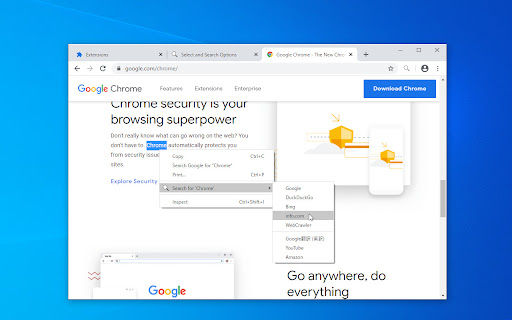
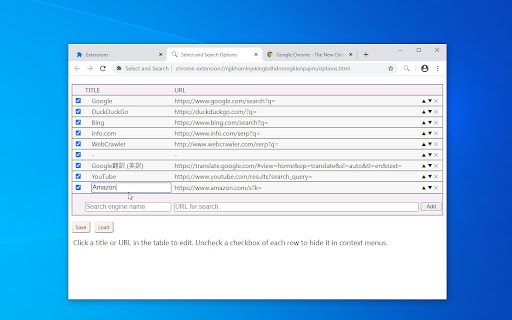
Search for selected text on any search engine. You can add or remove search engines to context menu. You can also search for images, videos, dictionaries and shopping or use translations and more. 《 URL format for search settings in the option page 》 Your selected text will be replaced from %s in URL for search or that is placed at the end of the URL. https://www.google.com/search?q=%s or https://www.google.com/search?q= * If you need a separator, set TITLE and URL to "-"(minus sign). * Search engine URL examples available, please see my web page (Firefox version).

Selection Search - Quick Search
Easily search 🔎 for selected text in different search engines. 1. Install and add the extension to Chrome. 2. Select a text, left-click on the selected text to get a popup where you can choose a search engine to search with. 🔎 3. Customize the look of the buttons that activates the menu, which search engines to show, and many other things. 1. Copy option to copy the selection to the clipboard. 📋 2. Option to open searches in a small popup window. 🪟 3. Option to turn in-site popup blacklist into a whitelist. 4. Toolbar 🛠 popup support. With this extension, you can easily search 🔎for text you have selected in search engines.

Selected Text Searcher
Highlight any text and perform a search in any search engine with a couple of clicks, hotkey or gesture. 1. Install the extension. 2. Open any webpage (or refresh already opened). 3. Highlight any text with a mouse. 4. Middle-click on the highlighted text or hit F9. 5. Click on any search engine in the opened window. ★ Search for selected text in one or multiple search engines at once. ★ Search for selected text with hotkeys. ★ Search for selected text with gestures. ★ Easily rearrange and edit your search engines without going to settings. ⛗ User Guide (bit.ly/user-guide-sts) ---------------------------------------------------------------- Permissions: Read and change all your data on the websites you visit Allows the extension to insert its user interface in pages. Allows the extension to get highlighted text to search for it in search engines. ---------------------------------------------------------------- 🧩 Follow my Facebook page (more extensions): https://www.facebook.com/browservery

Selection Menu
Pop-up menu after selection with copying and searching for selected text in Google (or other search engines) Select the text and click on one of the buttons in the pop-up menu (copy or search in Google (or other search engines)). See extension preferences to choose your own search engine.

Search on YouTube
Search for anything on YouTube by selecting the text and right clicking. A simple extension for the Google Chrome browser that allows you to search on YouTube by right clicking highlighted text and using the context menu. Similar to how the built in "Search Google for..." context menu item works. 1) Select some text 2) Right click the mouse to open context menu 3) Select "Search YouTube for [your text]" option Icons and logos done by @liamcaindesigns on Instagram.
