
opiijdljnckiadkfcjjmajieannaigmd

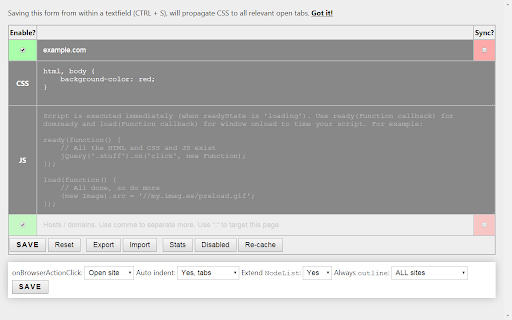
Simple tool for customizing websites by adding your own CSS & JS. This extension allows you to add per-domain custom CSS and JS. It stores those settings locally OR in your Google profile, depending on the setting per site. * StyleBot, but adds JS and a much simpler UI * Personalized Web, but adds online storage and a browser action button for easier access * add CSS to any domain * add custom JS to any domain * add custom CSS to the extension's options page (in case you don't like my UI design skillz) * store your settings online (optional, connected Google Drive) * export your sites to JSON format * import your JSON with UUIDs, so you can sync manually between computers or as backup * have a simple UI that saves with CTRL+S or ENTER and a browser action button to point to it 1.22 - 1.23 Added ** wildcard for anything. Fewer console messages. Bug in site order with 'all' and 'matches' sites. 1.20 Added wildcard domains: `*.wikia.com`, `my.*.com` etc. Improved temporary disable (on page action button). 1.13 Automatic sync with Google Drive. Added sync log. Added inline stats (option). 1.11 Moved from Google's Extension Data (sync) to Google Drive, because manually is better than automagic. Added 'all sites' token. Better document check (not in XML docs). More detailed import. 1.10 Handle errors in decoding online data. Discarding for now. **Back up your sites data!** 1.8 Stats+, faster loading for big online storage, browser action contextmenu label+. 1.7 Improved stats, help, options auto-indent, dis/enabling. **Disabling a site moved from page contextmenu to the icon's contextmenu!** 1.3 Added live CSS reload/refresh/update after saving a site on the options page, so no page refresh necessary anymore! 1.2 Added UUID and import. 1.1 Added (prefs and) onBrowserButtonClick option. Maybe added onBeforeUnload (or was that 1.0?).

Awesome Window & Tab Manager
Displays a list of all windows and tabs open in Google Chrome. Allows filtering, sorting, refreshing, bookmarking, and saving. Awesome Window & Tab Manager does the following: (1) - Tells you how many Chrome windows and tabs are open. (2) - Displays all the windows and tabs. (3) - Allows text filtering (searching) on the windows and tabs. (4) - Allows alphabetic sorting of tabs. (5) - Categorizes tabs by window, domain, or category. (6) - Categories are determined by your own bookmark structure. (7) - Window, domain, or category groups can be refreshed or closed. (8) - All windows and tabs can be saved and restored later. (9) - Window, domain, or category groups can be saved and restored later. (10) - Unbookmarked tabs can be bookmarked. Note: Google Chrome version 16 or higher is required for tab refreshing functionality.

Tab Master 5000
The swiss army knife of tab, history, bookmark, session, and extension management. Tab Master 5K replaces your New Tab page with a full-featured tabs, history, bookmarks, apps, extensions, and sessions manager. -- Tabs - Close, pin, and mute tabs from your New Tab page. - Re-order tab tiles by dragging and dropping them. - Close all tabs from a specific website. - Close duplicate tabs, and optionally make them pulsate. - Manage tabs through icons, the right click menu, or through a table view. - Search tabs in the top search bar. - Option to sort tabs by website or alphabetical order, and apply the order to your Chrome window. - Option to view tabs across all windows. - Automatically discard tabs from memory and customize how long they have to be inactive to trigger it. -- Customization - Full control of the New Tab's appearance with a flexible theme editor. - Import any wallpaper as a background. - Adjust the size of the grid tiles. - View a screenshot of each tab in the grid. - Enable screenshots to cover the background of a New Tab page when you hover over a tab tile. You can adjust the strength of the blur and opacity of backgrounds in Preferences. -- Session Management - Session manager built in for saving and restoring your current tab sessions. - Synchronize your saved sessions, and keep them persistently updated with the current Chrome window. - Tab sessions can be exported and imported. - View, sort, and filter your session tabs as tiles in the grid view. -- Chrome Management - View, sort, and filter your bookmarks, history, apps and extensions as tiles in the grid view. You can change how apps launch, create app shortcuts, enable/disable, or uninstall them. - Quickly navigate the extension with keyboard shortcuts. - Undo tab actions by pressing CTRL+Z, or through the context menu while a New Tab page is open. - Add websites you do not want to view to a comma separated blacklist in Settings -> Preferences. Websites added to the blacklist will have their tabs closed under any circumstance. Please report any issues on this store page's Support tab. If you like this extension, or think it could be better, please rate it and leave feedback. You can also fork and pull request this extension on its public Github repository: https://github.com/jaszhix/tab-master-5000-chrome-extension

Awesome Button Bar
Button bar, combining downloads, bookmarks, extensions, history, view source, print, and more from a single button. Awesome! Extensions, history, downloads, bookmarks, view source, options, new window, and print are all here. Recently added buttons are duplicate tab, second home, and refresh all tabs. Showing each button on the bar is optional so you don’t have to have them all if you don’t want them all. Also, each button can be configured to open either in the current window or in a new window. Note: print to a new window now works too!

Stylebot
Change the appearance of the web instantly You pick an element and choose any changes you want to make from the editor. You can change the font, color, margins, visibility and a lot more. You can also code CSS manually. ★ Easy to use: Pick and style elements using UI actions ★ Simple & Quick: Changes are saved instantly ★ Code editor - Write your own CSS ★ Readability Mode - Make articles on any site readable by hiding non-essential page elements like sidebars, footers and ads. ★ Grayscale Mode - Turn on grayscale to reduce strain from websites Homepage: https://stylebot.dev/ Twitter: http://twitter.com/ahujaankit Bug reports and feature requests: https://github.com/ankit/stylebot/issues Stylebot has never collected and will never collect any personal data, browsing history etc. The permission to access websites is to only let you customize the CSS for any webpage and automatically apply your CSS when you visit the webpage in the future. In the future, Stylebot may collect browser version, platform name, user's settings (except website list or any other data which can help identify user). This information is needed for decision on implementing new features, removing unused features or suggesting default settings for new users. It will happen only with your permission.
