
ooeealgadmhdnhebkhhbbcmckehpomcj
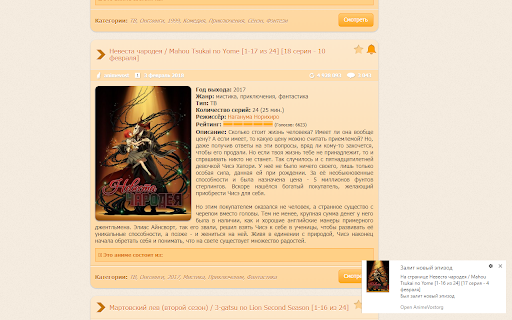

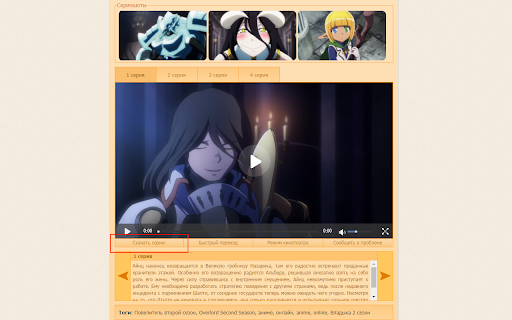
Открывает дополнительные функций на сайте AnimeVost.org Воспользуйтесь новыми возможностями на Animevost.org! Возможности: + Авто-подбор сервера для наивысшего качества и скорости даже при сильных нагрузках! + HD качество в HTML5 плеере. + Мелкие дизайнерские исправления.

Youtube Unblocked
Unblock YouTube & enjoy unrestricted access for free, using Youtube Unblocked! Are you tired of being blocked from accessing YouTube? Say goodbye to restrictions and hello to limitless entertainment with the YouTube Unblocked Chrome extension! What is YouTube Unblocked Chrome Extension? YouTube Unblocked is a powerful tool that allows users to bypass restrictions and access YouTube seamlessly. Whether you're at school, work, or in a country where YouTube is restricted, this extension enables you to enjoy unrestricted access to YouTube, and that too for free! How Does it Work? In many institutions such as offices, schools, workplaces, and colleges, YouTube access is often restricted using ISP or firewall-based restrictions. Additionally, some countries have enforced a ban on YouTube and its services. YouTube Unblocked Chrome extension comes to the rescue by leveraging a tunneling-based mechanism. It bypasses all restrictions, allowing users to access YouTube content without any limitations. Key Features: - Unrestricted Access: Enjoy seamless access to YouTube, bypassing ISP or firewall-based restrictions. - High-Speed Proxy Servers: YouTube Unblocked fetches YouTube content from high-speed proxy servers, ensuring high-quality streaming without buffering. - Single Website Proxy: With its single-website-based proxy, YouTube Unblocked ensures that access to all other websites on the internet remains quick, snappy, and free from hiccups. Key Benefits: - Unrestricted Access: Enjoy YouTube from anywhere, anytime, without worrying about the restrictions. - High-Quality Streaming: Enjoy high-quality YouTube content with smooth streaming, thanks to our high-speed proxy servers. - Snappy Browsing: YouTube Unblocked ensures that access to other websites remains fast, seamless, and uninterrupted. How to Use YouTube Unblocked? YouTube Unblocked is simple & easy to use. - Click on "Add to Chrome" to install the extension - Once installed, click on the extension icon in the browser toolbar to access main interface - Click on the "Unblock" button to unblock the restrictions - In 5 to 10 seconds, the extensions establishes connection to its proxy servers - You can then access YouTube without any restrictions. Top Use Cases: At Work: Stay entertained during breaks without worrying about the restrictions. At School/College: Access educational content and tutorials on YouTube for academic purposes. In Restricted Areas: Enjoy YouTube content without worrying about the country or area based restrictions Note: YouTube Unblocked is an independent project and is not affiliated with Google, LLC. Who is it for? YouTube Unblocked Chrome extension is the ultimate solution for anyone who wants to enjoy unrestricted access to YouTube, be it students, working professionals, users living in places where YouTube is banned or restricted. Remember, this extension is designed for educational and entertainment purposes only. Always respect the policies and guidelines of your institution or country. Experience the freedom with the YouTube Unblocked Chrome extension today!

Laitis Browser Extension
Laitis Browser Extension allows Laitis to control websites using your voice Laitis Browser extension allows Laitis to control websites using your voice. Requires installation of Laitis app from laitis.ru website. You can create voice commands with JS to control specific websites, or use predefined commands for most popular websites and global commands to browse hyperlinks. Also you can dictate text into text fields, open/close tabs in chrome, open small browser tabs with handy info from selected websites. Laitis contains voice commands to control chromium web browser, Youtube website and many more apps and websites. Voice commands examples: "Open Chrome", "Open YouTube", "Select video", "Next", "Open video", "Full screen", "pause video".

VK Next - functions for VK
The best add-on for VK with many features, some of which are exclusive. Among the features: • Disable ads • Hide community ad posts • Hide posts with source • Make feed wider • Hide stories block • Post filters • Disable people recommendations • Disable post recommendations • Disable community recommendations • Disable clips recommendations • Disable VK Video recommendations • Disable story recommendations • Disable service recommendations • Disable game recommendations • Themes • Accents • Page background • Emojis • Logo customization • Custom font • Alternative site header • Alternative scrollbar • New "Communities" interface • Compact community list • Compact friends list • Compact stories block • Garland above the logo • New Year logo 2023 • Falling snowflakes effect • Garland on the site header • VK SquaRE+ • Animated splash screen on load • Rounded design elements • Change corner radius • Change sticker size • Inline commands • Show deleted messages • Show disappearing messages • Show message edit history • Ignore incoming calls • Confirm before calling • List of online members in chats • Highlight chat admins in messages • Transcribe messages • Expanded message action menu • Don't mark voice messages as listened • Ghost mode (unreads) • Typing hider • Classic interface • New media viewer • Old message read indicator style • Disable server reconnection indicator • Change reactions to Apple emojis • Alternative input bar view • Reduce graffiti size • Button to open Favorites • Message templates • Jump to start of chat • Display my mentions in chat • Message encryption • Download chat history • View chat statistics • Send graffiti • Send audio messages • Send video messages • Hide NFT avatars • Hide emoji statuses • Hide names and avatars • Hide quick chats • Hide recent communities block • Hide unviewed reactions indicator • Hide unhideable sections • Custom links • vk.cc link shortener button • Display current online status • Fix left menu position • Rename section titles • Alternative menu view • Make menu more compact • Name and avatar instead of "My Profile" • Avatars instead of icons for favorite communities, games, and apps • Hide section titles • Hide settings gear icon • Hide counters • Hide additional pages under the menu • Hide recommendations • Don't mark stories as viewed • Notification ghost mode • Partial offline • Manage online hiding via VK Messenger • Bypass online hiding • Display verification badges next to names • Set custom verification badge • Animated profile cover • Alternative profile view • Additional info in profiles and communities • Disable tracking • Highlight friends with selected color • Highlight mutual groups with selected color • Telegram stickers • View and set all emoji statuses • Number tracks when downloading playlists • Add ID3 tags to music • Insert lyrics from Genius into track metadata • Alternative player view in site header • Block ads while listening to music • Show track bitrate next to duration • Disable away.php • Show poll results without voting • Scroll through photos with mouse wheel • Photo spoofing button • Display media download buttons • Disable analytics • Disable tracking/telemetry • Clean up friends • Clean up followers • Clean up chats • Clean up blacklist • Clean up wall • Clean up photo albums and much more.

VK Blue - EQ & Scrobbler for VK.com
Extension to the standard vk.com player functionality. It adds EQ, Last.fm scrobbling, media keys support, artist's bio and lyrics This extension only works for social network site vk.com. It adds additional capabilities to the 'Music' section of the network, which includes: - Biographies of artists - EQ - with auto tuning option - Surround sound effect - Media keys enabled - Cool visualizer - Songs syrics - Last.fm scrobbling If you feel lack of powerful bass in your songs? If you want to learn more about your favorite artists? If you want to here your old music in a fresh way - install this extension. Blue has many functions that can surprise you. Blue is an extension for VK.com social network, which adds full-featured player with many functions to the standard VK interface. Equalizer - to adjust the power of the different frequencies of the audio stream, you can use it to increase both low frequencies (bass) and high. In addition to this, it is possible to allow the equalizer to select settings automatically depending on the genre of the song. Visualizer - this widget has a purely aesthetic purpose and serves to get visual pleasure, with it you will see how at the moment. Information about the artist - as soon as you include your song, we try to find biographical information about the performer of this song and give it to you. Lyrics - this is a good way to sing along with your favorite artists. Last.fm scrobbling: If you fan of the stats and scrobbles - we can help you too Also many other features that can surprise you. PRIVACY POLICY: We do not collect or store any data about users of the extension. All the data never leave the user's machine. More information about our policy can be found at https://sleepingdude.com/policy.html By installing the extension, you agree to vk Blue Privacy Policy (https://sleepingdude.com/policy.html).
