
pckkddchhdhkfapanbkcalloijbbjhbd
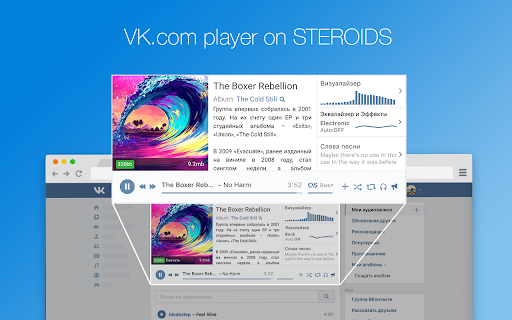

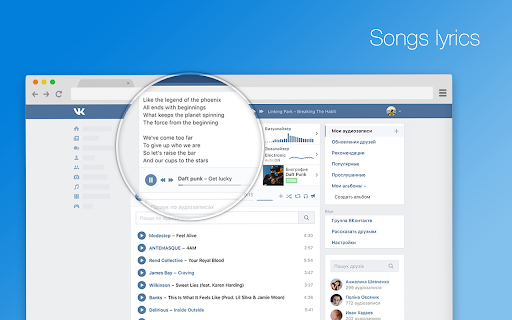


Extension to the standard vk.com player functionality. It adds EQ, Last.fm scrobbling, media keys support, artist's bio and lyrics This extension only works for social network site vk.com. It adds additional capabilities to the 'Music' section of the network, which includes: - Biographies of artists - EQ - with auto tuning option - Surround sound effect - Media keys enabled - Cool visualizer - Songs syrics - Last.fm scrobbling If you feel lack of powerful bass in your songs? If you want to learn more about your favorite artists? If you want to here your old music in a fresh way - install this extension. Blue has many functions that can surprise you. Blue is an extension for VK.com social network, which adds full-featured player with many functions to the standard VK interface. Equalizer - to adjust the power of the different frequencies of the audio stream, you can use it to increase both low frequencies (bass) and high. In addition to this, it is possible to allow the equalizer to select settings automatically depending on the genre of the song. Visualizer - this widget has a purely aesthetic purpose and serves to get visual pleasure, with it you will see how at the moment. Information about the artist - as soon as you include your song, we try to find biographical information about the performer of this song and give it to you. Lyrics - this is a good way to sing along with your favorite artists. Last.fm scrobbling: If you fan of the stats and scrobbles - we can help you too Also many other features that can surprise you. PRIVACY POLICY: We do not collect or store any data about users of the extension. All the data never leave the user's machine. More information about our policy can be found at https://sleepingdude.com/policy.html By installing the extension, you agree to vk Blue Privacy Policy (https://sleepingdude.com/policy.html).

Music Storm - visualize any music tab
With Music Storm, you can visualize any tab. YouTube, SoundCloud, GoogleMusic - it works everywhere. Just click on Storm and done. Smart screen saver with your favorite music from YouTube, GoogleMusic, SoundCloud? We can do that!

MarketApp P2P
MarketApp P2P is the official extension for the Market.CSGO marketplace, designed to facilitate safe and fast item sales through a peer-to-peer (P2P) system. Extension Features: Basic Integration with Steam API The extension retrieves basic information from your Steam profile for display, as well as information from other users profiles for P2P trades on the trade offer page. Creating and Accepting Trade Offers via Steam API The extension allows users to create and accept trade offers on Steam that are initiated by Market.CSGO. Depending on the settings, this process can be either manual or automatic. Note that the extension does not handle trade confirmations. You will need to use the official Steam app, the MarketApp, or the Market.CSGO mobile app to confirm trades. Steam Trade Offer Page This page features a custom interface that distinguishes Market.CSGO trade offers from other offers. It also provides the ability to manually create and confirm trade offers from Market.CSGO. CS2 Game Inventory Page on Steam The appearance of the inventory page for CS2 items has been enhanced, with added features such as displaying the Float value and showing trade restrictions for items. For convenience, quick-sell and instant-sell buttons have been added for selling items on the Steam marketplace. The top toolbar has also been redesigned with a “Multiple Item Sale on Steam Marketplace” feature, which allows users to select multiple CS2 inventory items and sell them at a specified price. Steam Market Page The extension enhances the Steam Community Market page with advanced trading tools and market analytics. The module provides three main sections: Active Lots for managing your buy and sell orders with price deviation warnings, Steam Market Trade for browsing popular items, new listings, and recently sold items with search functionality, and Market History for viewing your complete trading history with filtering options and CSV export. Users can create buy orders, list items for sale, remove listings, and cancel buy orders directly from the enhanced interface, with real-time price updates and trade volume information displayed for better trading decisions.

VK Next - functions for VK
The best add-on for VK with many features, some of which are exclusive. Among the features: • Disable ads • Hide community ad posts • Hide posts with source • Make feed wider • Hide stories block • Post filters • Disable people recommendations • Disable post recommendations • Disable community recommendations • Disable clips recommendations • Disable VK Video recommendations • Disable story recommendations • Disable service recommendations • Disable game recommendations • Themes • Accents • Page background • Emojis • Logo customization • Custom font • Alternative site header • Alternative scrollbar • New "Communities" interface • Compact community list • Compact friends list • Compact stories block • Garland above the logo • New Year logo 2023 • Falling snowflakes effect • Garland on the site header • VK SquaRE+ • Animated splash screen on load • Rounded design elements • Change corner radius • Change sticker size • Inline commands • Show deleted messages • Show disappearing messages • Show message edit history • Ignore incoming calls • Confirm before calling • List of online members in chats • Highlight chat admins in messages • Transcribe messages • Expanded message action menu • Don't mark voice messages as listened • Ghost mode (unreads) • Typing hider • Classic interface • New media viewer • Old message read indicator style • Disable server reconnection indicator • Change reactions to Apple emojis • Alternative input bar view • Reduce graffiti size • Button to open Favorites • Message templates • Jump to start of chat • Display my mentions in chat • Message encryption • Download chat history • View chat statistics • Send graffiti • Send audio messages • Send video messages • Hide NFT avatars • Hide emoji statuses • Hide names and avatars • Hide quick chats • Hide recent communities block • Hide unviewed reactions indicator • Hide unhideable sections • Custom links • vk.cc link shortener button • Display current online status • Fix left menu position • Rename section titles • Alternative menu view • Make menu more compact • Name and avatar instead of "My Profile" • Avatars instead of icons for favorite communities, games, and apps • Hide section titles • Hide settings gear icon • Hide counters • Hide additional pages under the menu • Hide recommendations • Don't mark stories as viewed • Notification ghost mode • Partial offline • Manage online hiding via VK Messenger • Bypass online hiding • Display verification badges next to names • Set custom verification badge • Animated profile cover • Alternative profile view • Additional info in profiles and communities • Disable tracking • Highlight friends with selected color • Highlight mutual groups with selected color • Telegram stickers • View and set all emoji statuses • Number tracks when downloading playlists • Add ID3 tags to music • Insert lyrics from Genius into track metadata • Alternative player view in site header • Block ads while listening to music • Show track bitrate next to duration • Disable away.php • Show poll results without voting • Scroll through photos with mouse wheel • Photo spoofing button • Display media download buttons • Disable analytics • Disable tracking/telemetry • Clean up friends • Clean up followers • Clean up chats • Clean up blacklist • Clean up wall • Clean up photo albums and much more.

Remove VK ads
Removes advertisements, posts, banners on the social network Vkontakte The extension removes the following types of ads on the vk.com social network: - advertising banners on the left side of the page, - advertising posts in the feed, publics and groups, - advertising posts in the feed, publics and groups.
