
kkfnfemdemphdadfolkmoimpeibeiadc

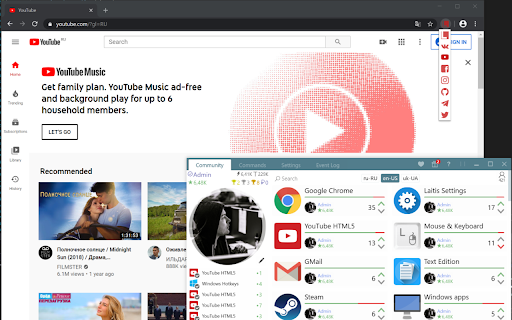

Laitis Browser Extension allows Laitis to control websites using your voice Laitis Browser extension allows Laitis to control websites using your voice. Requires installation of Laitis app from laitis.ru website. You can create voice commands with JS to control specific websites, or use predefined commands for most popular websites and global commands to browse hyperlinks. Also you can dictate text into text fields, open/close tabs in chrome, open small browser tabs with handy info from selected websites. Laitis contains voice commands to control chromium web browser, Youtube website and many more apps and websites. Voice commands examples: "Open Chrome", "Open YouTube", "Select video", "Next", "Open video", "Full screen", "pause video".

VKSaver - скачать музыку ВК
Скачать музыку с ВК с VKSaver это легко! Скачать музыку и видео с ВК вместе с обложками и тэгами, один трек или плейлист целиком. Скачать музыку с ВК с помощью VKSaver всегда легко и просто! VKSaver это самый надежный, простой и удобный способ скачать музыку с вк, а также скачать видео с социальной сети ВКонтакте, т.к. VKSaver позволяет скачать музыку с ВК вместе с обложками и тэгами, один трек или плейлист целиком. При этом скачивание музыку и видео будет происходить с экономией ресурсов Вашего компьютера, т.ч. даже старые конфигурации компьютеров и ноутбуков не будут тормозить при работе расширения VKSaver. Это официальное расширение VKSaver - все остальные являются подделками и мы не рекомендуем их использовать. Как скачать музыку с вк? Этим вопросом задаются многие пользователи компьютеров и ноутбуков, которые хотят найти удобные способы как скачать свои треки с вк на компьютер. Ответ прост - не тратить время зря, ведь, чтобы скачать музыку с ВКонтакте нужно всего лишь выполнить следующие шаги: 1. Установите официальное расширение VKSaver • Перейдите в Chrome Web Store • Найдите расширение "VKSaver - скачать музыку ВК" и установите его 2. После установки VKSaver • Расширение само откроет страницу VK Музыки • Кликните мышкой на появившуюся синюю кнопку напротив трека • После чего откроется страница, на которой можно будет скачать музыку • На странице скачивания музыки нажмите красную кнопку "Скачать" • Дождитесь загрузки файла в загрузках браузера VKSaver поможет Вам: • скачать Вашу музыку с ВК • скачать Ваше видео с ВК • скачать Ваши клипы с ВК • скачать Ваши плейлисты с ВК целиком • скачать Ваших треки с записей в ВК При этом скачивание происходит с обложками треков, тэгами и с экономией ресурсов Вашего компьютера, т.ч. даже старые конфигурации компьютеров и ноутбуков не будут тормозить при работе нашего расширения. В планах: • упрощение скачивания больших плейлистов • скачивания Ваших фото с ВК по отдельности и целиком • добавление гибких настроек для расширения • и многое другое ^__~ Код нашего расширения проверен сотрудниками Google и антивирусами, что гарантирует безопасность расширения и отсутствие вредоносного ПО. В случае вопросов или обнаружения недочётов и багов, пишите на форму обратной связи на официальном сайте http://audiovk.com/feedback.php Если же Вы хотите расширенные возможности при скачивании музыки и видео с ВК, то скачайте и установите официальное приложение VKSaver, которое совместно с официальным браузерным расширением VKSaver даст вам дополнительные возможности и удобства при сохранения Вашей музыку и видео с ВК. Обнимаем, команда AudioVK.COM

YouTube Fix
Загружает аватарки на YouTube У вас пропали изображения на Ютубе? YouTube Fix - решает эту проблему! Особенности: - Работа без потери скорости. - Изменение http запросов сразу при отправке.

AliRadar Shopping Assistant
AliRadar finds similar products, shows price history and seller’s ratings. Features of AliRadar extension: – display products’ price changes; – check seller trust level; – track products’ prices and send notifications when price is changed; – check photos and reviews from real products’ buyers; – search of similar products from more than 10 000 stores with cheaper prices; – find out main information about products by hovering links on other sites. Important: Aliradar is an independent service and it does not belong to any marketplace (e.g. AliExpress™). The purpose of Aliradar is to help to find better products from reliable sellers. AliRadar extension will help you to choose products faster, reducing customers risks by providing all the above information about sellers and products. By using this add-on, you agree to the AliRadar Privacy Policy available at https://aliradar.com/en/privacy.html and authorize that you can be redirected by the links of the affiliate programs of online stores. Single purpose of the extension: to find products with cheaper prices from reliable sellers. AliRadar extension uses the following permissions for the reasons listed below (a) tabs - 1. To open https://aliradar.com/en/thank-you.html page after extension installation and allow user to open instruction how to use extension; 2. To open tabs with products for instruction feature for new users, to demonstrate extension functionality; 3. To open the https://aliradar.com/en/bye.html page when users remove extension in order to ask them for feedback 4. To display correct extension icon to show the status if extension works on current page; (b1) webRequest – allows to identify pages of products to apply the partner programs of online stores; (b2) webRequestBlocking - Is needed to provide stable work of partner programs of online stores; (c) cookies – 1. to determine the relevant language and currency for the user in the online-store where the extension works; 2. to check user's authorization status in the extension; (d) storage - to cache data in order to display information about products faster. This is needed to ensure stability and absence of uncomfortable deceleration of the extension; Please feel free to contact us if you have any questions: support@aliradar.com -------------------------------------------- Disclaimer: This extension uses Google Analytics™ to collect extension usage statistics to help improve user experience. If you want to opt-out of Google Analytics™ tracking, please visit http://tools.google.com/dlpage/gaoptout or you can set up a filter in Adblock™ Plus or similar ad blocker tools like AdBlock™, uBlock™ or Adblock™ Pro. Other name: Ali Radar

VK Blue - EQ & Scrobbler for VK.com
Extension to the standard vk.com player functionality. It adds EQ, Last.fm scrobbling, media keys support, artist's bio and lyrics This extension only works for social network site vk.com. It adds additional capabilities to the 'Music' section of the network, which includes: - Biographies of artists - EQ - with auto tuning option - Surround sound effect - Media keys enabled - Cool visualizer - Songs syrics - Last.fm scrobbling If you feel lack of powerful bass in your songs? If you want to learn more about your favorite artists? If you want to here your old music in a fresh way - install this extension. Blue has many functions that can surprise you. Blue is an extension for VK.com social network, which adds full-featured player with many functions to the standard VK interface. Equalizer - to adjust the power of the different frequencies of the audio stream, you can use it to increase both low frequencies (bass) and high. In addition to this, it is possible to allow the equalizer to select settings automatically depending on the genre of the song. Visualizer - this widget has a purely aesthetic purpose and serves to get visual pleasure, with it you will see how at the moment. Information about the artist - as soon as you include your song, we try to find biographical information about the performer of this song and give it to you. Lyrics - this is a good way to sing along with your favorite artists. Last.fm scrobbling: If you fan of the stats and scrobbles - we can help you too Also many other features that can surprise you. PRIVACY POLICY: We do not collect or store any data about users of the extension. All the data never leave the user's machine. More information about our policy can be found at https://sleepingdude.com/policy.html By installing the extension, you agree to vk Blue Privacy Policy (https://sleepingdude.com/policy.html).
