
onlgiehoglnklmgeiekdpaakjkleafle

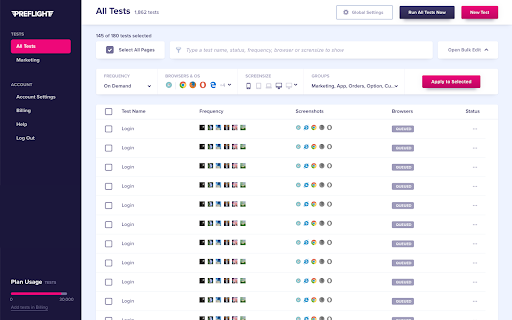
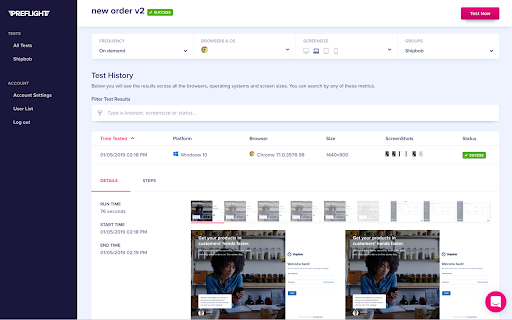
Preflight Chrome Extension *PreFlight Recorder* PreFlight is No-code testing tool to automate browser-based software tests. You record your tests manually once, then PreFlight can perform that test on-demand in the cloud. With PreFlight recorder you record your tests like you would if you were manually performing them. We’ll record all of the actions you perform (and a lot more) then we’ll use that data to test at your wish. *Connecting the Extension* Go to https://preflight.applitools.com and register. If you’ve already got the Chrome Extension, we’ll connect to it now or we’ll walk you through coming back here to get it installed. Once connected, so long as you’re logged in to PreFlight, we’ll automatically be connected. *The Extension’s Access* While recording tests, we track your clicks and typing. That allows us to recreate them in the cloud. When the extension is closed or not ‘recording’ we won’t track any actions and we can’t see anything you’re doing. We care about security and the privacy of our users. *PreFlight Features:* - Test across different operating systems (MacOS and Windows) - Test on all popular browsers (Chrome, Safari, FireFox, Edge, IE) - Record on production, test on QA, Dev or any other environment. - Run tests on a schedule (Monthly, daily, weekly, hourly etc) - Test Different screen sizes (mobile, desktop, tablet, laptop.) - Group tests then run them in a batch. If you have any questions - Get in Touch - support@applitools.com

Chrome Notes
A simple notepad extension for Google Chrome NEW: You can now use speech to text NEW: You can now open Chrome Notes with Ctrl+Shift+X (Command+Shift+X on mac) NEW: You can now download and upload complete backups NEW: Chrome Notes adds a right click menu option to send the selected text to a new note! NEW: You can now have multiple notes! NEW: You can now customize the font size! A simple notes extension, right in your browser! Easily copy around a few words to and from different browser windows and other apps. Thank you for over 100,000 users, 100 ratings and 4.5 stars! Chrome Notes remembers your notes and mode, even after closing your browser or restarting your computer! Notes are stored in local storage, so nobody else will ever see them, not us, and not Google, Microsoft, or Apple. Features: * Resizable notepad * Shortcut buttons for cut, copy, paste, and select all * Normal keyboard shortcuts work too * Save as a .txt file * Open in new window * Speak selected text out-loud * Remembers last notepad size for you next time * Store multiple notes, and quickly create, edit, share, or delete * Focus mode for distraction free writing * Adjustable font size * Right click and send selection to new note * Download and upload full backups * Speech to text (click the mic and speak to put your words on the notepad) * Keyboard shortcut Ctrl+Shift+X (Command+Shift+X on mac) to open Chrome Notes is the smart, simple notepad built for you 😊

Quran Extension
A Chrome extension for reading and listening to the Quran Quran Extension - Read, Listen, Translate & Hijri Calendar Description: Easily read and listen to the Holy Quran directly in your browser sidebar! This Quran Extension provides seamless access to Surahs and Ayahs, allowing you to listen to beautiful Quran audio recitations or read the text without leaving your current page. Experience the Quran with high-quality, gapless audio playback. Choose from a wide selection of over 20 renowned reciters to listen to your preferred style. Understand the meaning better with accurate Quran translations available in 15 languages. 🎧 Listen to Quran Audio: High-quality gapless playback with over 20 reciter options — no delays between Ayahs. 📖 Read Quran Text: Clear display of all Surahs and Ayahs. 📅 Hijri Calendar: View a full monthly Islamic calendar with both Gregorian and Hijri dates, and jump to any month/year instantly. 🌙 Hijri Age Calculator: Find out your age in Hijri years — a fun Islamic calendar tool. 🕌 Prayer Times: See today's prayer schedule for your city (Fajr, Dhuhr, Asr, Maghrib, Isha) with the next prayer highlighted. 🌐 Multiple Translations: Understand the text in 15 languages (English, Arabic, French, Spanish, German, Turkish, Urdu, Russian, Persian, Indonesian, Chinese, Hindi, Bengali, Portuguese, Japanese, Korean). 📌 Convenient Sidebar Access: Access the Quran anytime without switching tabs. 🎨 Beautiful Dark Theme: Clean, intuitive, and easy on the eyes. Install Quran Extension now to conveniently read, listen, and connect with the Quran daily. Quran text, translations, and audio features are powered by the excellent alquran.cloud API. Calendar, prayer times, and Hijri date features are powered by AlAdhan API.

Proxidize Proxy Extension
Best Proxy Extension: Top Rated & Featured by Chrome The Best Proxy Extention - Top Rated & Featured by Chrome For Both HTTP(s) and SOCKS Proxies. Manage and switch between multiple proxies quickly and easily with the Proxidize proxy extension. The Proxidize proxy extension has been designed from the grounds up to be the best the easiest to use proxy extension. Adjusting proxy settings has never been more convenient. Consider the Proxidize proxy extension as an updated and modernized version of the traditional "Proxy Settings" interface, crafted to be more straightforward, faster, and significantly more efficient, with a special focus on optimizing for Chrome. Forget about navigating through the complex advanced section in Chrome's settings. Avoid the repetitive process of filling in and clearing the proxy configuration dialog in your operating system. Simply configure all your proxies with the Proxidize proxy extension, and switch between them effortlessly with just a single click. Features: 1. HTTP(s) proxies support 2. SOCKS v4 and SOCKS v5 support 3. Auto detect of backconnect IP 4. Auto detect proxy country 5. Test proxy before connecting 6. Easily import manually or bulk import via paste 7. Import via CSV file 8. One-click switching between proxies 9. Easy search and filter 10. Display custom columns 11. Auto detects HTTP(s) or SOCKS proxies 12. And more!

PrimeVideo X-Ray Blocker
A Chrome extension to disable the X-Ray feature on Prime Video. PrimeVideo X-Ray Blocker is a Chrome extension designed to disable the X-Ray feature of Amazon Prime Video. This extension allows you to turn off the X-Ray information windows that appear on the screen while watching Prime Video.
