
acijakofobffmjdhkdcijbmcledbeikg
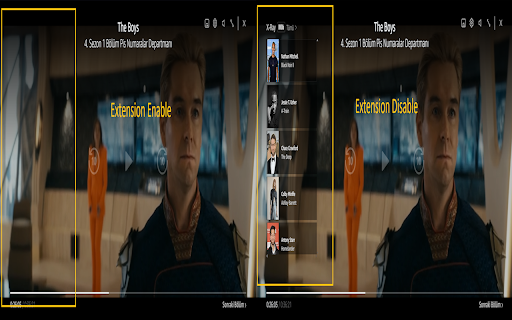
A Chrome extension to disable the X-Ray feature on Prime Video. PrimeVideo X-Ray Blocker is a Chrome extension designed to disable the X-Ray feature of Amazon Prime Video. This extension allows you to turn off the X-Ray information windows that appear on the screen while watching Prime Video.

Streaming enhanced Netflix Disney Prime Video
Skip ads, intros, credits and add adjust speed, etc. on Netflix, Prime video, Disney+, Crunchyroll and HBO max. You can customize which features are enabled in the Settings. This extension enhances your streaming experience by automatically: • Block Ads • Skipping Intros & Recaps • Skipping Credits • Displaying TMDB ratings for all shows • Hide Movie button • Adding customizable playback speed control (keyboard shortcuts: s, d) • Automatically start to play videos in fullscreen • Go fullscreen on double click • Scroll to change the volume • Netflix: • Remembers and selects your last-used profile automatically • Blocks the “Are you still watching?” inactivity warning • Remove games from Netflix • Amazon Prime Video: • Skips self-promotional ads (for Prime Video productions) • Filters out paid content (movies, series) from the home page • Moves the category "Continue" to the top of the page • Hide the Xray Quick View over a video • Removes the blur effect when hovering over videos • Crunchyroll: • Remembers and selects your last-used profile automatically • Adds filters to the release calendar, so it is useable • Video size expanded to entire window • Disable the numpad controls • Prime Video • Disney+ (Hotstar, STAR+) • Crunchyroll • HBO Max To use the extension on an Android phone, download Firefox. • At any time the websites can update their UI, which may break various features of the extension. • If you encounter any issues, please report them on the [Github issue tracker](https://github.com/Dreamlinerm/Netflix-Prime-Auto-Skip/issues). • You can also write a review to report issues. Please avoid giving a bad rating, as I will always respond regardless of the rating, since I receive an E-mail. • Since I am a single developer, I may not be able to fix issues immediately. Please be patient and I will do my best to resolve them as soon as possible. ☔ Safe & Open Source This extension is open-source! Feel free to contribute or explore the code on [Github](https://github.com/Dreamlinerm/Netflix-Prime-Auto-Skip). 💕 Enjoying Streaming enhanced? If you'd like to support further development, you can buy me a [coffee](https://github.com/sponsors/Dreamlinerm). If you’re enjoying the enhanced streaming experience, please consider leaving a 5-star review! Disclaimer Netflix, Prime Video, Disney+ (Hotstar, STAR+), Crunchyroll and HBO max are trademarks and the author of this addon is not affiliated with these companies.

Prime Video Speeder: adjust playback speed [QVI]
Extension allows to adjust the playback speed on Prime Video according to preference Get your skates on and be in control of the playback speed on Amazon Prime Video. This extension will allow you to either speed up or slow down shows and movies to enjoy watching your favorite content at your own pace. Didn't catch that fast-talking dialogue? Want to experience your favorite scenes in slow-motion? Or maybe you'd like to fast forward the less interesting part to enjoy the series finale? You're in the right place! Here's the solution for changing the video speed. All you need to do is to add the extension to your browser and run the control panel which enables you to choose from 0.25x up to 16x speed rates. You can also use hotkeys on your keyboard to control it. It is as simple as that! How to find Speeder's control panel: 1. After installation, click the small puzzle piece icon next to your Chrome profile avatar (top right corner of the browser window) 2. You'll see all your installed and enabled extensions. 3. You can pin Speeder to have it always on top in your browser. 4. Click the Speeder icon and try different speed settings. This extension is part of the Quality Viewership Initiative, a collaborative effort to enhance the understanding of audience engagement. It collects anonymous, aggregated viewing insights to support creators and studios in improving the quality of their content. You can stop sharing your information at any time by switching the toggle on the options page. Disclaimer : Prime Video is a trademark of Amazon.com, Inc.. This website & extension hold no association or affiliation with Amazon Prime Video or any third-party companies.

Refined Prime Video
Adds small tweaks and useful new features to Amazon Prime Video. ★ Hide spoilers Accidentally scrolling too far down and catching a glimpse of a spoiler sucks. Refined Prime Video allows you to hide them by blurring the thumbnails and hiding the descriptions of episodes you haven’t watched yet. You can control when that happens in the extension settings. ★ Continue watching Wanna quickly continue watching your favorite series without drowning in the sea of thumbnails of Prime Video’s home page or managing bookmarks? Just click on the Refined Prime Video icon, select the series from a list of things you’ve recently watched, and that’s it! The episode you left off at will start playing instantly. ★ Skip shortcut Seeing a trailer for a new series while watching something else is super annoying and in the time that it takes for you to move your mouse to the “Skip” button and click, the trailer has already finished playing. With Refined Prime Video all you have to do is press the “S” key on your keyboard. This works with trailers, intros, recaps, and the “Next up” countdown. Prime Video is a trademark of Amazon Technologies, Inc., a subsidiary of Amazon.com, Inc. The author of Refined Prime Video is not affiliated with these companies.

HboMax Dark Remover
The Max.com Video Enhancer is a lightweight Chrome extension designed to enhance your video-watching experience on Max.com by removing distracting visual elements like gradients. Specifically, the extension automatically removes page elements with class names containing BottomGradient and TopGradient, streamlining the visual presentation of video pages. • Automatic Cleanup: Removes unwanted visual elements (gradients) from video pages on Max.com as soon as the page loads, without the need for manual interaction. • Seamless Integration: Works in the background to enhance your experience without any disruptions or configurations. • Focused Viewing: Provides a cleaner, distraction-free video playback environment by eliminating page clutter. This extension only activates on URLs related to Max.com video pages, ensuring that it runs efficiently and only when necessary.
