
ondledijeilehmgddddcgpkjijjbfknb

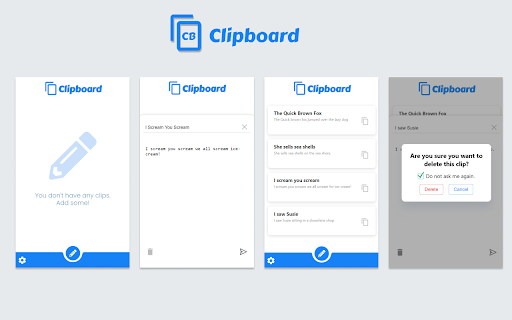
Clipboard lets you add small text snippets, which can be easily copied to the clipboard whenever required. Clipboard is a simple chromium extension for copy-pasting and storing small text snippets. Clipboard lets you add small text snippets, which can be easily copied to the clipboard whenever required. This tool was mainly built to be used as a simple way to store snippets of text that need to be used several times while performing tasks such as coding or testing a website, filling forms and other such tasks.

Clipboard Archive
Remember what you copied with Simple and Free Clipboard archive Clipboard Archive is an easy-to-use free chrome extension that will directly help you track your clipboard history and free your time from searching the source. 👉Page Source: Helps you in redirecting to the source page from which the content was copied and it also has fav-icon to help you navigate the archived clipboards list. 👉Character Length: Helps the user in tracking the character length of each and every clipboard, so you don't have to go find other tools to find the character limit of your context. 👉Delete Clipboard History: Delete all the clipboards by clicking the “Clear All” button on the top-right corner or delete the individual clipboard by clicking the recycle action icon. 👉Safe & Secure Data: We don't store any of your personal or private or clipboard information in our database , all of the clipboard data is stored in your local system which expires when you delete the clipboard archives. We no way possess any of your data for your safe and secure user journey.

Copycat
Manage your clipboard history with Copycat! Copycat saves your clipboard history so you can paste it later! Search and filter your clipboard history securely, all stored in your browser's local storage

Quick Copy Clipboard
A clipboard extension used to copy strings quickly. A clipboard chrome extension to be used to quickly copy strings that you have previously saved there to your clipboard. Found to be useful for job applications to save you time typing out things like your name, email, phone number etc. NOTE: Do not save sensitive / private information on it such as passwords or login information.

Ather Tab - Synced Notes in Tab, Popup and Side Panel
The world's first notepad that works in both your browser's new tab and as a pop-up window. Ather Tab - Synced Notes in Tab, Popup, and Side Panel Overview Ather Tab is abeautiful new-tab notepad extension that syncs your notes across all Chromium-based browsers, including Chrome, Edge, Brave, and more. With Ather Tab, your new tab becomes a personal, editable notepad. It also includes a popup and side panel for quick access and editing. Sync Across Devices: Notes are synced across all devices where bookmark syncing is enabled, making your notes accessible from any browser. Multiple Interfaces: Access Ather Tab from the new tab, popup, or side panel. Automatic Saving: Notes are automatically saved, with backup storage to keep your data safe. Editing Shortcuts: Use shortcuts like CTRL + ; to insert the date and time instantly. Customization: Choose between dark and light themes, adjust font size, and keep track of word and character counts. Character Limit: Limited to approximately 8000 characters due to browser constraints. You can download and back up your notes to save space for new text. Mobile Editing: Access and edit notes from mobile devices by syncing bookmarks. Bookmarks and Storage: Necessary for syncing and saving notes across devices. Side Panel: Used to display Ather Tab in the side panel for easy access. Limited Storage Space: The bookmark-based storage has a character limit. Sync Delays: Refresh the side panel if you notice any syncing issues with the new tab. 1. Screenshot #1: Ather Tab open in a new tab with split mode enabled. 2. Screenshot #2: A website displaying the Ather Tab side panel with notes visible. 3. Screenshot #3: Ather Tab in dark mode, with edit mode active in the new tab, showing both popup and side panel. 4. Screenshot #4: Bookmark editor with editable notes stored in bookmarks (instructions not to edit title or change folder structure). 5. Screenshot #5: Steps to verify if Chrome Sync is active for Ather Tab.
