
olpbcgndobkekkfpdbaickohblbnkmim
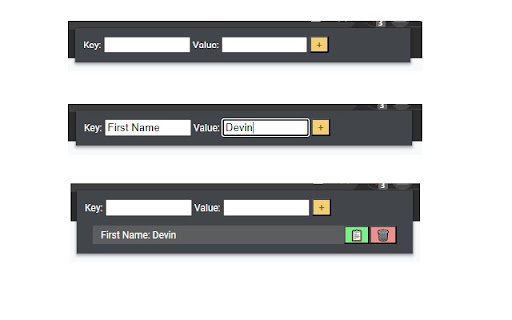
A clipboard extension used to copy strings quickly. A clipboard chrome extension to be used to quickly copy strings that you have previously saved there to your clipboard. Found to be useful for job applications to save you time typing out things like your name, email, phone number etc. NOTE: Do not save sensitive / private information on it such as passwords or login information.

Watch Later List - YouTube Summarizer & Save Videos To Playlists
Save, organise, and instantly summarise YouTube videos with AI. Watch Later List is a YT video summarizer that creates instant AI summaries, transcripts, and playlists for any YouTube video. Save YT videos to your private list, organize them into playlists, and get AI-powered summaries—all with one click. WatchLaterList makes it easy to save and manage YT videos. Add a save button directly on YT videos, organize them into playlists, and generate AI summaries. ✨ Key Features 🎯 One-Click Saving Save button appears on every YT video thumbnail and watch page Quick access without leaving YT Works on home, search, and watch pages 📚 Smart Organization Create custom playlists Categorize videos Set a default playlist for quick saves Manage your collection from the dashboard 🤖 AI-Powered Summaries Generate summaries for any saved video Copy summaries to clipboard Download summaries as text files Save time by reviewing summaries before watching 📝 Personal Notes Add notes to any saved video Edit notes anytime Keep context and reminders 🔒 Private & Secure Your videos are stored privately Secure authentication with Google or email Your data stays yours 🚀 How It Works Install the extension and sign in Browse YT —save buttons appear automatically Click the save button on any video Organize videos into playlists from the dashboard Summarize videos with AI when needed 💡 Perfect For Students saving educational content Professionals building knowledge libraries Content creators organizing inspiration Anyone who wants a better way to save YT videos 🎨 Features Seamless Integration: Save buttons appear naturally on YT Beautiful Dashboard: Manage videos with a clean interface Search & Filter: Find videos quickly Category Tags: Organize by topic or playlist Export Summaries: Copy or download summaries Start building your YT video library today. Install WatchLaterList and never lose track of videos you want to watch later.

I Notes
i Notes is a lightweight, easy-to-use extension for taking quick notes, saving developer commands Notes is a lightweight and intuitive Chrome extension that lets you quickly jot down notes, save ideas, and stay organized without leaving your browser. iNotes helps you keep your thoughts in one place. Why You’ll Love iNotes: ✅ Voice Notes: Just speak, and your note is saved automatically. ✅ Rich Text Formatting: Bold, italic, underline, lists – organize your notes beautifully. ✅ Reminders & Alarms: Never forget a task or idea with easy-to-set alarms. ✅ One-Click Copy: Share or save notes instantly to your clipboard. ✅ Minimalist Design: Focus on your thoughts, not distractions. ✅ Stay Organized: Quickly jot down ideas, plan tasks, and keep everything neat. Take notes faster, smarter, and easier – all without leaving your browser!

Later: Save webpages to a list
Simple list to save any pages for later. Do you ever find yourself with too many tabs open and too many tasks on your plate? With Later, you can easily save all of your next-to-do items in one place and focus on your current task without context switching. Whether you are saving websites for design inspirations, comparing competitors, or just browsing on your own, Later comes handy. Later allows you to: With Later, you can focus on what you're doing without getting sidetracked. Prioritize your tasks and tackle them when you're ready. Say goodbye to cluttered tabs and hello to a more organized and focused workflow. Try Later today!

Clipou: Clipboard History Manager
Manage all your Clipps in one app Quickly manage and list copied text. Clipou will store the text you've copied across the web and allow you to manage it easily. - Manage your ClipBoard history. - Add Clips by Ctrl + C or Click and Copy - Add your Clips as favorits. - Delete your Clips. Notes : - Clipou will ignore copied text from password fields. - You Must reopen Chrome after installation.
