
ondecobpcidaehknoegeapmclapnkgcl
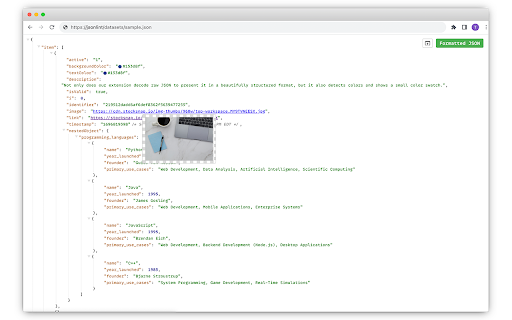


Instantly transform raw JSON into a beautifully structured and color-coded format. Improve Your JSON Viewing Experience with JSON Formatter! When you encounter raw JSON data, it's often just an overwhelming wall of text. Navigating this maze can be tedious and error-prone. But with the enhanced JSON Formatter, you can now visualize, understand, and interact with JSON in ways you never imagined. 🌟 Intuitive Visualization: Not only does our extension decode raw JSON to present it in a beautifully structured format, but it also detects colors and shows a small color swatch. With clear indentations, color-coded elements, and organized blocks, you can discern different components at a glance. 🖼️ Image Previews: Whenever images are detected within your JSON data, JSON Formatter will provide a handy preview, making your data more interactive and easier to understand. 🔍 Effortless Navigation: Dive deep into nested structures with our collapsible trees and indent guides. And with the added feature of human-readable timestamps, understanding your data's timeline becomes a breeze. 🔗 Clickable URLs: Found a link within your JSON? It's now instantly clickable! No more copy-pasting. This streamlines your workflow and saves you time. ⏳ Human-Readable Timestamps: No more puzzling over cryptic timestamps. Our extension now converts them into a format that's easy to understand. 🔄 Toggle with Ease: Whether you need the original data or the formatted version, effortlessly switch between raw and parsed views with a simple click. 📤 Export to jsonlint.com: Want to edit your JSON? Easily export it to jsonlint.com and make your modifications there. 🛡️ Safe and Respectful: We prioritize your privacy. Our extension operates client-side, ensuring your data never leaves your browser. No tracking, no data collection, just pure JSON magic. Speed Up Your Development Workflow For developers, every second counts. Why squint at unformatted JSON when you can view, interact, and even edit it seamlessly? With JSON Formatter, you're not just reading data; you're experiencing it. Whether you're debugging, analyzing, or just curious, our tool is designed to speed up your workflow. Install JSON Formatter today and transform chaos into clarity!

JSON Formatter
The original JSON Formatter, now with optional dark mode 🌚 Auto-formats JSON when you load it in a browser tab. - Fast, even on very long JSON pages - Dark mode - Syntax highlighting - Collapsible trees, with indent guides - Clickable URLs - Negligible performance impact on non-JSON pages (less than 1 millisecond) - Works on any valid JSON page – URL doesn't matter - Buttons for toggling between raw and parsed JSON - FIXED: Exports the parsed JSON to window.json so you can explore it in Dev Tools Note: this extension might clash with other browser extensions that modify the DOM before it runs. If it doesn't seem to be working, try disabling other extensions. If it clashes with an extension you need, open an issue and I'll try to find a solution. PRIVACY No tracking, no advertising, and nothing else nefarious.

JSON Pretty
Use JSON Pretty to parse, format, and pretty print json data. A powerful json formatter and beautify tool for easy data readability. Introducing the ultimate JSON Pretty Chrome extension for web developers, data analysts etc. Our extension brings you everything you need to make raw data human-like and enhance your reading experience. Say goodbye to messy files with json pretty print that’s easy to use, visually organized, and equipped with essential features. If you need a reliable online JSON formatter, look no further. It’s the perfect tool for anyone who wants to work with minimal effort. From raw text to collapsible nodes and syntax highlighting, this extension has it all! 1️⃣ JSON Beautify. This feature organizes data with prettification, so you can focus on what matters. 4️⃣ Light and dark. Themes help you customize the experience to make json pretty and readable in any condition. 5️⃣ Secure. The extension works with your data locally. You can paste or upload source directly from your computer. 6️⃣ Syntax Highlighting. Syntax highlighting simplifies print and transforms how you see JSON pretty format online. Working with raw data can be challenging. Pretty printing converts raw into a structured, organized view, reducing errors and enhancing readability. Our json beautifier makes code pretty for easier analysis and debugging. It’s not just a JSON parser online; it’s a productivity tool for anyone. ☄️ Easy Navigation • Collapsible nodes for quick overview • Easy to use form to copy-paste your data ☄️ Customization Options • Light and dark modes supported • Syntax highlighting for easier code recognition ☄️ Comprehensive data Support • Raw format view for unfiltered access • Supports online beautification and pretty json format This extension serves as your go-to online json viewer. Whether you’re formatting, viewing, or debugging, this online formatter has you covered. It’s compatible with raw and prettified structure, making it a versatile tool for all your needs. ➤ Raw Format Support • The raw format lets you view output in its original form. • Switch seamlessly between raw and pretty formats. ➤ Real-Time Work • See your changes in real-time with live json prettify updates. • Ideal for developers and data handlers who need instant feedback. ➤ Easy-to-Use Interface • Access JSON pretty print online without leaving your browser. • Intuitive design makes beautification simple, even for beginners. • Instantly load, format, and view data without hassle. 🙋♂️ How to Use the JSON Pretty Extension? 1. Open the output tab in Chrome 2. Data will be parsed automatically 3. Use collapsible nodes, syntax highlighting to customize the view 4. Switch between pretty format and raw view as needed 5. Click on extension icon to open the extended editor From json beautification to structured data graphs, this extension is perfect for those who handle large files or complex structures regularly. 🎯 Ideal for Beginners and Experts Alike This formatter online is suitable for all skill levels. Beginners will find beautifier features helpful in understanding what is JSON format, while advanced users will appreciate the organized, pretty printing JSON capabilities. - JSON reader online. Ideal for developers who work across different programming languages. - This tool is perfect for developers, data analysts, or anyone who needs a simple way to organize and view it. - You can see json in easy readability form right in your browser. 1. Can I switch between formatted and raw views? Yes! You can toggle between the prettified and raw formats within the buttons in the bottom of the tab, giving you flexibility based on your needs. 2. Is the JSON pretty online secure to use? Yes, it processes data locally in your browser, ensuring that your data stays private and secure. 3. Does the extension support syntax highlighting? Absolutely. The extension highlights different elements in files using colors, making it easier to spot key elements and understand the structure. Transform your experience and work smarter with the ultimate viewer and formatter. Start exploring json prettifier today and discover how easy it can be to prettify json and take your data management to the next level!

JSON Formatter
based on https://github.com/callumlocke/json-formatter add force to return application/json content-type action; change the font; fixed JSONP leading semicolon bug; dark mode.

JSON Beautifier and Editor
Display JSON objects by transforming them into Syntax editable highlighted HTML to validate, format, and save This extension monitors JSON pages and converts them into a human-readable object. You can view, edit, search through values and keys. You can even change the format of a key or drag it into a new place. There is no need to do anything after installation. Just open a JSON page and the extension automatically converts the page into the editor mode. As of version 0.2.0, the extension uses a dark theme if your browser's default theme is dark. FEATURES ► Supports both JSON & JSONP formats ► Has light and dark syntax highlighting themes ► Supports collapsible trees ► Converts text links into clickable URLs ► Supports raw, code, and parsed JSON views ► Keeps expanded structure when refreshing the JSON page ► Copy Object Path ► Copy Outer JSON ► Copy Inner JSON ► Open a new editor to write a new JSON object ► Open a new editor from selection text (right-click context menu) ► Supports large numbers (BigInt, BigFloat, ...) Change Logs: 0.1.3: 1. It is now possible to beautify local (file://) JSON files. 2. Extension now uses "persistent = false" background page (event page) to have no performance effect when it is not used. 0.1.6: 1. It is now possible to change the view mode to "Tree", "Code", and "Text" modes. The coding mode is useful to edit the raw JSON, and the text mode is useful to copy the raw data. The default view is the tree view which displays the JSON in a formatted and highlighted format.
