
lpopeocbeepakdnipejhlpcmifheolpl
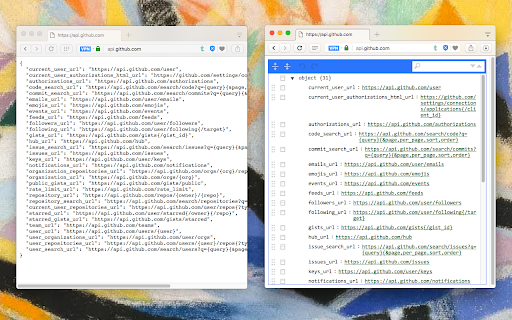
Display JSON objects by transforming them into Syntax editable highlighted HTML to validate, format, and save This extension monitors JSON pages and converts them into a human-readable object. You can view, edit, search through values and keys. You can even change the format of a key or drag it into a new place. There is no need to do anything after installation. Just open a JSON page and the extension automatically converts the page into the editor mode. As of version 0.2.0, the extension uses a dark theme if your browser's default theme is dark. FEATURES ► Supports both JSON & JSONP formats ► Has light and dark syntax highlighting themes ► Supports collapsible trees ► Converts text links into clickable URLs ► Supports raw, code, and parsed JSON views ► Keeps expanded structure when refreshing the JSON page ► Copy Object Path ► Copy Outer JSON ► Copy Inner JSON ► Open a new editor to write a new JSON object ► Open a new editor from selection text (right-click context menu) ► Supports large numbers (BigInt, BigFloat, ...) Change Logs: 0.1.3: 1. It is now possible to beautify local (file://) JSON files. 2. Extension now uses "persistent = false" background page (event page) to have no performance effect when it is not used. 0.1.6: 1. It is now possible to change the view mode to "Tree", "Code", and "Text" modes. The coding mode is useful to edit the raw JSON, and the text mode is useful to copy the raw data. The default view is the tree view which displays the JSON in a formatted and highlighted format.

JSON Viewer Pro
A completely free extension to visualise JSON response in awesome Tree and Chart view with great user experience and options. It… A completely free extension to visualise JSON response in awesome Tree and Chart view with great user experience and options. It has lot of unique features which makes it a must have JSON formatter for beginner to advance users. ✅ Completely Free and no advertisements. ✅ Beautify JSON response from API ✅ Visual representation of JSON with Chart ✅ Depth traversing of JSON property using breadcrumbs ✅ Access or Traverse via JSON Path navigation Prompt ✅ Write custom JSON in Input area ✅ Configurable Content-Type and JSON Content Detection ✅ Ignore particular websites or URLs from rendering ✅ Import local JSON, YAML and XML files supported ✅ Download JSON file using Context Menu ✅ Dark and Light theme supported ✅ Custom CSS supported ✅ Intuitive User Interface ✅ Copy path of any property and value easily ✅ Access JSON in your console using only json keyword

JSON Lite
- Format JSON/JSONP responses and clipboard - Select and format/encode/decode text on every page - Collapsible arrays, objects and long values - Collapse all childs with Ctrl(Command) + Click - Collapse property also on all sibling items with Alt(Option) + Click - Count items and properties in a collection - Show collection sizes - Do its best to show large (10MB+) JSON files - Do its best to show invalid JSON files - Do not sort objects with numeric keys - Do not round large numbers - "Save as..." saves the original JSON document - Select and copy a working JSON from the formatted JSON Copyright (c) 2016-2024 Lauri Rooden The MIT License

JSON格式化工具
一个JSON格式化工具,方便查看、查找JSON格式数据 1. 支持对结果进行折叠显示 2. 支持主题、字体选择 3. 支持数据统计,能统计文件行数、长度 4. 支持单独打开JSON格式化页面,可以对JSON进行压缩、转义等操作

Code Beautifier (JS, CSS, HTML)
A lite and free JavasScript, CSS and HTML beautifier for your browser. Code Beautifier, is an extension that lets you easily beautify codes in your browser. This addon supports JavaScript, CSS, and HTML as input languages. You can either browser files via the (+) button at the UI (top-left corner) or drag & drop a file in the left textarea. The former method is preferred as the coding language for the input file can be detected automatically and the interface will be updated accordingly (no need to adjust the input language manually). Code Beautifier can work offline without the need for an internet connection. It uses an open-source library called "js-beautify" and available in this (https://github.com/beautify-web/js-beautify) GitHub repo. Moreover, it also uses the famous CodeMirror (https://github.com/codemirror/CodeMirror) library to format the input and output codes. Within the interface, there are several buttons at the top toolbar which are self-explanatory. There is also a settings list at the top which contains several options for the beautifier. Change any desired settings and see the live result in the output field. To download the beautified result, please click on the download button at the top toolbar. If you have a feature request or found a bug to report, please fill the bug report form on the addon's homepage (https://mybrowseraddon.com/code-beautifier.html).
