
onbmgdjjfmpplckekdiaeekdgclldiji
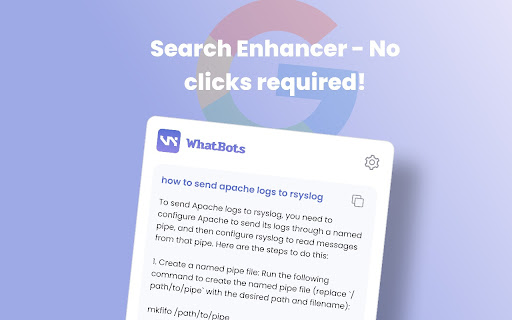


Your GPT Assistant on every website you visit WhatBots is a privacy focused ChatGPT Chrome Extension that answers all your complex questions with just CMD+M press. It seamlessly works with Google Search and any website you visit, providing instant assistance whenever you need it. Just press Cmd+M or Ctrl+M to start chatting. The best thing is that it does not collect any chat data, and your queries to the GPT API are anonymous🕵️♂️ 2. WebChat: Mini ChatGPT chat window inside of any website (Yes inside the site, not in another tab) just press Cmd+M or Ctrl+M! 💬 3. GitHub Enhancer: Explains source code files on Github. Yes click on Explain Code button on GitHub and it will write documentation for the code 👨💻 Super Smart AI: Powered by cutting-edge GPT technology, WhatBots offers intelligent explanations for any challenge you face. Easy Integration: WhatBots seamlessly blends into GitHub and Google Search, making your online journey smoother and more productive. Real-Time Help: Instant, on-demand assistance is just a click away with our in-page chat feature on any website. User-Friendly: Simple and easy to use, WhatBots understands your needs and offers context-aware solutions. Privacy-Focused: Rest assured, WhatBots cares about your privacy. It doesn't collect any personal info or browsing data, ensuring a secure and reliable experience. Download WhatBots now and boost your productivity to new heights! It's the perfect companion for everyone, no matter your background or expertise. Let WhatBots make your online life easier and more enjoyable!

ChatGPT Bulk Delete
A Chrome extension to bulk delete ChatGPT conversations This Chrome extension is designed to help users quickly and efficiently delete conversations in the ChatGPT’s left sidebar. With the extension installed, users can add checkboxes to each conversation in the sidebar, select multiple conversations to delete or archive, and accomplish this with just a few clicks. Hold Shift and click to select multiple conversations for efficient bulk actions. This extension is particularly useful for users who frequently use ChatGPT and need to manage their conversations efficiently. Instead of deleting conversations one by one, users can remove multiple conversations at once, saving both time and effort. Additionally, this extension now offers a “bulk archive” feature for a one-time fee of $0.99 USD. This paid feature allows users to archive multiple conversations simultaneously, further enhancing the tool’s utility and convenience. The extension popup includes a small advertisement labeled “Ad” in the footer, linking to TubeVocab (https://www.tubevocab.com/), a third-party language-learning product. This ad helps support the continued development and free distribution of ChatGPT Bulk Delete. Clicking it is entirely optional and does not affect any of the extension’s core functionality.

ChatGPT Chrome Extension - Silly Ai
Chat GPT powered writing companion that enables you to write, rewrite, and translate anything anywhere. 👋 Say hello to Silly AI's ChatGPT Chrome Extension, your new writing partner! Designed to simplify and elevate your writing process, this extension is as feather-light and unobtrusive as they come. No more cluttered workspace - we're all about a seamless, widget-free experience. 🚫💻 This easy-to-use tool is supercharged by ChatGPT and is operational on practically any website. Need to jot down a comment, draft an email, create social media content, or even fill out a job application? 📝 Silly AI's ChatGPT extension has got you covered. Just write it with a '>>' symbol then your prompt and hit Enter or Return key(⏎) on your keyboard. and sit back to watch the AI do its magic! 🪄✨ Our promise to you is an uninterrupted writing process. Forget about copy-pasting or unnecessary clicking - Silly AI is all about maintaining your writing flow. 🌊 This extension works on almost all websites, from Google Docs to spreadsheets, bringing AI efficiency to your fingertips.👌 But Silly AI's ChatGPT extension isn't just about writing. You can rewrite, summarize, translate, explain, and even reply to texts anywhere, all with a single command. 📚🌍 And guess what? No ChatGPT (OpenAI) account is required! Plus, you get 20000 free tokens every month for your daily tasks. 🎉 What's more, Silly AI's ChatGPT extension delivers consistently high speed and quality for all users, free or premium. Choose your preferred AI - OpenAI's Chat GPT, Google's BARD, or our unique hybrid API for diverse content. 🚀 Add a personal touch to your writing by setting the tone, verbosity, or creativity per site - make it professional for LinkedIn, casual for Twitter, or extra creative for Google Docs. 🕴️💃🎨 Silly AI remembers your preferences, so you only have to set it once. Remembering complex commands or shortcuts is a thing of the past. 📜 With Silly AI's ChatGPT extension, just type '>>', your prompt, and hit Enter. Want to give your AI assistant a unique name? Go right ahead! 🎈 Your experience with Silly AI's ChatGPT extension is just like using ChatGPT, but without the need to visit a separate site. Pay the same amount and recharge tokens as needed, with an easy-to-track system right within your browser. Plus, we're all about privacy. 🔒 Your prompts and writing history are saved locally and deleted once you refresh the page. So, ready for a smoother, more efficient writing experience? 👍 1. Click "Add to Chrome" at the top-right corner. 🖱️ 2. Refresh your open tabs to activate the extension. 🔄 3. Type '>>' followed by your prompt and hit Enter. ⌨️ Welcome to the future of writing with Silly AI’s ChatGPT Chrome Extension. Your words, our magic. 🌈🖊️

ChatGPT to Help
Get Instant Help Anywhere and Anytime with ChatGPT AI Assistant on Chrome With the ChatGPT2Help extension, you can integrate artificial intelligence into your writing process. Whether you're drafting an email, social media post, or article, ChatGPT2Help can provide suggestions and corrections in real-time, helping you to write more effectively. 🤖 Customize Your Own Prompts - Add unlimited personalize prompts - Set default prompts - Add, Edit, Update, Reorder freely 🌎 Easy Translation: - Translate text between 100+ languages with ease. - Get accurate translations. - Save time and resources with this feature. 👨💻 Shared AI Responses: - Sync AI-generated responses across multiple browser tabs. - Never miss a response or message with this feature. - Continue having conversation with AI with content from different browser tabs. 📧 Smart Reply to Emails: - Respond to emails faster with the help of smart reply technology. - Save time by using pre-written responses generated by AI. - Customizable options for frequently asked questions and common inquiries. 📝 Instant Online Explanations: - Get instant answers to anything you want to know online. - The extension uses ChatGPT to provide quick and accurate explanations. - Easily search for explanations within the software interface. ✨ Fast Content Marketing: - Scale up your content marketing efforts quickly and efficiently. - Improve your writing skills. - Tools to optimize and analyze your content to increase engagement. 📈 Boost Ad Conversions: - Improve your ad copy. - Increase your conversion rates with targeted messaging. - Get suggestions for better headlines, descriptions, and calls-to-action. ✍️ Finish Essays Faster: - Write faster and more efficiently. - Get suggestions for better sentence structure, grammar, and spelling. - Save time and meet deadlines with ease. 🧠 Brainstorming Tool: - Generate new ideas and concepts. - Enhance your creativity with this feature. - Use this feature to overcome writer's block or brainstorm for new marketing campaigns. 📱 Social Content Creation: - Create social media content quickly and easily. - Use selected text as a starting point for your content. - Use different tone and style to increase user engagement. More and More ...

ChatExtension - A ChatGPT Extension
A Chrome extension to interact with ChatGPT for All Websites. ChatExtension is an innovative browser add-on that empowers users with AI-powered assistance while they browse the web. By leveraging the advanced capabilities of OpenAI's ChatGPT API, the extension can answer any question with current page contenxt. Key features of this extension include: 1. Instant Summaries: With just one click, users can generate concise summaries of web pages, enabling them to quickly understand the main points without having to read the entire content. 2. Intelligent Assistance: The extension integrates a user-friendly chat interface that allows users to communicate with GPT3.5 AI model and ask questions about the content they are browsing, getting instant answers and insights. 3. Wide Range of Use Cases: From summarizing news articles and research papers to getting quick answers and insights on complex topics, this extension is a versatile tool that can benefit users across various fields and industries. By installing this extension , users can enhance their browsing experience with AI-powered assistance that helps them save time, improve productivity, and gain a deeper understanding of the content they encounter online. The extension's convenient, user-friendly interface and powerful AI capabilities make it an essential tool for modern web users who seek to make the most out of their time on the internet.
